

SVGStud.io
SVGStud.io · Image
SVGStud.io is an AI SVG generator that turns text prompts into editable vector files, with semantic search across 127,303 SVGs, a browser editor, and free CC-BY-SA downloads.
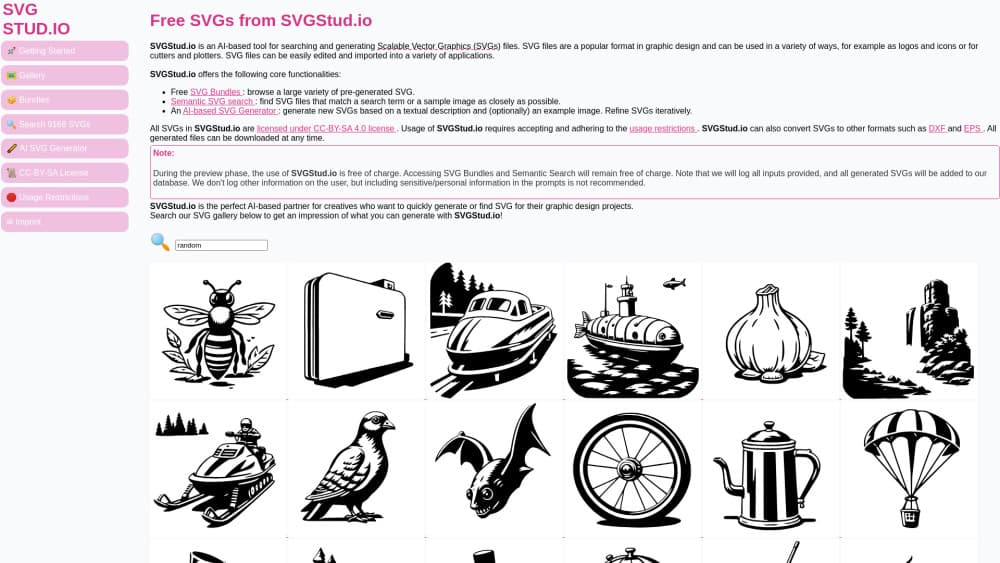
About SVGStud.io
What Is SVGStud.io
SVGStud.io is a web app that generates Scalable Vector Graphics from a written description. Type what you want, optionally attach a reference image, and the model draws the result as paths and shapes rather than pixels. That matters because an SVG stays sharp at any size and opens in design software as editable objects.
The site bundles four things that usually live in separate tools: a generator, a semantic search engine over its public library, a themed bundle browser, and an in-browser editor built on the open source SVGEdit project. Text to SVG conversion runs in the tab, so you can go from a rough idea to a finished icon without switching apps.
The catch is openness by design. Every prompt you submit gets logged, and every generated file joins the public library. Files ship under CC-BY-SA 4.0, which allows commercial use as long as you credit SVGStud.io and keep the same license on derivatives. The generator also runs on a daily per-user limit during the current preview phase.
Getting Started
- Open svgstud.io in a desktop browser and sign in if you want your bookmarks and history to persist.
- Go to the generator, write a prompt that names the subject, style, and color scheme, then set pencil size, canvas width and height, sample count, and iterations.
- Add an example image or an inpainting mask if you need the output to follow a specific silhouette.
- Generate, compare the samples, and adjust the prompt or seed for another pass.
- Download the SVG, or send it to the editor to clean up paths and colors before export.
Product Information
A quick look at SVGStud.io's pricing, supported platforms, and performance.
Best for
The users, tasks, and scenarios where this tool fits best.
Users
- Web designers who need icons and spot illustrations fast
- Print and craft sellers
- Developers who want placeholder art
- Hobbyists learning vector work
Tasks
- Turning a written brief into a first-draft logo mark
- Finding an existing icon by description
- Cleaning up a downloaded graphic
- Filling a themed asset set
Scenarios
- A landing page needs a matching icon set by Friday
- A teacher builds worksheets
- A side project needs a quick visual identity
Key features
Prompt and image based generation
The core AI SVG generator takes a text description, and optionally a reference image, and returns several vector samples per run. You control canvas size, sample count, iteration count, seed, and a flexibility value that decides how loosely the model follows your prompt. Higher flexibility gives more surprising shapes; lower values stay closer to the literal request. The result is AI vector art you can open and reshape, not a flat picture. A pencil size setting changes stroke weight, which is handy when you need icons that match an existing set.
Iterative refinement with seeds and masks
Getting a usable result usually takes two or three passes. SVGStud.io keeps the seed visible, so you can hold a composition you like and change only the wording. An inpainting mask lets you protect part of the canvas and regenerate the rest, which is the difference between nudging a design and starting over. That workflow suits anyone who treats generation as sketching rather than a one-shot slot machine.
Semantic SVG search
The semantic SVG search reads meaning, not file names. Describe an object in plain words or upload a sample image, and the engine ranks matches from a library of 127,303 SVGs. This is the fastest route when you already know roughly what you want and would rather adapt an existing drawing than generate a new one. Results come from the same public library that generated files feed into.
In-browser SVG editor
The editor is a hosted build of SVGEdit, an open source vector tool. It covers the basics that matter after generation: moving nodes, changing fill and stroke, grouping, layering, and resizing the canvas. You get a real editing surface on any machine with a browser, including a Chromebook. It won't replace a full design suite for complex illustration, but for cleanup and recoloring it's enough.
Themed SVG bundles
Bundles organize the library by subject, from airplanes and birds to weddings and Halloween. Each bundle collects many drawings in one style family, which makes it easy to build a consistent set for a project instead of mixing sources. Bundles and semantic search stay free during the preview phase, and the same CC-BY-SA terms apply to everything inside them.
API access
A token-authenticated API exposes two endpoints: /generate for creating SVGs and /semantic_search for querying the public library. The documentation publishes the full schema, so a script can request artwork, pull the returned paths, and cache them locally. For teams automating asset pipelines, this turns the site into a vector graphics generator that runs on demand.
Pros and cons
Pros
- Output is genuine SVG, not a raster image wrapped in a vector container, so files stay editable and scale cleanly.
- The free tier covers generation, search, bundles, and the editor, with only a daily generation cap.
- Semantic search across 127,303 files often beats generating from scratch when you need something simple.
- The API makes batch generation and reuse practical for developer workflows.
- CC-BY-SA 4.0 allows commercial use, which is friendlier than most free art sites.
Cons
- Every prompt is logged and every output enters the public library, so confidential client work does not belong here.
- The share-alike clause means derivatives must carry the same license, which complicates some commercial brand assets.
- Results vary by prompt, and abstract or highly detailed subjects often need many reruns before they hold up.
- The daily generation limit is not published as a fixed number, so heavy users can hit a wall without warning.
Frequently asked questions
Yes. Generation, semantic search, bundles, and the editor are free during the preview phase, with a daily cap on generator runs. The site states that no additional costs apply right now. That can change once the preview ends.
Related content
Explore related tools, skills, and articles for SVGStud.io.
SVGStud.io Alternatives

Google EmbeddingGemma 2
Google DeepMind · Writing · Image · CodingGoogle EmbeddingGemma 2 is a 740M-parameter open model that turns text, code, images, audio, and video frames into vectors in one 768-dimension space, running on phones and laptops.

Tractionwave
TractionWave · Image · MarketingTractionWave is an AI attention heatmap tool for static ads. Upload a PNG or JPG and it returns predicted attention, ranked hotspots, and fixes before you spend budget.

Imejis.io
Imejis.io · Image · MarketingImejis.io is an AI design studio for agents and marketing teams. Describe an image in plain words, and it writes the copy, builds the layout, reflows it to every size, then exports a finished file.