

Symphony
Dongho Yee · Productivity
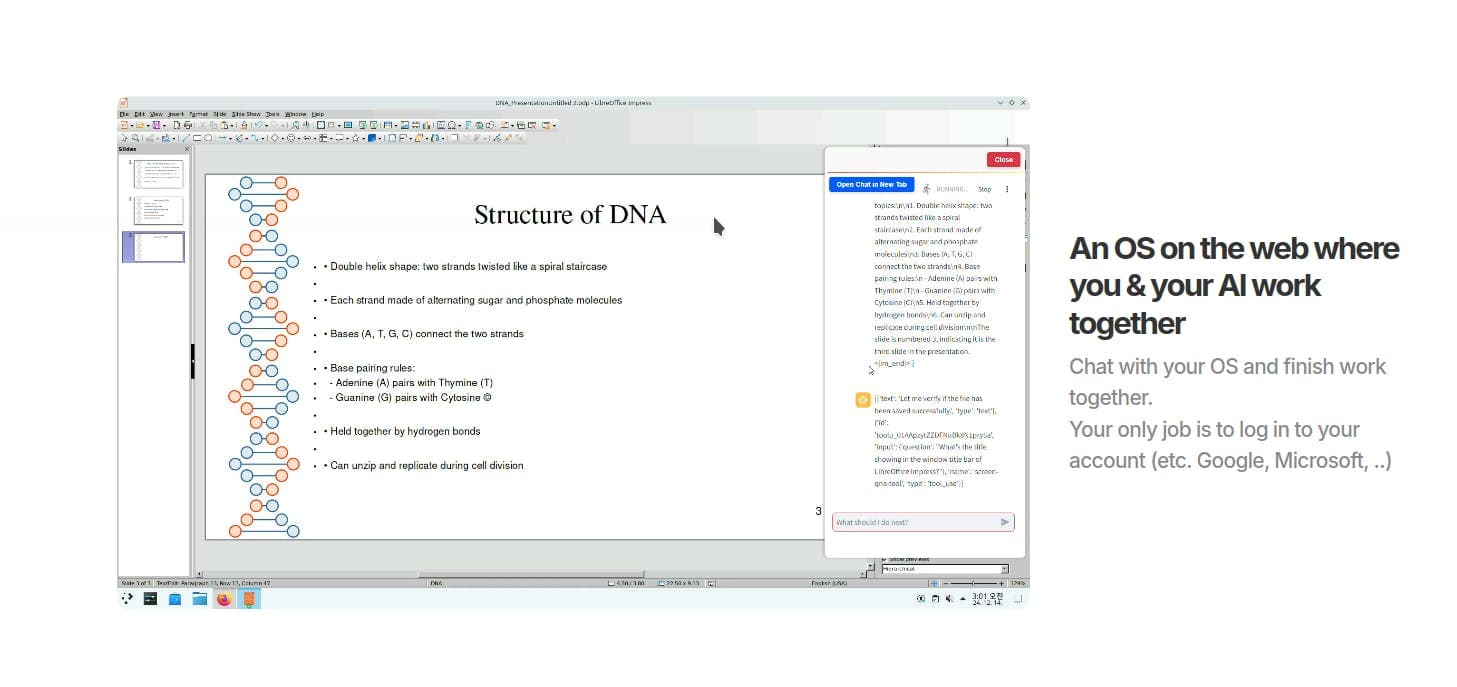
Symphony is a cloud desktop that runs in your browser, where an AI agent takes over the mouse and keyboard to finish tasks inside real programs like Firefox and LibreOffice.
About Symphony
What Is Symphony
Symphony is an operating system you open in a web browser instead of installing on a laptop. Under the hood it runs Ubuntu with the KDE Plasma desktop, and an AI agent sits on top of it with permission to move the mouse, click, and type. The pitch is simple: you describe the job, the agent does it inside the same apps you would normally open yourself.
That approach sets Symphony apart from chat tools that only talk. The agent works inside real software, so it can open a browser, gather information from a page, drop the results into a spreadsheet, or build a slide deck without you switching windows. The developer, Dongho Yee, launched it on Product Hunt in early January 2025 as a take on computer-use models that can operate a full desktop.
The biggest limit is that the desktop lives in the cloud, not on your machine. You need a steady connection, and the agent runs on someone else's servers. Right now the site itself loads an empty page for many visitors, so the live product is hard to reach.
Getting Started
- Create an account on the Symphony site and open the web desktop in your browser.
- Log in first from a computer, then from your phone, since the display needs the larger screen to set up correctly.
- Open the chat panel and describe the task in plain language, like "find three laptops under $700 and put them in a sheet."
- Watch the agent move the cursor and type, then review the result in the open app and correct it if needed.
Product Information
A quick look at Symphony's pricing, supported platforms, and performance.
Best for
The users, tasks, and scenarios where this tool fits best.
Users
- Solo professionals who want routine desktop chores handled without learning scripts
- Students who need help with research or math problems
- Small teams testing computer-use AI early
Tasks
- Building a presentation from scratch
- Pulling data from a webpage into a spreadsheet
- Writing and sending routine emails
Scenarios
- Kicking off a task on a desktop and checking progress from your phone later in the day
- Automating repeatable admin work you dread
Key features
AI Agent With Mouse and Keyboard Control
The core of Symphony is a computer use agent that operates the desktop the way a person does. It moves the cursor, clicks buttons, and types into fields inside real applications rather than a chat box. That means it can drive programs that were never built with an AI hook, which is the main reason people find the idea interesting.
Browser-Based Desktop Built on Ubuntu
Symphony works as a browser based operating system rather than a download. It opens as a web desktop running Ubuntu with KDE Plasma, so the whole workspace follows your account instead of a specific machine. Firefox, LibreOffice, and OnlyOffice come preinstalled, and the developer has said more programs are planned.
Task Automation Across Installed Apps
Because the agent works at the operating-system level, it can chain steps across different programs. A single request can cover browsing a page, copying what it finds, and pasting it into a document. This kind of AI desktop automation is what separates it from tools that stay inside one window.
Remote Access From a Phone
The desktop runs in the cloud, so you can close the browser and continue the conversation from a phone. The agent keeps working on the server while you are away. The developer notes you should set things up from a computer first, then switch to mobile, since the layout depends on the bigger screen.
Works With Existing Desktop Programs
Symphony does not ask you to switch to a special app store. It drives the programs already installed on the cloud machine, from the browser to the office suite. For anyone tired of juggling separate AI tools per app, that single entry point is the selling point.
Pros and cons
Pros
- Controls the mouse and keyboard, so it can use programs that have no AI features of their own.
- Runs in a browser on a cloud Ubuntu desktop, letting you pick up a session from another device.
- One-time $15 license, which is cheap next to monthly subscriptions.
- Ships with Firefox, LibreOffice, and OnlyOffice ready to use.
- Handles multi-step chores like gathering data and moving it into a sheet or deck.
Cons
- The website currently loads an empty page, so signing up and reaching the live desktop is unreliable.
- No free plan and no free trial, which makes it hard to test before paying.
- Everything depends on a cloud server and a stable connection; a local install is not an option.
- Runs on someone else's infrastructure, so you should not treat it as a place for sensitive files.
Frequently asked questions
It runs a cloud desktop and lets an AI agent complete tasks inside installed programs. Typical jobs include writing emails, making presentations, taking data from a webpage into a spreadsheet, and navigating sites to gather information.
Related content
Explore related tools, skills, and articles for Symphony.
Symphony Alternatives

Base Code
Base44 (Wix) · Coding · ProductivityBase Code is a shared cloud development environment from Base44. Teammates describe changes to an existing GitHub codebase in chat, preview them live and send them back as pull requests.

Knocket
Knocket (Tencent RTC team) · Productivity · Business · ChatbotKnocket is a free live chat and contact page tool that lets visitors message you from your website, app, or a shareable link, with every reply handled from Telegram or one inbox.

FloorGen
Vinit Kumar (FloorGen) · Productivity · China AIFloorGen is a browser-based floor plan maker that turns a sentence or a sketch into an editable 2D plan and a 3D walkthrough. Export to PDF, DXF or video, and draw without an account.