

Synopsule
Sunny Nagra · Productivity
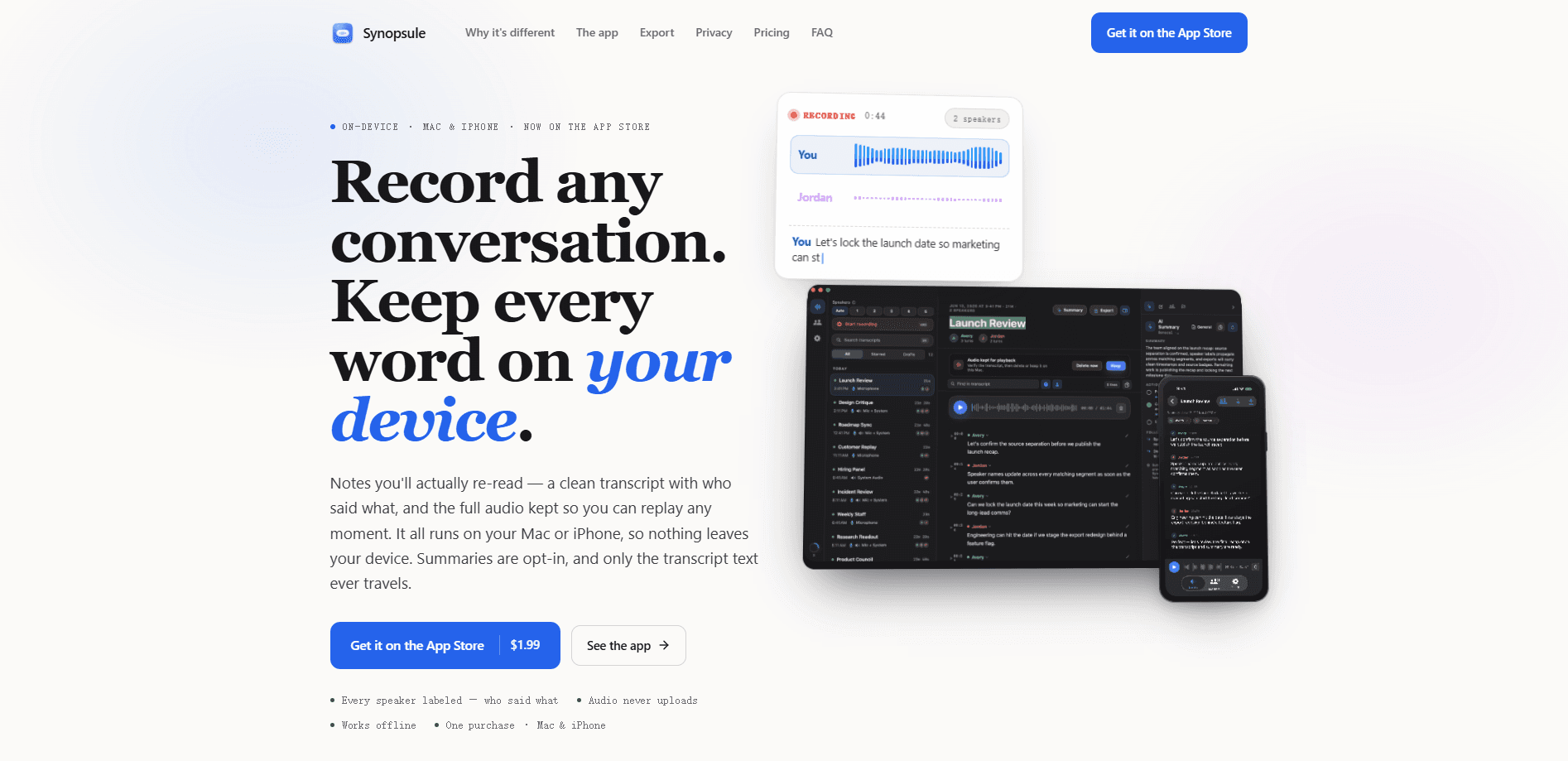
Synopsule is a private AI meeting recorder and transcription app for Mac, iPhone, and Apple Watch. It captures conversations, labels who said what, and keeps the full audio on your device so you can replay any line. Everything from recording to search runs locally with Whisper. The app is a one-time $1.99 purchase with no account and no subscription.
About Synopsule
What Is Synopsule
Synopsule is a meeting transcription app built around a single idea: your audio never leaves the device that recorded it. It runs Whisper locally, so the transcript appears while you talk and stays offline from the first launch. No bot joins your call. There's no sign-up. Nothing uploads. So what do you give up for that? Mainly sync, and the trade is worth understanding before you buy.
The app turns messy conversations into notes you can actually reuse. Every speaker gets labeled, each line links back to its moment in the recording, and exports land as open Markdown that any AI tool can read. On a Mac it records both your microphone and the call itself. Remote meetings come through in full.
The trade you make is real. Because nothing uploads, there is no cloud library and no sync between devices. Your Mac and your iPhone each keep their own recordings, and you move a library with a backup file you make yourself. The interface is English only. Capturing the other side of a call works on Mac, not iPhone.
Getting Started
- Buy Synopsule on the App Store for $1.99. One purchase covers your Mac, iPhone, and the Apple Watch app.
- Open the app and grant microphone permission. On a Mac, also allow system audio capture if you plan to record calls.
- Pick a Whisper model. A small one ships with the app, and you can download a larger model up to 1.5 GB for tougher audio.
- Press record, or start from anywhere with the Mac shortcut, Siri, a widget, or the Action button on iPhone.
- Read the labeled transcript when it's ready, then export it to Markdown, Word, PDF, or straight into Obsidian and Apple Notes.
Product Information
A quick look at Synopsule's pricing, supported platforms, and performance.
Best for
The users, tasks, and scenarios where this tool fits best.
Users
- Privacy-conscious professionals
- Note-takers who re-read their notes
- Apple-only households
Tasks
- Recording remote calls on a Mac
- In-person interviews and lectures
- Turning meetings into action items
Scenarios
- A hallway chat you wish you had written down
- A meeting you forgot to prepare for
- Searching months of conversations
Key features
Fully on-device Whisper transcription
Synopsule ships a Whisper model inside the app, so recording and transcription work with no download and no connection. You can add a larger model, up to 1.5 GB, when you want better accuracy on fast talkers or accents, and switch between several models instantly without re-downloading. Nothing is sent to a server to produce the transcript.
Speaker labeling that recognizes returning voices
When a recording finalizes, on-device diarization splits the audio by voice. Name someone once and Synopsule builds a voiceprint, then labels that person automatically the next time they speak. Correct a wrong guess and it learns. Your voiceprints never leave the device.
Mac captures both sides of a call
On a Mac the app records your microphone and your system audio in separate lanes using Apple's Core Audio process taps. That means both sides of a Zoom, Meet, or Teams call. There's no bot in the meeting and no virtual driver to install. The recording screen shows what is actually being captured, so a failed lane or a missing permission is visible before you rely on it.
Playback synced to every line
Tap any line to jump straight to that moment, then change speed or skip fifteen seconds either way. The waveform is drawn from your real audio, so a quiet stretch looks quiet. Find steps through each match, and a transcript-wide replace fixes a name the model heard wrong everywhere at once.
Opt-in summaries with your choice of engine
Summaries never run on their own by default. Turn them on and pick a template such as one-on-one, standup, sales call, interview, or legal, and Synopsule produces a structured recap with owners and open questions. Run them free through your own OpenAI, Anthropic, or Gemini key, on-device via Ollama or Apple Intelligence, or through the optional Pro plan.
Exports that feed any AI tool
Every transcript exports to Word, PDF, Markdown, HTML, plain text, SRT, and VTT, or one tap into Obsidian and Apple Notes. Markdown keeps the clean headings, speaker labels, and timestamps that large language models read best. On a Mac, a built-in MCP server lets Claude, Codex, and ChatGPT read transcripts straight from your library.
Calendar prompts, Siri, and the Apple Watch app
Synopsule reads your calendar on the device and offers to record when a meeting is starting, naming the file after the event. On iPhone, Siri, Shortcuts, the Action button, a widget, and a Control Center control all reach it, with a Live Activity keeping the timer on your Lock Screen. The Apple Watch app records on your wrist and hands off to the iPhone.
Pros and cons
Pros
- Audio never uploads, which suits anyone handling confidential conversations and rules out the risk of a cloud breach.
- On-device Whisper works offline from the first launch, so it holds up on a plane or in a basement.
- A one-time $1.99 covers Mac, iPhone, and Apple Watch, with no account and no per-seat monthly fee.
- Speaker labeling remembers returning voices and keeps every line linked to its place in the audio.
- Open Markdown exports and a built-in MCP server let existing AI tools read your notes without cleanup.
Cons
- No cloud library and no sync, so moving recordings between a Mac and an iPhone means making and restoring a backup file yourself.
- The interface is English only, which limits it for non-English speakers, and transcription in other spoken languages doesn't change that.
- Capturing the other side of a call is a Mac-only feature, so iPhone users recording remote meetings will miss half the conversation.
- Summaries depend on a configured provider, and the fully on-device paths for them require a Mac or Apple Intelligence hardware.
Frequently asked questions
It records conversations on your Mac, iPhone, or Apple Watch and turns them into labeled, searchable transcripts without sending audio off the device. You get a written record with speaker names, timestamps, and the full audio kept for replay.
Related content
Explore related tools, skills, and articles for Synopsule.
Synopsule Alternatives

Base Code
Base44 (Wix) · Coding · ProductivityBase Code is a shared cloud development environment from Base44. Teammates describe changes to an existing GitHub codebase in chat, preview them live and send them back as pull requests.

Knocket
Knocket (Tencent RTC team) · Productivity · Business · ChatbotKnocket is a free live chat and contact page tool that lets visitors message you from your website, app, or a shareable link, with every reply handled from Telegram or one inbox.

FloorGen
Vinit Kumar (FloorGen) · Productivity · China AIFloorGen is a browser-based floor plan maker that turns a sentence or a sketch into an editable 2D plan and a 3D walkthrough. Export to PDF, DXF or video, and draw without an account.