

TalentSight
TalentSight · Business
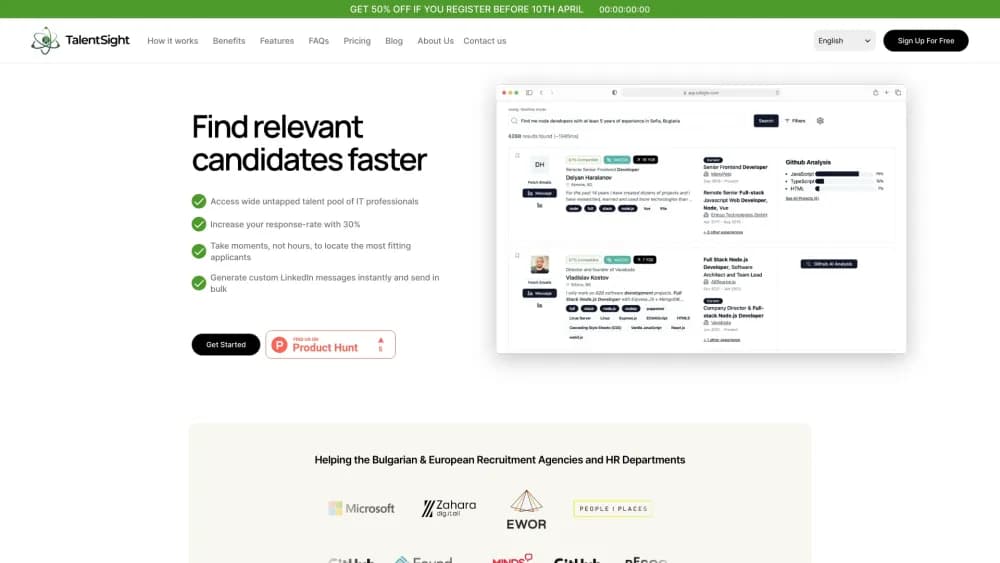
TalentSight is an AI recruiting platform for IT and tech hiring. It automates LinkedIn sourcing, outreach, and follow-ups across multiple accounts and pulls every reply into one inbox.
About TalentSight
What Is TalentSight
TalentSight is a sourcing and outreach tool built for recruiters who hire technical people. You load a list of candidates or a search, build a sequence of connection requests, InMails, and direct messages, and the system runs the sequence on a schedule. Replies from both inboxes land in one place, so nobody gets a second message by accident.
The company is a small team from the Balkans that started in late 2023 and shipped the product in 2024 after a pre-seed round backed by EWOR. Its own count puts usage at more than 350 recruitment teams, and the site reports clients cutting active sourcing time by about a quarter. Treat those numbers as vendor claims, not audited figures.
Where it fits is narrow and clear. It assumes LinkedIn is your main channel and that your team already knows which profiles to target. It doesn't replace a sourcing strategy, and it won't find candidates on job boards. What it removes is the clicking: the follow-up queue, the second inbox, the manual counting of connection requests so an account doesn't get flagged.
Getting Started
- Create an account at app.talsight.com and start the trial. No credit card step is advertised on the sign-up page.
- Connect your LinkedIn account, or several of them if your team runs shared recruiter seats. Standard, Premium, and Recruiter accounts all work.
- Import candidates from a LinkedIn search, a saved list, or your ATS, then build a campaign with the message steps, delays, and conditions you want.
- Turn the campaign on. TalentSight sends each step inside the daily and weekly limits it tracks for that account.
- Watch replies in the unified inbox and check response and acceptance rates in the analytics view. Connect your ATS if you want candidates and status changes pushed back automatically.
Product Information
A quick look at TalentSight's pricing, supported platforms, and performance.
Best for
The users, tasks, and scenarios where this tool fits best.
Users
- IT recruiters at agencies
- In-house tech hiring teams
- RPO and staffing firms
- Founders doing their first technical hires
Tasks
- First-touch sourcing at volume
- Follow-up discipline
- Multi-channel candidate discovery
Scenarios
- Hiring five backend engineers in a month
- Recruiting in a market where candidates ignore the first message
- Running outreach from a shared recruiter seat
Key features
LinkedIn Automation With Built-In Limits
Sourcing automation only pays off if the account survives it. Campaigns send connection requests, InMails, and direct messages on a schedule you define. TalentSight tracks the daily and weekly caps for each action and pauses a campaign before it crosses them, which is the part that protects the account. You can also mix message types inside one flow rather than running separate tools for InMail and DM.
Multi-Step Outreach Campaigns
Each campaign is a flow, not a single message. Add a connection request, wait a day, send a DM, branch on whether the request was accepted, then add follow-ups with their own delays. Conditions run on the candidate's actual response, so someone who replies gets a different path from someone who stays silent.
One Unified Inbox
InMails and direct messages normally sit in separate places inside LinkedIn. TalentSight syncs both into a single view with the full history of every step and reply. That removes the usual failure mode where two recruiters message the same engineer on the same day.
Candidate Discovery Beyond LinkedIn
LinkedIn isn't the only place technical candidates live. The platform pulls public profiles from GitHub and StackOverflow alongside LinkedIn, which helps on stacks where the obvious search returns the same twenty people. Access to those sources sits on the higher plan, so check what your region includes.
Campaign Analytics
Every campaign reports messages sent, connection requests, acceptance rate, and response rate. That's enough to compare two message variants and drop the weaker one after a week. Managers get a separate portal for viewing outreach across the team.
ATS Integration and Team Workflow
TalentSight connects to your existing ATS or CRM, so candidates and status changes don't have to be copied by hand. The company says it partners with major global ATS providers. Setup is a per-account task, and the cleanest results come when your ATS is already the source of truth for pipeline stages.
Pros and cons
Pros
- Handles the repetitive part of tech talent sourcing: sequencing, timing, and follow-ups across many candidates at once.
- Tracks LinkedIn limits per account, which lowers the risk that comes with any LinkedIn automation.
- Merges InMail and DM replies into one inbox, so duplicate outreach stops being a daily worry.
- Pulls in GitHub and StackOverflow profiles for stacks where LinkedIn search is thin.
- Reports acceptance and response rates per campaign, giving you something concrete to test against.
Cons
- No public price list. You have to talk to sales to learn what a seat costs, which slows down budgeting.
- The site lists different features per region, so the plan you read about may not be the plan you can buy.
- There's no free plan. The trial shows the workflow, but it isn't a permanent free tier for a solo recruiter.
- Everything depends on LinkedIn staying tolerant of automated activity. If the platform tightens enforcement, your pipeline feels it first.
Frequently asked questions
It runs LinkedIn sourcing and outreach campaigns for you. You define the candidate list, the message steps, and the timing, and the platform sends each step, tracks account limits, and collects replies in one inbox.
Related content
Explore related tools, skills, and articles for TalentSight.
TalentSight Alternatives
Liveplan
Palo Alto Software · BusinessLivePlan is business plan software that helps founders and small business owners turn an idea into a funder-ready plan. It combines AI-assisted writing, market research with cited sources, and connected financial forecasting so your income statement, cash flow, and balance sheet move together when you change one number. Over 1.5 million businesses have used it to plan, forecast, and track performance against real accounting data. That's a lot of founders. It's also a signal the tooling survived contact with real lenders.

Swms
Swms AI · Writing · Productivity · BusinessSwms is an AI safety compliance tool that turns a plain description of a job into ready-to-use safety documents. Describe your project, trade, and known hazards, and it writes a safe work method statement, job hazard analysis, safe work procedure, RAMS, or safety data sheet in seconds. It also ships with Oscar, a chat assistant that answers workplace safety questions in any language. Teams in construction, mining, transport, and warehousing use it to cut the paperwork that usually eats into a workday.

Rows
Rows (Superhuman) · Productivity · BusinessRows is an AI spreadsheet and data analysis tool that imports live data from more than 50 sources, then lets you work with it using plain language instead of SQL queries or nested formulas. You can pull numbers out of PDFs, connect ad platforms, databases, and bank accounts, and ask the AI to build reports, merge datasets, or set up models that recalculate themselves. It runs in the browser, works like a spreadsheet, and now sits under the Superhuman umbrella.