

Tammy AI
Tammy AI (independent team) · Productivity · Marketing
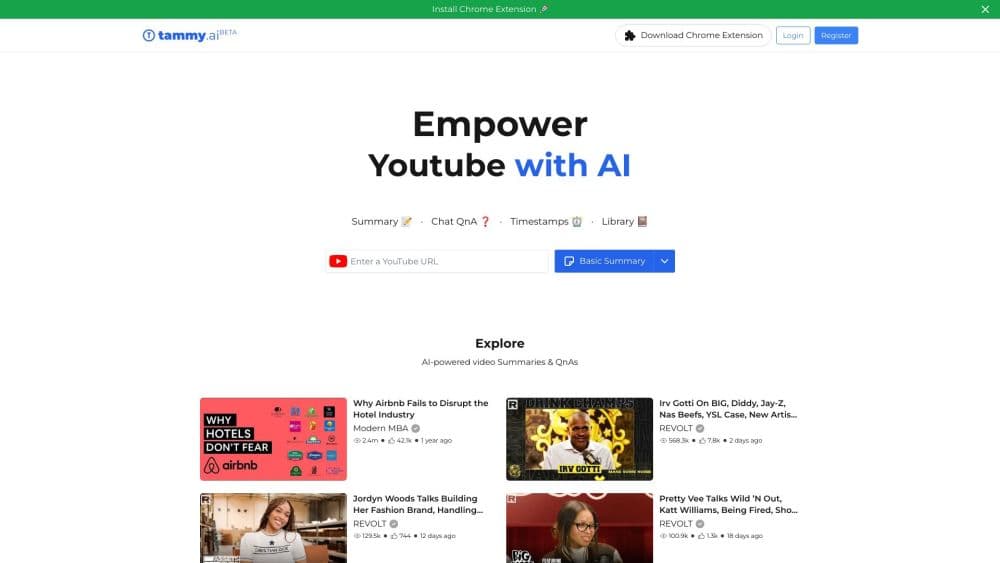
Tammy AI was a YouTube summarizer that turned long videos into Basic and Pro summaries, with chat QnA tied to timestamps. It has since shut down.
About Tammy AI
What Is Tammy AI
Tammy AI was a tool built around one promise: watch less, learn more. You pasted a YouTube link, and the app wrote a short digest of the video so you could decide whether the full thing was worth your time. It lived mostly as a Chrome extension that sat next to the player, plus a web app where you could browse, search, and save summaries.
The pitch landed with students, researchers, and anyone who used YouTube as a study or work library. Instead of scrubbing through a two-hour lecture or interview, you got key points and chapter timestamps you could click to jump straight to the moment that mattered. A chat panel let you ask follow-up questions about the video and answered with links back to the exact second in the timeline.
The honest part is the ending. Tammy AI shut down. Its company profile is marked permanently closed, the Chrome extension stopped working around June 2025 when YouTube changed how it hands out video transcripts, and the tammy.ai domain now sits on a marketplace listing for sale. If you're searching for it today, the tool you find in reviews is a product that no longer runs.
Getting Started
- Install the Tammy AI Chrome extension, or open the web app and sign in with a Google account.
- Open any YouTube video and let the extension generate a Basic Summary with chapter timestamps.
- Upgrade to a Pro Summary for a longer, more structured digest when you need depth over speed.
- Open the chat panel to ask questions about the video, then click the timestamped answers to jump to that moment.
- Save the summaries you want to keep into folders in My Library for later reading.
Product Information
A quick look at Tammy AI's pricing, supported platforms, and performance.
Best for
The users, tasks, and scenarios where this tool fits best.
Users
- Students working through lecture recordings
- Researchers and professionals screening long interviews
- Casual viewers deciding what to watch
Tasks
- Summarizing a long video fast
- Asking questions about a specific video
- Building a personal summary library
Scenarios
- Catching up on a lecture before an exam
- Reviewing a talk for work research
- Managing a watch-later backlog
Key features
Basic Summary with Timestamps
The default mode condensed a video into key points broken into chapters, each with a clickable timestamp. The point was speed: a two-hour video became a short read you could scan in a minute, and one click dropped you back into the video at the exact moment. For anyone who used YouTube as a reference library, that combination of digest plus jump-to-moment was the core of the product.
Pro Summary
Pro Summary traded brevity for structure. According to Tammy AI, this mode produced a longer, more balanced breakdown of the video's arguments, still anchored to timestamps. It suited people who needed to understand the shape of a talk rather than just its headline points, which is why it was pitched as the paid-tier feature on the higher plans.
Chat QnA with the Video
The chat panel let you ask questions about the video and got answers pulled from its content, each linked to the relevant moment on the timeline. Rather than scanning the whole summary for one fact, you could ask directly and then verify it by clicking the timestamp. That grounding in the source video was what separated it from a generic chatbot.
Explore and Featured Channels
Tammy AI ran a discovery section that rounded up summaries of popular channels and trending videos, so you could browse summaries without pasting a link yourself. It turned the tool from a one-off utility into something closer to a reading feed for people who followed the same channels regularly.
My Library with Folders
Saved summaries went into My Library, where you could organize them into folders and come back to them later. The free plan capped the number of folders, and the premium plan lifted that limit. For students and researchers, this was the feature that made the tool sticky, because it accumulated into a personal knowledge base over time.
Multilingual Summaries
The paid plans added full multilingual support, so summaries could be produced in more than just English. That mattered for viewers who followed channels in other languages or wanted to read a summary in their native tongue, and it was one of the clearest lines between what free and paid users could do.
Pros and cons
Pros
- Basic and Pro summaries with clickable timestamps made long videos skimmable without a full watch.
- Chat QnA answered questions about a specific video and tied each answer back to the source moment.
- My Library with folders turned saved summaries into a searchable personal knowledge base.
- A free tier covered light use, so casual viewers could try it without paying.
Cons
- The product has shut down, so the extension and web app no longer work for new users.
- It depended on YouTube's transcript pipeline, which broke across many summarizer extensions when YouTube changed its access in mid-2025.
- The free plan's daily credit limits (a handful of summaries and chat messages) ran out quickly for heavy users.
Frequently asked questions
No. Tammy AI has shut down, and its company profile is listed as permanently closed. The tammy.ai domain is up for sale, and the Chrome extension no longer works, so you can't use the tool as it was reviewed.
Related content
Explore related tools, skills, and articles for Tammy AI.
Tammy AI Alternatives

Base Code
Base44 (Wix) · Coding · ProductivityBase Code is a shared cloud development environment from Base44. Teammates describe changes to an existing GitHub codebase in chat, preview them live and send them back as pull requests.

Knocket
Knocket (Tencent RTC team) · Productivity · Business · ChatbotKnocket is a free live chat and contact page tool that lets visitors message you from your website, app, or a shareable link, with every reply handled from Telegram or one inbox.

FloorGen
Vinit Kumar (FloorGen) · Productivity · China AIFloorGen is a browser-based floor plan maker that turns a sentence or a sketch into an editable 2D plan and a 3D walkthrough. Export to PDF, DXF or video, and draw without an account.