

Tattoo AI Design
TattooAI.Design · Image
Tattoo AI Design is a browser-based AI tattoo generator that turns a text prompt or reference photo into tattoo designs, then previews them on a photo of your own body before you book an artist.
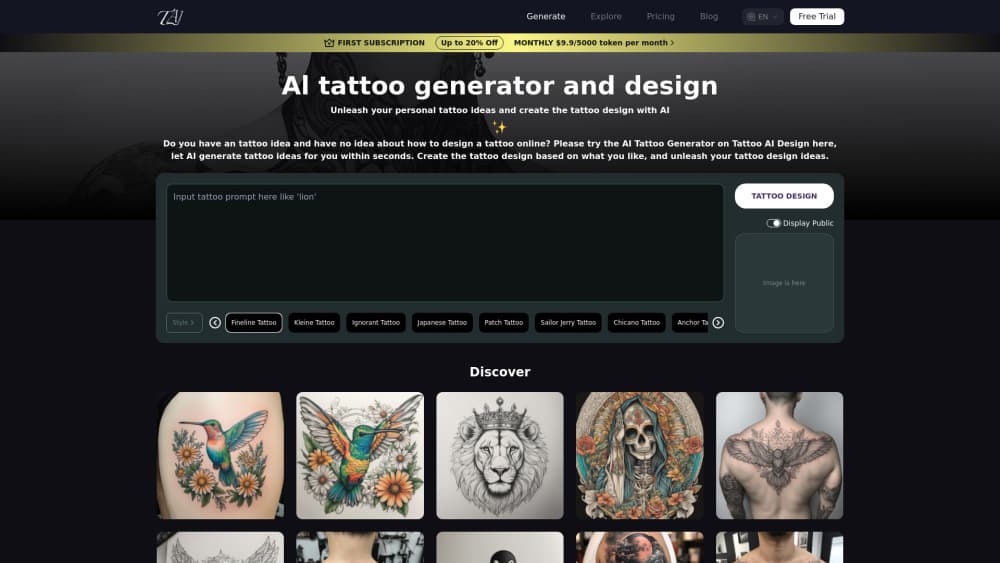
About Tattoo AI Design
What Is Tattoo AI Design
Tattoo AI Design is a web tool for anyone who has an idea for a tattoo but not a drawing of it. You describe the piece in plain words, pick a style, and the site returns artwork you can download, refine, or hand to an artist as a starting point. There's no app to install, and the free tier makes it a usable free AI tattoo generator before you pay anything.
The gap it fills sits between a Pinterest board and a tattoo studio. Reference images show what other people chose. A generator lets you describe your own idea, in your own words, and see several versions of it in minutes. For someone planning a first tattoo, that shortens the awkward conversation where you try to explain a concept to an artist who has thirty other clients that week.
The limits are worth knowing before you pay. Output is generated art, not a drawing checked by a human artist, so line weights and small details may need cleanup before a stencil is usable. The free tier adds a watermark and keeps your history for 15 days. And credits are a separate currency from the subscription, which surprises people who expect an unlimited plan.
Getting Started
- Open tattooai.design and create a free account with an email address. New accounts start with 60 credits.
- Choose a tool. The AI Tattoo Generator works from text, AI Tattoo Try On works from a photo of your body, and a third page combines both.
- Write your prompt in the description box, or use Inspire me to get a starting sentence. Upload a reference image if you have one.
- Set the style, color, background, ratio, and resolution.
- Generate. Each run costs credits from the balance shown on the button.
- Download the result, keep refining, or move to the try-on tool to see the design on skin.
Product Information
A quick look at Tattoo AI Design's pricing, supported platforms, and performance.
Best for
The users, tasks, and scenarios where this tool fits best.
Users
- First-time tattoo planners
- Tattoo artists collecting references
- Illustrators and designers
Tasks
- Turning a written idea into a visual draft
- Testing placement before booking
- Producing a stencil for an artist
- Exploring styles cheaply
Scenarios
- A first consultation
- Cover-up planning
- Flash sheet prep
Key features
Text to Tattoo Generation
You type a description, and the generator returns a tattoo design in the style you picked. Prompts can be as short as a subject plus a placement, and the site offers an Inspire me button that fills in a sample sentence when you're stuck. Each generation costs credits, and the same prompt produces different results on each run, so plan on two or three attempts before you get something usable.
Reference Image Upload
A reference image slot lets you steer the output with a photo, a sketch, or a piece you already like. This matters more than the prompt for styles with strict visual rules, such as Japanese sleeves or fine line florals, where a written description tends to lose the details that make the style readable. You can also feed an existing tattoo design into the try-on tool instead of generating a new one.
Style, Color, and Background Controls
The generator exposes separate controls for tattoo style, color, and background. Style options cover minimalist, black and grey, colorful, realistic, tribal, and geometric, among others. Background choice matters for a stencil: a clean white background is easier to print and trace, while a paper texture looks better in a mockup you send to a friend. Color options let you stay monochrome or add a palette before generating rather than editing afterwards.
AI Tattoo Try On
The AI tattoo try on tool overlays a design onto a photo of your body. You upload the tattoo image and a body photo, or pick a preset body part such as forearm, upper arm, back, lower leg, thigh, neck, or abdomen. The system detects the body area, adjusts the angle, and matches skin tone so the result reads as ink rather than a sticker. You can still nudge size and position if the automatic placement lands badly.
Detail Editing and HD Export
After generating, you can adjust size, line weight, and style details without starting over. Exports come out at higher resolution on paid plans, which is the difference between an image you can eyeball and a tattoo stencil you can print at true scale. If your artist prefers to redraw from a reference, a clean high resolution export is usually enough for them to work from.
Model Selection and Prompt Helpers
The site runs several image models, including Nano Banana Pro, Nano Banana 2, and Seedream 4.5, and lets you pick one before generating. Different models handle line art, skin texture, and text differently, so it's worth testing the same prompt across two of them. A separate video generator built on Veo 3.1 turns a design into a short clip, which is mostly useful for social posts rather than for planning a tattoo.
Pros and cons
Pros
- The free plan is genuinely usable: 60 starter credits plus 20 more per daily check-in, enough to test the workflow before paying anything.
- The try-on tool solves the hardest part of tattoo planning, which is judging size and placement on your own body.
- Six broad tattoo styles plus color, background, and ratio controls cover most common requests without a long prompt.
- Paid plans unlock 365-day history, no watermark, private generations, and commercial rights, which covers the needs of working artists.
- Multiple image models in one place mean you can compare output quality instead of trusting a single engine.
Cons
- Free outputs carry a watermark and history disappears after 15 days, so anything worth keeping needs a download on day one.
- Credits expire 100 days after purchase and premium access lasts one month, which penalizes occasional users who buy a large pack.
- Lettering and small symbols often come out garbled and need several retries or a manual redraw.
- There's no public API and no native mobile app, so studio software integration and phone-only workflows are out.
Frequently asked questions
Yes, with limits. A new account gets 60 credits, daily check-in adds 20, and you can generate on the normal queue with a watermark. High quality output, faster queue, private generations, and commercial rights require a paid plan.
Related content
Explore related tools, skills, and articles for Tattoo AI Design.
Tattoo AI Design Alternatives

Google EmbeddingGemma 2
Google DeepMind · Writing · Image · CodingGoogle EmbeddingGemma 2 is a 740M-parameter open model that turns text, code, images, audio, and video frames into vectors in one 768-dimension space, running on phones and laptops.

Tractionwave
TractionWave · Image · MarketingTractionWave is an AI attention heatmap tool for static ads. Upload a PNG or JPG and it returns predicted attention, ranked hotspots, and fixes before you spend budget.

Imejis.io
Imejis.io · Image · MarketingImejis.io is an AI design studio for agents and marketing teams. Describe an image in plain words, and it writes the copy, builds the layout, reflows it to every size, then exports a finished file.