

Tattoos.ai
Tattoos.ai · Image
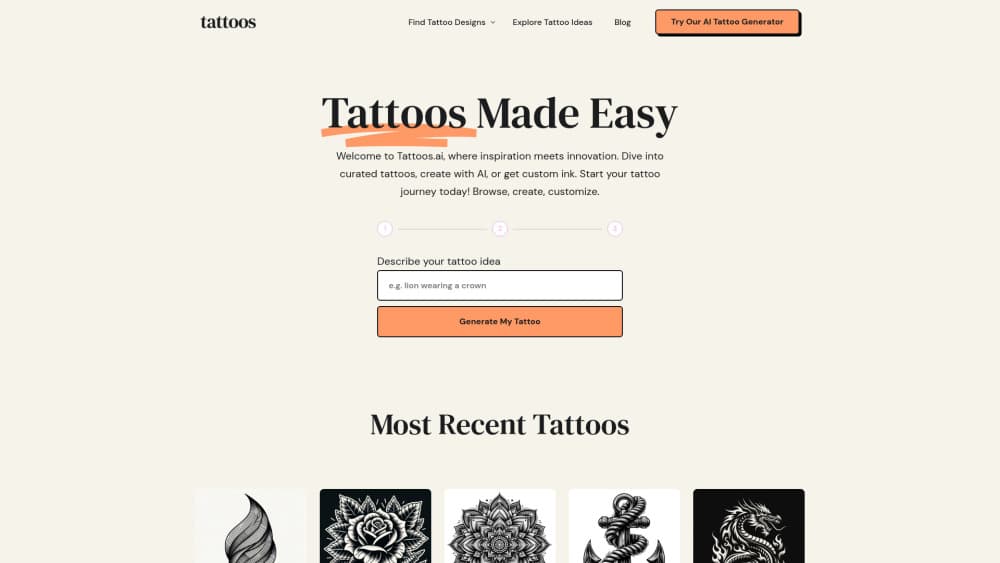
Tattoos.ai is a web based AI tattoo generator that turns a written prompt into custom tattoo designs you can download and hand to an artist as a stencil.
About Tattoos.ai
What Is Tattoos.ai
Tattoos.ai is a browser based design tool for people who know roughly what they want inked but can't draw it. You describe the piece in plain language, pick a style, and the site returns a sketch within seconds. The output is a reference image, not a finished tattoo, and that distinction matters for how you should use it.
The site pairs the generator with a large library of tattoo ideas, placements, and style explainers. That library is the quieter half of the product. Someone deciding between a spine piece and a forearm piece can read the placement page first, then generate three drafts in the same session. Compare that with opening a general image model and hoping the anatomy lands right.
The limits are worth knowing before you pay. Designs come out as WEBP files, so you'll convert them if your artist wants a PDF or a layered file. The generator works from text prompts, so it won't project a design onto a photo of your arm. And the sketch you get is a starting point: a tattooer still has to redraw it for skin, needle size, and how the piece wraps around a wrist or a shoulder blade.
Getting Started
- Open tattoos.ai in a browser and sign in through My Account. You get a few free credits on the house, enough to test the tool before spending anything.
- Browse the ideas, placement, and tattoo styles pages if you haven't settled on a direction. Saving two or three references makes your first prompt much sharper.
- Write the prompt with the details that matter: subject, style, placement, size in inches, line weight, and whether you want black and gray or color.
- Generate the first sketch, look at what missed, and edit the prompt rather than starting from a blank box. Adding "thin outline, no shading" usually fixes a muddy result faster than rewriting everything.
- Download the design you like as a WEBP file, then send it to your artist for a redraw or ask them to pull a stencil from it.
Product Information
A quick look at Tattoos.ai's pricing, supported platforms, and performance.
Best for
The users, tasks, and scenarios where this tool fits best.
Users
- First-timers who have an idea but no sketch
- People with several tattoos already planned
- Tattoo artists hunting for reference shapes
Tasks
- Turning a vague brief into a usable reference
- Comparing styles on one motif
- Prepping a stencil conversation
Scenarios
- The night before a consultation
- A memorial or lettering piece where wording matters
- Cover-up planning
Key features
Prompt Based Design Generation
The core tool takes a written description and returns a sketch in seconds. Detail in, detail out: a prompt naming subject, style, placement, and line weight beats a one word request every time. You can rerun the same prompt after a small edit, which is how most people land on a keeper.
Style Coverage That Matches Real Tattoo Categories
The style list lines up with what shops actually book: minimalist, fine line, traditional, dotwork, realism, micro realism, tribal, patchwork, and cyber sigilism. Picking a style up front keeps the model from drifting into generic digital art. Small tattoos benefit most, since a clean fine line read is harder to fake than a big bold shape.
Idea, Placement, and Meaning Pages
Beyond the generator, the site runs explainer pages for tattoo ideas, body placements, fonts, pain charts, and symbolism. These pages do the research work that usually eats a week of scrolling. They also double as prompt material, because a placement page tells you what fits a given area of skin.
Stencil Oriented Downloads
Finished designs download as WEBP, a format that opens in any browser and shares easily over chat. The tattoo stencil maker page walks through turning a design into something an artist can trace. You still need a human to size it for your body, and no export here replaces that step.
Trial Credits Then Pay Per Design
New accounts get a handful of free credits, so you can test several tattoo styles before committing money. After that you buy credit packs and spend them per generation. It's a pay as you go model, not a monthly subscription, which suits people who design in bursts and then stop for months.
Iteration Without Restarting
Every generation keeps your prompt editable, so refinement is a loop rather than a reset. You can hold the composition and change only the shading, or keep the shading and swap the subject. That single design decision saves more credits than any discount.
Pros and cons
Pros
- Fast first draft: a usable sketch in seconds beats a week of Pinterest boards when you just need a direction.
- Style vocabulary that matches shop language, so what you ask for is close to what a tattooer would call it.
- Free trial credits make the risk of trying it close to zero.
- One page covers generation plus placement and meaning research, so you don't juggle five tabs.
Cons
- WEBP only. If your artist wants a vector or a print ready PDF, you'll need a conversion step, which can soften thin lines.
- No on body preview, so placement and scale stay a guess until you talk to a tattooer.
- Credit packs mean costs scale with how much you experiment, and heavy iteration sessions add up.
- Output quality tracks your prompt writing, and vague input produces generic flash.
Frequently asked questions
Yes. New accounts get a few trial credits, enough for several designs across different styles. You only buy credits once those run out.
Related content
Explore related tools, skills, and articles for Tattoos.ai.
Tattoos.ai Alternatives

Google EmbeddingGemma 2
Google DeepMind · Writing · Image · CodingGoogle EmbeddingGemma 2 is a 740M-parameter open model that turns text, code, images, audio, and video frames into vectors in one 768-dimension space, running on phones and laptops.

Tractionwave
TractionWave · Image · MarketingTractionWave is an AI attention heatmap tool for static ads. Upload a PNG or JPG and it returns predicted attention, ranked hotspots, and fixes before you spend budget.

Imejis.io
Imejis.io · Image · MarketingImejis.io is an AI design studio for agents and marketing teams. Describe an image in plain words, and it writes the copy, builds the layout, reflows it to every size, then exports a finished file.