

Teachoo
iAsk AI · Leaning · Chatbot
Teachoo is a free AI homework helper that walks students through math, science, writing and coding problems one step at a time, with photo input, hints and flashcards.
About Teachoo
What Is Teachoo
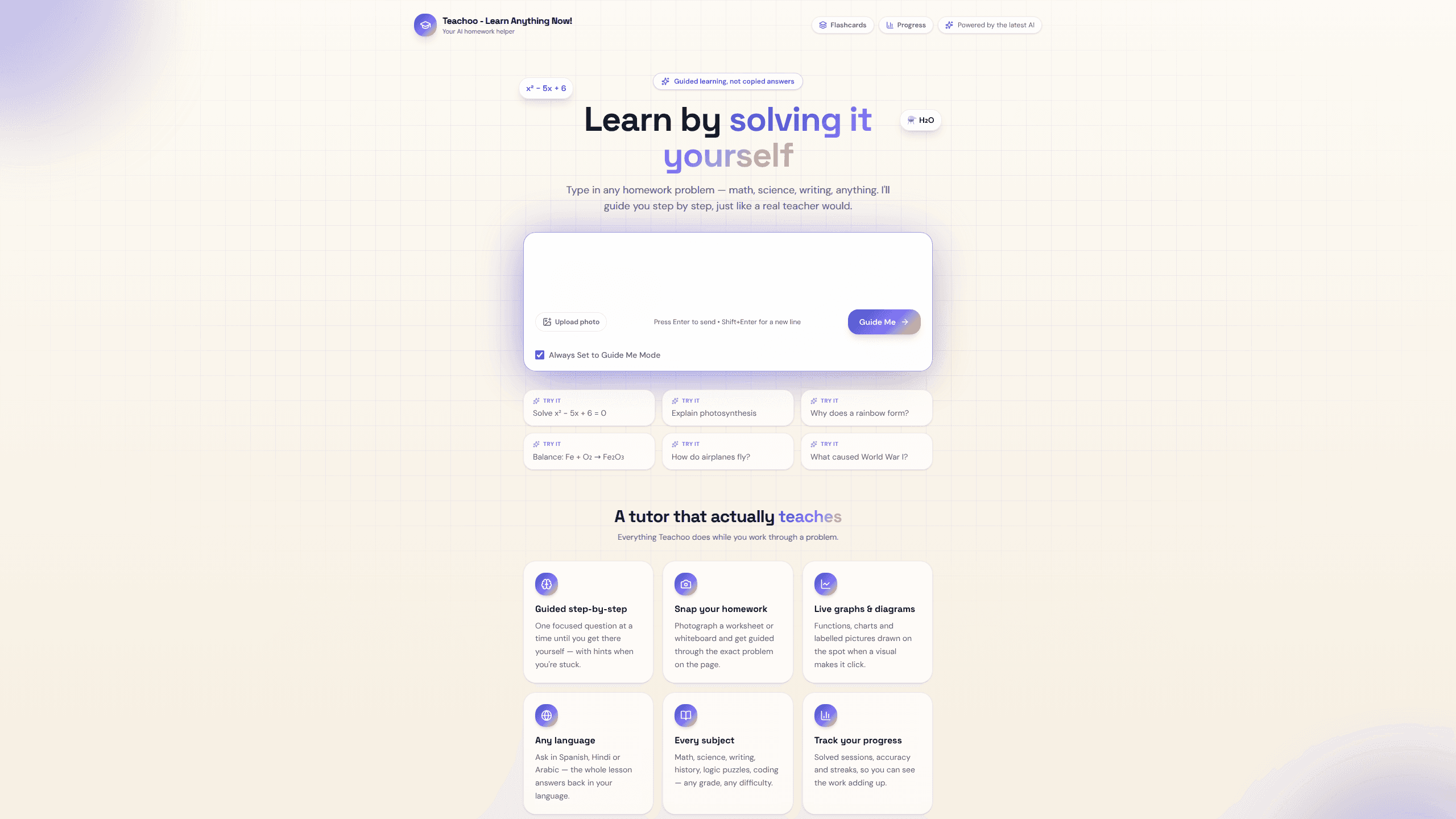
Teachoo is a browser-based AI tutor built by the team behind the iAsk AI answer engine. You give it a homework question, and it asks you to attempt the next step instead of printing the final answer. The line on the homepage sums up the intent: guided learning, not copied answers.
The product targets school and college students who want to understand a problem well enough to handle the next one alone. A session reads like a conversation. For x² − 5x + 6 = 0, the tutor starts by asking which two numbers multiply to 6 and add up to −5, then reacts to whatever the student types. A wrong attempt gets a narrower question about that part of the solution.
The pace is the main tradeoff. A five-step equation takes several exchanges, and a student who wants a quick answer will find the format slow. Subject coverage looks wide on the site, but the quality of the help depends on how precisely the question is worded.
Getting Started
- Open teachoo.ai in a browser and type a question, or pick Upload photo or Take photo to send a picture of a worksheet or whiteboard.
- Keep the mode on Guide Me for step-by-step homework help, or choose Explain via a video for a worked walkthrough.
- Answer the first question the tutor asks. Tap Bigger hint when the clue is too weak, or I'm Stuck to have the current step explained.
- When the problem is done, turn the topic into a flashcard and open Progress to check sessions, step accuracy and streaks.
Product Information
A quick look at Teachoo's pricing, supported platforms, and performance.
Best for
The users, tasks, and scenarios where this tool fits best.
Users
- Middle and high school students
- College students in introductory courses
- Parents helping with homework
- Adult learners refreshing the basics
Tasks
- Algebra and geometry homework
- Science explanations
- Writing feedback
- Coding practice and logic puzzles
Scenarios
- The night before a problem set is due
- Exam revision
- Catching up after a missed class
Key features
Guided step-by-step tutoring
The tutor never dumps a full solution at once. It asks one focused question, waits, and responds to the answer with feedback or a follow-up. Hints are optional, so a student who is close can keep trying without being handed the method.
Homework photo upload
The homework photo upload takes a worksheet, a notebook page or a whiteboard shot and reads the problem from the image. This helps most with printed exercises and handwritten equations, where typing everything out would break concentration.
Bigger hint and I'm Stuck
Two levels of help sit next to the answer box. Bigger hint gives a stronger clue about the current step, while I'm Stuck explains the reasoning behind it. The student decides when to use either, which keeps the difficulty under their control.
Live graphs and diagrams
Functions, charts and labeled diagrams get drawn during a lesson when a picture makes the idea clearer. A quadratic question shows the curve and its roots; a science question can get a labeled diagram instead of a wall of text.
Video explanations
Explain via a video produces an AI-generated walkthrough of the submitted problem, with the steps worked out in order. It suits students who want to see a full solution once, after they have tried the guided route.
AI flashcards with spaced repetition
The flashcard tool lets students write their own question-and-answer cards, then quizzes them and grades what they type. Spaced repetition schedules each card for the day it is due, so review time goes to the cards that are close to slipping.
Study progress tracker
The study progress tracker records completed sessions, how often each step landed correctly, and the number of consecutive days with activity. After a few weeks, it shows whether the practice is actually sticking or just filling time.
Pros and cons
Pros
- Free to use, with no paywall in front of the tutoring session or the flashcard tools.
- Feedback responds to the specific step a student got wrong, which is more useful than a generic explanation of the whole problem.
- Photo input covers printed worksheets and handwritten notes, so the question does not need to be retyped.
- Lessons work in several languages, including Spanish, Hindi and Arabic, which helps students who study in a second language.
- Flashcards and progress tracking live in the same account, so practice and review stay in one place.
Cons
- Multistep problems take many exchanges, which feels slow when the answer is already obvious.
- Flashcard creation is manual, with no automatic import from a lesson or a textbook chapter.
- There is no dedicated iOS or Android app, so phone users rely on the mobile browser.
- No public API is documented, which rules it out for schools that want to plug a tutor into their own platform.
Frequently asked questions
Yes. The tutoring sessions, flashcards and progress dashboard are free to use, and the site lists no paid plans at the moment.
Related content
Explore related tools, skills, and articles for Teachoo.
Teachoo Alternatives

HireKey
HireKey · Voice & Language · Productivity · LeaningHireKey is an AI job search copilot built by a former tech recruiter. It checks role fit, tailors resumes, runs interview practice and tracks every application.

Lune
Retrograde Labs · Productivity · LeaningLune is a research search engine for scientific AI agents. It runs as an MCP server that lets Claude, ChatGPT and Cursor search peer-reviewed computer science papers and cite them.
Coddy
Coddy · Coding · LeaningCoddy is a gamified platform to learn to code through short interactive lessons in 20+ languages, with a browser editor, an AI tutor and free certificates.