
Teletyped
Teletyped LLC · Chatbot · Prompts
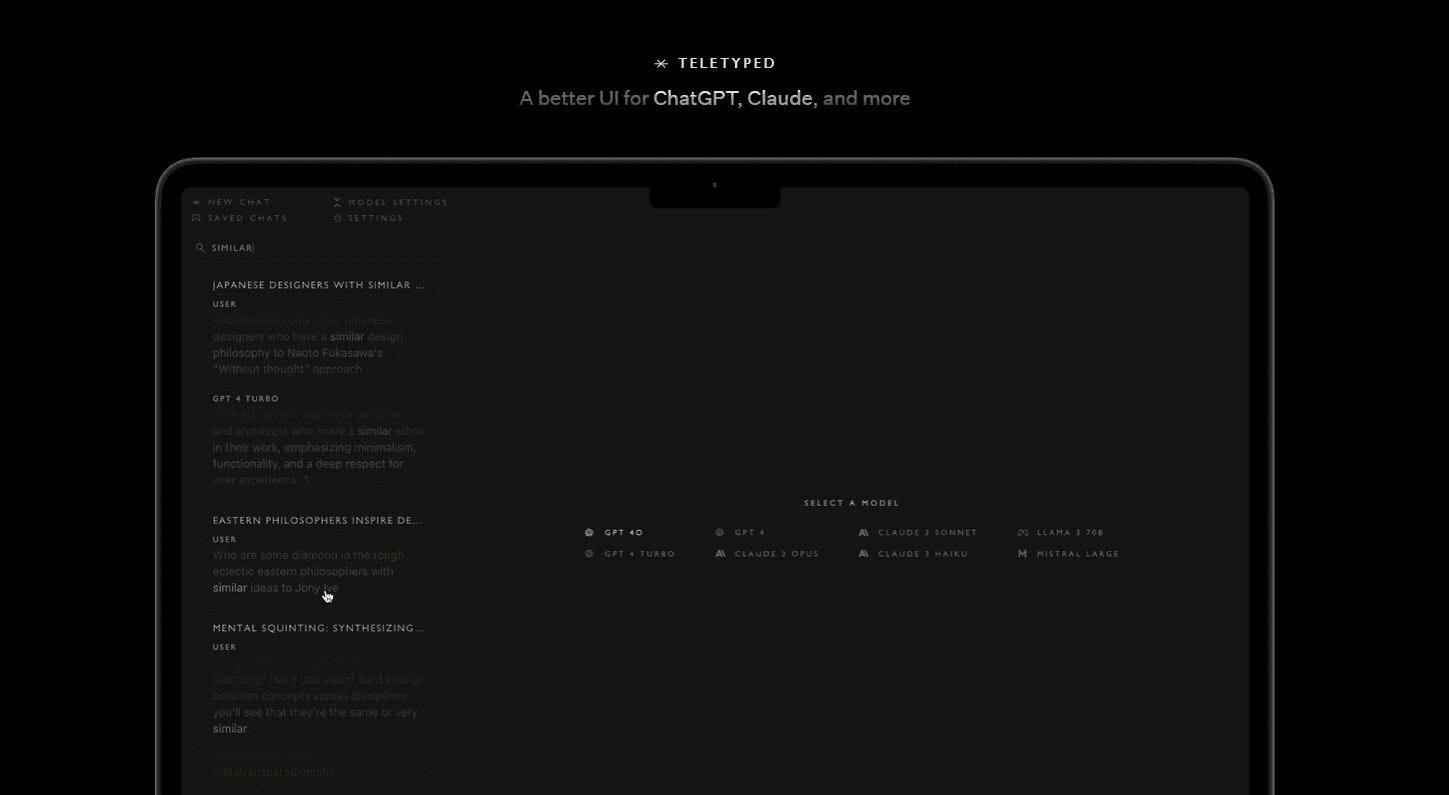
Teletyped Chat is a browser-based AI chat interface from Teletyped that runs ChatGPT, Claude and other models in one window, with full-text chat search, saved conversations and editable replies.
About Teletyped
What Is Teletyped
Teletyped is a small software studio that calls itself an exploratory company, with a stated aim of building tools that augment human capability. Its consumer product is Teletyped Chat, a web front end that lets you talk to several AI models from a single screen. The same company sells custom software, design work and AI consulting, and both sides of the business sit on one site.
The pitch is comparison without tab juggling. Most people who pay for two AI subscriptions end up copying a prompt from one window into another to see which answer holds up. Teletyped Chat turns that into a dropdown: you pick ChatGPT or Claude before you send, and the reply lands in a thread you can search later.
The constraints are worth knowing up front. It's a web app, so there's no phone client or desktop install. Nothing on the official site documents a public API. Your conversations get passed to the model providers for processing under their own privacy terms, which is unavoidable for any client that doesn't run its own models. And the terms say used model credits aren't refundable.
Pricing runs on a subscription with model credits attached. The official site doesn't publish a full price list, and third-party directories list the entry plan at about $10 a month. There's no advertised free tier, so treat a trial as something to confirm at signup.
Getting Started
- Open chat.teletyped.com in a desktop browser and sign in with a Google account or an email address.
- Pick the model you want from the interface before sending anything, since the choice shapes tone and reasoning more than any setting does.
- Type your prompt, then read the answer. You can edit the response text and keep working from the corrected version instead of starting a new thread.
- Switch to another model mid-conversation when an answer disappoints, or search your saved threads to pull up something from last week.
Product Information
A quick look at Teletyped's pricing, supported platforms, and performance.
Best for
The users, tasks, and scenarios where this tool fits best.
Users
- People who already pay for more than one AI subscription
- Writers and editors testing voice
- Freelancers and small teams without an IT department
Tasks
- Checking a factual claim twice
- Drafting with one model and rewriting with another
- Finding an old answer
Scenarios
- A research session that runs long enough to forget which model said what, where saved threads plus search keep the trail intact.
- Client work that needs a second opinion before delivery, with both drafts sitting in one searchable place.
- Everyday drafting on a laptop, where a browser tab is all the setup you're willing to do.
Key features
Several Models in One Chat Window
The workspace holds ChatGPT, Claude and other models behind a single interface, so a conversation can move between them without a separate account for each provider. That's the core of the product: one AI chat workspace instead of three tabs. What you don't get is the official apps' side features, like custom GPTs or Claude Projects, which stay with the providers.
Switching Models Mid-Conversation
You can change the model inside a thread rather than starting over. Practically, that means the whole exchange stays in context when you ask a second model to critique the first answer. It's the fastest way to spot a confident but wrong reply, since the two models rarely fail in the same place.
Full-Text Search Across Saved Chats
Search looks inside message text, not just thread titles. Auto-generated titles are useless once you have a few hundred conversations, so keyword search is what makes an archive usable again. Type a phrase you remember writing and the matching threads come back.
Saved Conversations You Can Reopen
Threads persist between sessions, and reopening one keeps the earlier messages in view while you continue. For long-running work, that continuity matters more than any single feature here, because it removes the habit of pasting context back in every morning.
Editable Replies and Custom Settings
You can edit the text of a response and keep going from the edited version, which is handy when a model gets one detail wrong but the rest of the draft is fine. Settings let you adjust how the interface behaves, and preferences stick to your account across browsers.
Credit-Based Billing Through Stripe
Payment goes through Stripe, and usage is metered in model credits tied to your subscription. You're paying for access plus the underlying model calls, which is why heavy users should watch consumption rather than assume a flat fee. The terms are blunt about refunds: credits already spent aren't returned.
Pros and cons
Pros
- One login covers ChatGPT and Claude, so multi-model AI chat stops requiring duplicate subscriptions in separate tabs.
- Chat search that reads message text turns a year of conversations into something you can actually query.
- Editable replies let you fix a wrong sentence and continue, which saves a whole regenerated answer.
- Sign-in with Google gets you into a working thread in under a minute.
Cons
- No mobile app and no offline mode, so the whole product depends on a desktop browser and a live connection.
- Model access runs through your credits, and spent credits aren't refundable, which makes experimentation feel expensive.
- Every prompt leaves your browser for the model providers, so sensitive material carries the same risk it does in the official apps.
- The official site publishes little pricing detail, and you'll be confirming plan limits at checkout rather than before.
Frequently asked questions
It's an AI chat interface that runs several models in one place. You use it to talk to ChatGPT, Claude and others from a single window, compare their answers, and keep the conversations searchable afterward.
Related content
Explore related tools, skills, and articles for Teletyped.
Teletyped Alternatives
Griffin by Tavus
Tavus · Voice & Language · Video · ChatbotGriffin by Tavus is the first Human Interaction Model: a full-duplex, video-to-video system that watches, listens, and answers during a live video call in real time.

Claude Haiku 5.5
Anthropic · Writing · Coding · ChatbotClaude Haiku 5.5 is Anthropic's fastest and cheapest small model, built for high volume tasks at $0.10 per million input tokens with a 1M token context window.

Wabi
Wabi, Inc. · Productivity · AI Assistant · ChatbotWabi is a messenger-style AI assistant for iOS, Android and Mac. It sorts your life into shared threads, builds small apps inside each one, and handles email, calendar and errands after you approve.