

Templated
Templated · Image · Coding
Templated is an API platform that turns your designs into automated images, videos, and PDFs, built for marketers and developers who need assets at scale.
About Templated
What Is Templated
Templated sits between the design tools you already use and the volume your work demands. You build a template once in a browser-based editor, then swap in text and images through a single API call or a no-code workflow. The result is thousands of on-brand variations. Nobody opens Photoshop.
The problem it solves is repetitive design work. Marketing teams that publish daily social posts, e-commerce stores that need product visuals for every SKU, and SaaS companies that mail personalized reports all hit the same wall: the same layout, over and over, with different content each time. Templated handles that loop for you. It's automated image generation with a template attached.
The main limit is that it's a rendering engine, not a full design suite, and you should read the fine print on credits. Images cost 1 credit each, PDFs cost 1 credit per page, and videos scale with resolution, frame rate, and length. That's the whole pricing model. The company reports roughly 2M images and 1M videos and PDFs generated per month across its users, which tells you the throughput is real, but heavy video use burns credits fast.
Getting Started
- Sign up for a free trial account, which starts you with 50 credits and no credit card requirement.
- Build a template in the drag-and-drop editor, generate one with the AI generator, grab a free design from the gallery, or import an existing Canva file.
- Name the layers the API will swap, like a text layer for a headline and an image layer for a cover photo.
- Connect the template through the Render API, or wire it up through Zapier, Make, or n8n if you'd rather skip code.
- Trigger a render, pull the finished JPEG, PNG, WebP, MP4, or PDF file from your dashboard or the API, and let the workflow repeat.
Product Information
A quick look at Templated's pricing, supported platforms, and performance.
Best for
The users, tasks, and scenarios where this tool fits best.
Users
- Marketing teams
- E-commerce managers
- Developers building content tools
Tasks
- Bulk social media graphics
- Personalized PDF reports
- Programmatic SEO images
Scenarios
- A weekly campaign push
- A product launch at scale
- An app feature that needs visuals
Key features
Real-Time Canvas Editor
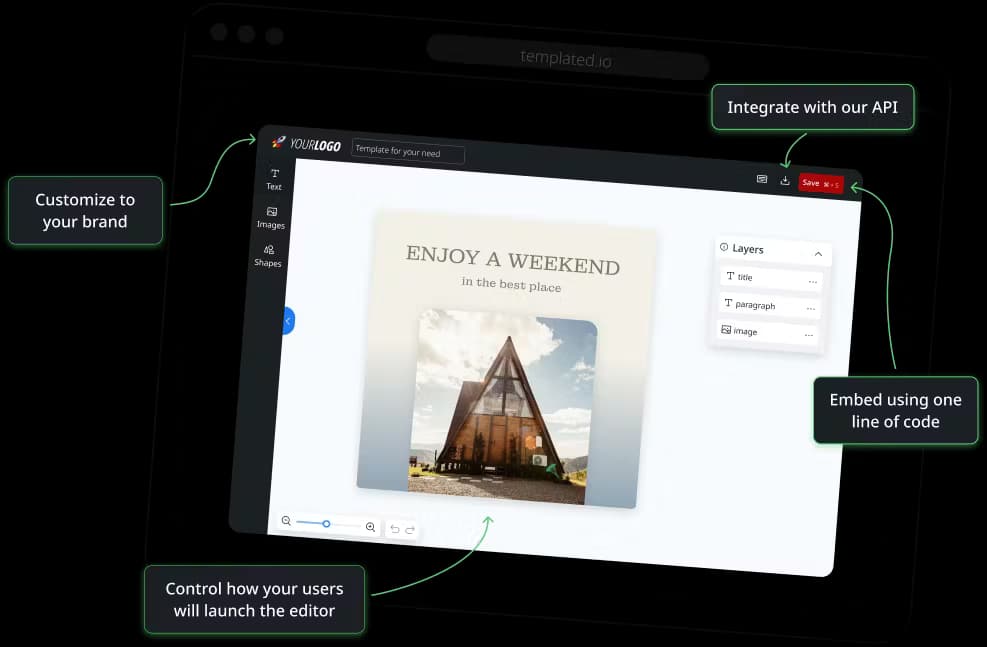
The editor is drag-and-drop with a live canvas, so what you place is what renders. You get different component types for text, images, and shapes. That matters. Those are exactly the layers the API swaps out later. There's no design experience required, and the learning curve is short.
AI Template Generator
Describe what you need and the AI produces a professional base template in seconds. It's handy when you don't have a starting point, and you can refine the output in the editor before wiring it to the API. Think of it as skipping the blank-canvas problem, not replacing a designer.
Multiple Output Formats
One template can render as JPEG, PNG, WebP, MP4, or PDF. That flexibility means the same design powers a social post, a print-ready file, and a downloadable report. The company says renders are pixel-perfect and ready to use or print without post-processing.
Canva Import
If your designs already live in Canva, you can import them and keep working in Templated's editor. This lowers the switching cost for teams that built their brand assets elsewhere. It also means your existing templates don't need to be rebuilt from scratch.
No-Code Integrations
Zapier, Make, and n8n are all supported, so you can connect Templated to the rest of your stack without writing a line of code. A workflow can generate hundreds of variations on a schedule. It's image automation for people who'd rather not touch a terminal. Most teams that start no-code add the API later when volume grows.
Render API
The core POST /v1/render endpoint takes a template ID and a set of layers, each with new text or an image URL. Send it, get a file back, typically in around two seconds. So why not call it an image generation API? That's basically what it does, and PDF generation API jobs run on the same endpoint. It's the piece that turns a design into a repeatable pipeline. The docs are short enough to read in one sitting.
White Label Editor
You can embed Templated's editor directly into your own site or app, letting your users create and customize designs on your platform. This is the feature that turns Templated from an internal tool into a product feature you can ship. It's the more advanced path, aimed at teams building for their own customers.
Pros and cons
Pros
- Wide format support across JPEG, PNG, WebP, MP4, and PDF from a single template.
- No-code routes through Zapier, Make, and n8n mean non-developers can automate without engineering help.
- Canva import spares teams from rebuilding existing brand assets.
- Free trial includes 50 credits with no credit card, so you can test the full pipeline before paying.
- Reported uptime SLA of 99.9% and renders around two seconds suit production workflows.
Cons
- Credit costs add up fast on video, since a 1080p clip at 60 FPS for 30 seconds runs 75 credits.
- The free tier is a short trial rather than a lasting free plan, so sustained use requires a paid tier.
- It's a rendering engine, not a design suite, so anything beyond templated output still needs a dedicated editor.
Frequently asked questions
Templated automates image, video, and PDF generation from templates you design once. Teams use it to produce personalized marketing assets, reports, and SEO images at scale through an API or no-code tools.
Related content
Explore related tools, skills, and articles for Templated.
Templated Alternatives

Google EmbeddingGemma 2
Google DeepMind · Writing · Image · CodingGoogle EmbeddingGemma 2 is a 740M-parameter open model that turns text, code, images, audio, and video frames into vectors in one 768-dimension space, running on phones and laptops.

Tractionwave
TractionWave · Image · MarketingTractionWave is an AI attention heatmap tool for static ads. Upload a PNG or JPG and it returns predicted attention, ranked hotspots, and fixes before you spend budget.

Imejis.io
Imejis.io · Image · MarketingImejis.io is an AI design studio for agents and marketing teams. Describe an image in plain words, and it writes the copy, builds the layout, reflows it to every size, then exports a finished file.