

Tensor Art
Shanghai Biyou Huixiang Intelligent Technology · Image · China AI
Tensor.Art is a cloud AI image generator where you run community Stable Diffusion, Flux, and Illustrious checkpoints in a browser, train LoRAs, and share images without a local GPU.
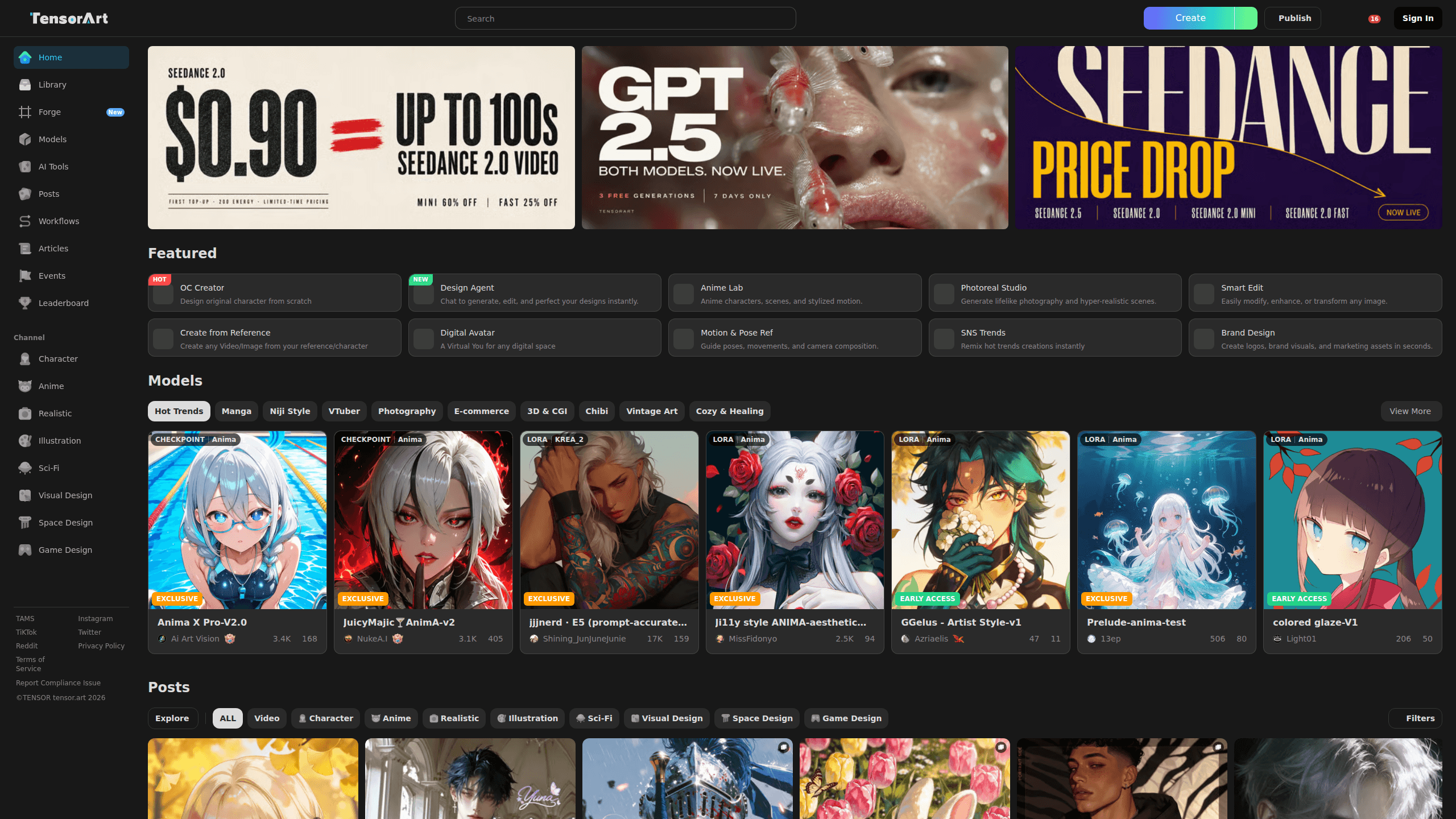
About Tensor Art
What Is Tensor.Art
Tensor.Art is a browser-based AI image studio and model-sharing community, and a solid free AI art generator. Instead of installing Stable Diffusion on a PC with a powerful graphics card, you pick a checkpoint from the gallery, type a prompt, and let cloud GPUs handle the render. It handles text to image generation and Stable Diffusion online runs in the same workspace. The platform launched in 2023 and is run by Shanghai Biyou Huixiang Intelligent Technology, with a Chinese-facing version at Tusi.Art.
The core promise is lowering the barrier to serious AI art. You get access to tens of thousands of community checkpoints, LoRAs, and embeddings, plus tools like ControlNet for layout control and an online trainer for building your own LoRA from a handful of reference images. Finished work posts straight to a feed, and you can rerun anyone's image with one click to borrow their settings.
The main limits are queues and credits. Free generations sit behind a wait during peak hours, and anything beyond the daily allowance, including LoRA training and high-resolution upscaling, burns credits you pay for. Commercial rights also depend on each base model's license, not the platform alone.
Getting Started
- Create a free account with email or a social login, then claim your starting credits.
- Browse the model library and open a checkpoint that matches the style you want.
- Click run to load the workspace, then enter a prompt and adjust steps, sampler, and aspect ratio.
- Add a ControlNet or LoRA if you need to lock a pose or a specific art style.
- Generate, upscale the result, and share it to the community feed if you want feedback.
Product Information
A quick look at Tensor Art's pricing, supported platforms, and performance.
Best for
The users, tasks, and scenarios where this tool fits best.
Users
- Beginner AI artists who want Stable Diffusion results without buying a GPU
- Model creators and LoRA trainers
- Casual designers and game artists
Tasks
- Generating anime, photoreal, or illustration art from a text prompt
- Training a personal character or art style
- Copying a pose or composition
Scenarios
- Testing several art styles before committing to one for a project
- Producing concept art and thumbnails on a laptop or phone
- Studying how a striking image was made
Key features
Cloud Checkpoint and LoRA Library
Tensor.Art hosts tens of thousands of community models, from base Stable Diffusion and Flux checkpoints to character LoRAs and embeddings. As an AI image generator it covers text to image, image to image, and inpainting in one library. You can run any of them online or download the files for local use, which makes it a practical middle ground between a gallery and a file host.
Browser-Based Generation Workspace
The generator runs on cloud GPUs, so the same workspace loads on a laptop, a tablet, or a phone. You set the prompt, sampler, steps, and resolution, then render without installing anything or managing drivers. It is the core reason people pick Tensor.Art over a local setup.
ControlNet and Layout Control
ControlNet models let you lock a pose, an outline, or a depth map so a new image follows the structure of a reference. OpenPose, Canny, and depth guides are the usual picks for keeping a character consistent across a series.
Online LoRA Training
You can train a custom LoRA directly on the platform from a handful of images, without a local GPU or a separate training rig. The trained model slots back into your workspace, so a personal character or house style becomes reusable in one place.
Canvas Editing and Upscaling
Tensor.Art Canvas works as an AI image editor for inpainting, outpainting, upscaling, and touch-ups, and it doubles as a workflow workspace. The editor handles the fixes that text prompts alone cannot, such as repairing hands or extending a background.
Community Feed and One-Click Remix
Posts show the prompt, model, and settings that made each image. You can rerun any of them to spin your own version, which turns the feed into a study tool as much as a gallery.
Pros and cons
Pros
- Free daily credits reset every 24 hours, so light users can keep generating at no cost.
- A huge checkpoint, LoRA, and embedding library covers anime, photoreal, and illustration styles in one place.
- Cloud rendering removes the GPU requirement, so a mid-range laptop or a phone is enough.
- Online LoRA training lets you build a custom model without owning a training rig.
- ControlNet support gives you pose and layout accuracy that plain text prompts miss.
Cons
- Free generations queue during peak hours, which slows down high-volume batch work.
- LoRA training and high-resolution upscaling consume extra credits beyond the daily allowance, so heavy projects add up.
- Commercial use depends on each base model's license, so you have to check terms before selling output.
Frequently asked questions
Tensor.Art is used to generate AI images from text prompts, run and share Stable Diffusion checkpoints and LoRAs, train custom models, and edit results with inpainting and upscaling. It targets people who want serious AI art tools without a local GPU.
Related content
Explore related tools, skills, and articles for Tensor Art.
Tensor Art Alternatives

Google EmbeddingGemma 2
Google DeepMind · Writing · Image · CodingGoogle EmbeddingGemma 2 is a 740M-parameter open model that turns text, code, images, audio, and video frames into vectors in one 768-dimension space, running on phones and laptops.

Tractionwave
TractionWave · Image · MarketingTractionWave is an AI attention heatmap tool for static ads. Upload a PNG or JPG and it returns predicted attention, ranked hotspots, and fixes before you spend budget.

Imejis.io
Imejis.io · Image · MarketingImejis.io is an AI design studio for agents and marketing teams. Describe an image in plain words, and it writes the copy, builds the layout, reflows it to every size, then exports a finished file.