

Text Reader
TextReader.ai · Voice & Language
Text Reader is a free browser tool that turns written text into natural speech with WaveNet AI voices in more than 40 languages, then exports the audio as an MP3.
About Text Reader
What Is Text Reader
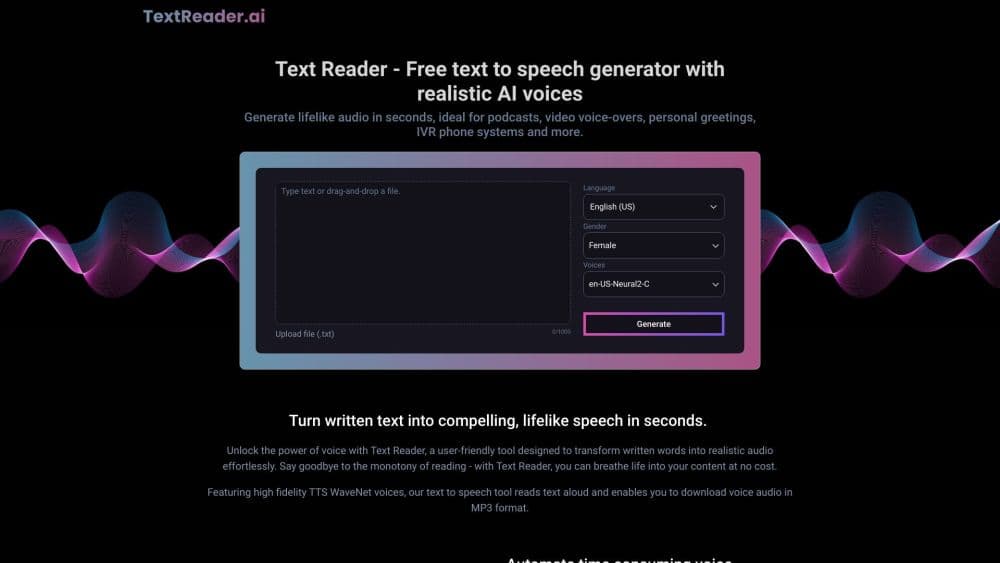
Text Reader is a web based text to speech tool from TextReader.ai. You paste text, pick a language and a voice, and the site converts the words into spoken audio you can listen to or download. There's nothing to install and no account to set up before your first run.
The product targets a simple problem. Recording a human narrator costs money and takes days of scheduling, and a phone microphone picks up every room noise. Text Reader replaces that process with a form field and a Generate button, which is enough for a video voice over, a phone menu recording, or a personal audio greeting.
The limits are clear once you use it. Each run accepts up to 1,000 characters, so a long article arrives in several pieces. The output is audio only, with no timeline editor or subtitle export, and there is no voice cloning: you choose from the voice library the site provides.
Getting Started
- Open textreader.ai in a browser and paste your script into the text box, or load a plain TXT file with the upload button.
- Pick the language from the dropdown, then narrow the list by gender if you already know the kind of voice you want.
- Choose a voice, press Generate, and let the tool read text aloud back to you.
- Preview the result, then click download to save the speech as an MP3 file.
Product Information
A quick look at Text Reader's pricing, supported platforms, and performance.
Best for
The users, tasks, and scenarios where this tool fits best.
Users
- Students with long reading lists
- People with dyslexia or low vision
- Small business owners
Tasks
- Turning a blog post into audio
- Narrating a short video
- Building IVR prompts
- Checking pronunciation in another language
Scenarios
- Proofreading by ear
- Last minute content changes
- Multilingual product pages
Key features
WaveNet Voices That Sound Like People
Text Reader runs on Google WaveNet speech models, the same family of voices used in many commercial voice products. The result carries tone and pacing rather than the flat delivery of older screen readers. For a narration under a minute, most listeners won't guess a machine made it.
More Than 40 Languages and Accents
The voice library covers over 40 languages and regional variants, including English in US, UK, and Australian accents, Spanish for Spain and the US, Portuguese for Brazil and Portugal, plus Mandarin, Cantonese, Japanese, Korean, Arabic, Hindi, and Vietnamese. You can produce one script in several accents, which helps when a campaign runs in more than one market.
Paste Text, Type It, or Upload a TXT File
There are three ways to get words in. Paste from a document, type straight into the box, or upload a plain text file. The counter under the field shows how many characters you have left out of 1,000, so you know before you press Generate whether the script needs splitting.
One Click MP3 Download
Every generation can be saved as an MP3, which plays on phones, in video editors, and inside presentation software without conversion. There's no watermark and no waiting queue once the audio is ready. Teams that pipe the file into a video tool can keep the same workflow for every new script.
Filter Voices by Language and Gender
Two dropdowns cut the list down fast. Choose a language, then filter to male or female voices if the part calls for it. The remaining options show the accent and the speaker name, so you can note a favorite and return to it on the next project.
Free Text to Speech Without an Account
The AI voice generator asks for no signup, no card, and no trial countdown. You open the page, generate speech, and download it. That makes the tool useful for a quick one off job, and easy to test before you commit to a paid voice platform for daily production.
Pros and cons
Pros
- No cost and no signup, so a trial run takes seconds instead of a checkout flow.
- WaveNet voices handle punctuation and sentence rhythm well, which keeps long paragraphs listenable.
- The language list covers most major markets, including separate accents for English, Spanish, and Portuguese.
- MP3 output drops into video editors, phone systems, and podcast tools without conversion.
- Gender and language filters cut a long voice list down to a few realistic options.
Cons
- The 1,000 character cap means a 2,000 word article needs several passes and manual stitching, which adds time on long projects.
- There's no editor for pauses, emphasis, or pronunciation, so a misread name requires rewriting the sentence and regenerating.
- No voice cloning or custom voice upload, which rules it out for brands that need one consistent signature voice.
- Nothing is saved between visits, so closing the tab loses the script and the audio unless you downloaded it.
Frequently asked questions
Text Reader converts written text into spoken audio in a browser. People use it for video voice overs, phone menu recordings, audiobook drafts, language practice, and listening to articles on a commute.
Related content
Explore related tools, skills, and articles for Text Reader.
Text Reader Alternatives

Jarq
Jarq (Birzhan Abishev) · Writing · Voice & Language · ProductivityJarq is a Mac app that translates, shortens, fixes, or rewrites the text you select without leaving the app you're in, and types dictated speech at your cursor.

Angebotsmeister
rainmaker labs GmbH · Voice & Language · Productivity · BusinessAngebotsmeister is an AI quoting app for German tradespeople: speak the job on site, get positions with quantities and prices, then send a PDF quote and invoice from one record.

Sente
teai.io · Voice & Language · Coding · ChatbotSente is an AI coding agent CLI from teai.io: one curl command installs it, it wraps OpenCode, and it reaches more than 380 models through one OpenAI-compatible endpoint.