

TinyWow
TinyWow · Productivity · Other
TinyWow is a free online toolkit with 200+ PDF, image, video, and AI writing tools. Convert, compress, and edit files in your browser, with no install or account needed.
About TinyWow
What Is TinyWow
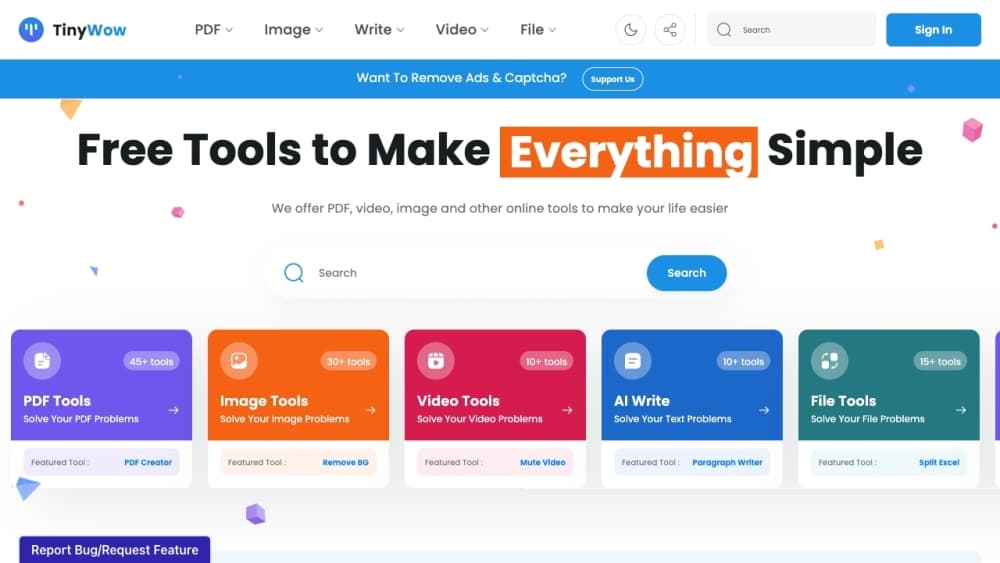
TinyWow is a browser-based toolbox that handles the small file jobs people run into every day. Split a PDF, strip a background from a photo, shrink a video, or rewrite a paragraph, all from one site. There's nothing to install and no account to create for the free tools.
The appeal is the range. Instead of hunting for a separate online file converter for every format, you get PDF, image, video, writing, and spreadsheet tools under one roof. Most of them run on the free tier with no hard limits, and the AI tools cover writing tasks like rewriting sentences, fixing grammar, and drafting blog ideas.
Two things shape when it fits. The free tier shows ads and occasional CAPTCHA checks, so anyone who needs a clean, fast workspace will feel the friction. And these are single-purpose utilities. If you need deep editing or long-form work, a dedicated desktop app still does more. For quick, one-off conversions, it lands well.
Getting Started
- Open tinywow.com and pick a category, such as PDF, Image, Video, Write, or File.
- Choose a tool, like Merge PDF or Remove Background. No signup is required on the free tier.
- Upload your file or paste your text, then let the tool process it in the browser.
- Adjust the settings if the tool offers them, then download the result or copy the output.
- Sign in only if you want to save favorites or upgrade to Premium for ad-free processing.
Product Information
A quick look at TinyWow's pricing, supported platforms, and performance.
Best for
The users, tasks, and scenarios where this tool fits best.
Users
- Students
- Office workers
- Content creators
Tasks
- Converting files between formats
- Removing image backgrounds
- Compressing PDFs and videos
- Cleaning up writing
Scenarios
- A last-minute upload limit
- Working on a shared or borrowed computer
- Testing an AI writing task
Key features
Wide PDF Toolkit
TinyWow covers the common PDF chores that come up constantly. You can merge files into one, split a document, compress a heavy scan, or convert PDF to Word, JPG, and back. There's password removal, eSign, rearrange, and text extraction too. It's the part of the site most people land on first, and most of it runs free.
Image Editing and AI Image Tools
On the image side you get background removal, photo restoration, object removal, and an AI image generator, plus everyday edits like resize, crop, blur, and format conversion. The background remover handles the task people usually open Photoshop for. Results are good enough for web images and quick mockups rather than print work.
AI Writing Assistants
The Write section handles text tasks with AI: rewriting sentences, fixing grammar, completing paragraphs, and generating essays, articles, or blog outlines from a prompt. It's aimed at a fast first draft or a quick clean-up. Treat the output as a starting point you still edit, not a finished piece.
Video and Audio Tools
You can compress a video, trim it, convert MP4 to MP3, extract audio, and turn clips into GIFs. There are also downloaders for social platforms and format swaps like MOV to MP4. Act as a quick video compressor and it handles the size problem too. For people who don't want to open a full video editor for a simple cut or a size reduction, this covers the basics in a browser.
File and Spreadsheet Converters
The File tools convert between Excel, CSV, XML, and JSON, and can split spreadsheets into separate files. It's a niche set, but for anyone juggling data formats in a hurry, staying in the browser beats installing a converter. These are among the more technical tools on the site.
Free Access with Premium Option
The free tier is the draw: 200+ tools, no install, no mandatory account. Premium removes ads, skips the CAPTCHA checks, and adds priority processing so jobs finish faster. You pay $20 per month, or $15 per month billed yearly. It's aimed at people who use the site often and want it out of the way.
Pros and cons
Pros
- Most tools are free with no account required, so the barrier to trying one is near zero.
- The range is broad: PDF, image, video, writing, and file tools live on the same site.
- Everything runs in the browser, which helps on shared or locked-down computers.
- The AI writing and image tools sit next to the converters, so one session covers several jobs.
- Premium at $20 per month, or $15 billed yearly, removes ads and CAPTCHA friction for heavy users.
Cons
- The free tier shows ads and periodic CAPTCHA checks, which slows down repeated use.
- These are single-purpose tools. Complex edits or long documents still need a full app.
- AI outputs need editing before use, and quality varies by task.
- There's no public API, so you can't wire the tools into your own workflow or app.
Frequently asked questions
TinyWow handles everyday file jobs in the browser. You convert, merge, split, and compress PDFs, remove image backgrounds, shrink videos, and run AI writing tasks like rewriting or grammar fixes. It's built for quick, one-off work rather than long projects.
Related content
Explore related tools, skills, and articles for TinyWow.
TinyWow Alternatives

Base Code
Base44 (Wix) · Coding · ProductivityBase Code is a shared cloud development environment from Base44. Teammates describe changes to an existing GitHub codebase in chat, preview them live and send them back as pull requests.

Knocket
Knocket (Tencent RTC team) · Productivity · Business · ChatbotKnocket is a free live chat and contact page tool that lets visitors message you from your website, app, or a shareable link, with every reply handled from Telegram or one inbox.

FloorGen
Vinit Kumar (FloorGen) · Productivity · China AIFloorGen is a browser-based floor plan maker that turns a sentence or a sketch into an editable 2D plan and a 3D walkthrough. Export to PDF, DXF or video, and draw without an account.