

tl;dv
tl;dv (Too Long; Didn't View GmbH) · Productivity
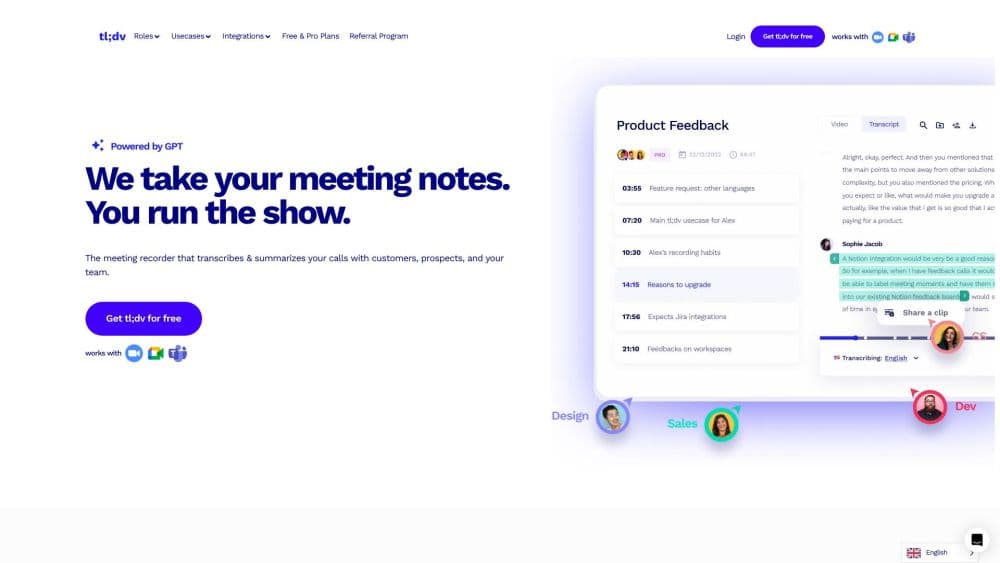
tl;dv is an AI meeting notetaker that records, transcribes and summarizes calls on Zoom, Google Meet and Microsoft Teams. It has a free forever plan and works without a bot in the meeting.
About tl;dv
What Is tl;dv
tl;dv is an AI meeting notetaker that joins your video calls and turns them into searchable notes. The name stands for "too long; didn't view," and the pitch is simple: stop taking notes by hand and let the tool capture the call. It records the meeting, writes a transcript, and produces an AI summary with action items, all inside a web workspace.
What separates tl;dv from a plain recorder is where the output lands. The summary doesn't sit in a silo. It flows into the tools a team already uses, such as Salesforce, HubSpot, Slack, Notion and a long list of other apps, so a sales call can update the CRM without anyone typing the update. Sales teams use it to coach reps, and product teams use it to pull feature requests out of customer calls.
The trade-offs are in scope and pricing. tl;dv is built around meetings first, so it won't help you edit a podcast or a standalone video. The free plan is genuinely usable, but the AI prompt features, CRM sync and team tools that make it valuable sit on paid plans. There's also no native mobile app, so recording on a phone runs through the auto-recording feature rather than a dedicated app.
Getting Started
- Sign up at tldv.io with a Google, Microsoft or email account. No credit card is needed for the free plan.
- Install the tl;dv extension for Chrome or Edge, or connect your calendar so the notetaker joins scheduled calls on its own.
- Start or join a Zoom, Google Meet or Microsoft Teams meeting and let tl;dv record and transcribe it.
- Open the workspace after the call to read the AI summary, edit the notes and tag key moments.
- Send the summary to Slack, Notion, your CRM or email, then ask follow-up questions across all your past meetings with AI Prompts.
Product Information
A quick look at tl;dv's pricing, supported platforms, and performance.
Best for
The users, tasks, and scenarios where this tool fits best.
Users
- Sales teams
- Customer success and support
- Product and research teams
- Remote and hybrid teams
Tasks
- Capturing a sales call
- Turning a meeting into action items
- Searching past conversations
- Following a meeting in another language
- Coaching reps on real calls
Scenarios
- Running a weekly team sync
- Onboarding a new sales hire
- Reviewing a quarter of customer calls
Key features
Bot-Free Meeting Recording
tl;dv is a meeting recorder that works on Zoom, Google Meet and Microsoft Teams without a bot joining the call. On these three platforms it captures the audio and video directly, so participants don't see an unfamiliar attendee pop up in the room. It keeps high-quality video and audio, and the recording is ready to watch or share right after the call.
AI Meeting Notes and Summaries
After each call, tl;dv writes a summary with the key points, decisions and action items. You can build your own summary format or pick a template such as MEDDIC for sales, so the notes match how your team already works. The summary is editable, and you can jump from any line back to the exact moment in the recording.
AI Prompts Across All Meetings
AI Prompts let you ask questions that span your whole meeting library, not just one call. A sales manager can ask which objections came up this week, and a product manager can ask which bugs customers mentioned in sales calls. The answer comes back with the source moments attached, so you can check where it came from.
CRM and Workflow Integrations
Recordings and summaries sync into the tools a team runs on. tl;dv connects to Salesforce, HubSpot, Pipedrive, Slack, Notion, monday.com and Zapier, and the company lists more than 5000 apps through Zapier. The AI can also draft follow-up emails and next-step tasks from the conversation, so post-call admin drops to a review and a click.
Transcription and Translation in 30+ Languages
The meeting transcription covers more than 30 languages and dialects, including English, Spanish, Portuguese, French, German, Japanese, Korean and Mandarin. Transcripts and summaries can be translated, which lets a global team follow a call in the language they read best. The platform is fully localized in 7 languages.
Sales Coaching and Call Analysis
Beyond note-taking, tl;dv analyzes calls to help sales managers coach. Soft skill metrics flag how reps handle objections and how well they follow the playbook, and AI surfaces coaching moments automatically. New hires ramp faster by reviewing curated clips from real calls rather than reading a script.
Privacy and Security Controls
tl;dv runs on end-to-end encryption, is GDPR and SOC 2 compliant, and hosts data in EU-based ISO 27001 data centers. The company says it anonymizes metadata and processes meetings in small chunks, and it states recordings and transcripts are never used to train AI. Private hosting is available on request for teams with stricter rules.
Pros and cons
Pros
- Records Zoom, Google Meet and Teams without a bot in the room, so nothing disrupts the meeting.
- Free forever plan covers unlimited recordings, transcripts and AI summaries, which is rare for this category.
- AI Prompts search across every meeting, so you get answers from months of calls instead of one recording.
- Syncs to CRMs and 5000+ apps through Zapier, which cuts post-call data entry to almost nothing.
- Translates transcripts and summaries in 30+ languages, useful for distributed teams.
Cons
- No native mobile app, so phone recording depends on the auto-recording feature rather than a dedicated app.
- CRM sync, AI Prompts and coaching sit on paid plans, so the free tier covers notes but not team workflows.
- Pro starts at 29 EUR/mo per seat and Business at 39 EUR/mo, so a large team pays by the head.
- The AI summary can miss nuance in a fast or overlapping conversation, so a quick skim before sharing is smart.
Frequently asked questions
tl;dv is an AI meeting notetaker. It records your Zoom, Google Meet and Microsoft Teams calls, writes a transcript, and produces an AI summary with action items you can search, share and sync to other apps.
Related content
Explore related tools, skills, and articles for tl;dv.
tl;dv Alternatives

Base Code
Base44 (Wix) · Coding · ProductivityBase Code is a shared cloud development environment from Base44. Teammates describe changes to an existing GitHub codebase in chat, preview them live and send them back as pull requests.

Knocket
Knocket (Tencent RTC team) · Productivity · Business · ChatbotKnocket is a free live chat and contact page tool that lets visitors message you from your website, app, or a shareable link, with every reply handled from Telegram or one inbox.

FloorGen
Vinit Kumar (FloorGen) · Productivity · China AIFloorGen is a browser-based floor plan maker that turns a sentence or a sketch into an editable 2D plan and a 3D walkthrough. Export to PDF, DXF or video, and draw without an account.