

ToDoVex
Ankita Kulkarni · Productivity
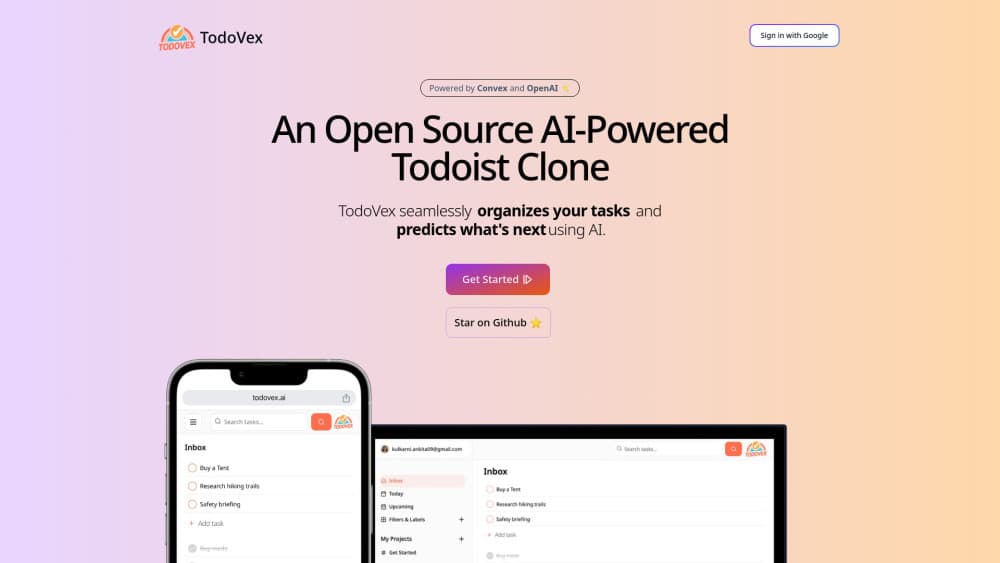
TodoVex is an open source AI task manager that copies Todoist's layout, then adds AI task suggestions and semantic search so you can see what a project is still missing.
About ToDoVex
What Is TodoVex
TodoVex is a free AI to-do list that keeps the parts of Todoist people actually use. You get projects, labels, due dates, five priority levels, one level of subtasks, and a separate view for finished work. Everything runs in a browser tab. Nothing to install.
What separates it from a dozen other clones sits in two AI features. Every task you save is turned into a 1,536 dimension vector and stored next to the task itself, which lets the search box match on meaning instead of exact words. The second feature reads the tasks already inside a project and asks OpenAI for five that are missing, each with a name and a short description. TodoVex then drops those drafts into the project under a system AI label so you can keep or delete them.
The project is by Ankita Kulkarni and doubles as a full stack teaching example: Next.js 14 App Router on the front, Convex as the reactive backend, Auth.js v5 for Google sign in, Tailwind and shadcn/ui for the interface. The code is MIT licensed and public on GitHub. Two limits matter. There's no email or password sign up, only Google, and the repository hasn't taken a code commit since June 2024, so expect a working demo rather than a product with a support team.
Getting Started
- Open todovex.ai and sign in with a Google account.
- Create a project, or start from the built in Today and Upcoming views.
- Add a task with a name, description, due date, label and priority, then break it into subtasks if it needs steps.
- Type a rough phrase into the search field to pull up tasks by meaning, even when you can't recall the wording.
- Open a project and run the suggestion action to get five additional tasks you hadn't listed.
Product Information
A quick look at ToDoVex's pricing, supported platforms, and performance.
Best for
The users, tasks, and scenarios where this tool fits best.
Users
- Solo planners who want Todoist's structure without a subscription
- Developers studying how to wire an AI feature into a real app
- Privacy conscious users
- Students and freelancers juggling a few unrelated projects
Tasks
- Breaking a vague project into concrete first steps
- Finding a task you half remember
- Weekly planning across projects
- Tracking small recurring chores by hand
Scenarios
- Kickoff for a side project
- Cleaning up a task manager you've abandoned
- Learning Convex or Auth.js on a real codebase
Key features
AI task suggestions per project
The suggestion action sends a project's existing tasks and its name to GPT-3.5 Turbo and asks for five missing items as structured JSON. TodoVex filters duplicates, creates the tasks, and tags them with a system AI label so they're easy to spot. It's a cheap model call, and the output usually reads like a decent colleague's checklist rather than a finished plan.
Semantic search across your tasks
Search converts your query into an embedding and runs a vector search over your own tasks, returning up to 16 close matches. Results follow meaning, so synonyms and fuzzy descriptions still hit. The filter scopes every query to your user ID, which keeps one account's tasks out of another's results.
A familiar task model
Each task carries a name, optional description, due date, priority and label, and can hold subtasks one level deep. Priorities run five steps from lowest to urgent, and completed tasks move to their own list instead of vanishing. Anyone coming from Todoist will recognize the shape on the first screen.
Projects, labels and dated views
Projects group work, labels cut across them, and Today plus Upcoming collect whatever is due soon. Convex pushes changes to every open tab in real time, so a checkbox you tick on a laptop updates a phone browser without a refresh. System projects and system labels sit alongside your own and can't be repurposed.
Google sign in with per user data
Authentication runs through Auth.js v5 and a Google OAuth flow, with sessions stored in the Convex database. Every query and mutation checks the signed in user before touching a row, which is the part most tutorial apps skip. The tradeoff is that a Google account is the only way in.
Self-hosted under the MIT license
The repository ships the full application: schema, queries, actions, components and configuration. Point it at your own Convex deployment, add an OpenAI key for the AI features, and you have a private task manager. Forking is explicitly allowed, and several forks already strip the AI layer to run fully offline.
Pros and cons
Pros
- Free with no seat limits, no trial timer and no feature gate on projects, labels or subtasks.
- AI suggestions are genuinely useful for project planning, because they read your own task list before answering.
- Semantic search fixes the specific failure of keyword search in to-do apps, where you remember the gist and not the words.
- Open source task management in the strict sense: schema, queries, actions and components all ship in the repo, and the code is small enough to read in a weekend.
- Real time sync arrives free through Convex, so multiple browser tabs stay consistent.
Cons
- Google is the only sign in option, so anyone who wants an email login or works in a Google-blocked environment can't use the hosted demo.
- No reminders, notifications, recurring tasks or calendar view, which means TodoVex can't replace Todoist for deadline-driven work.
- No shared projects or assignees, so it's a single user tool no matter how you deploy it.
- The last code commit is from June 2024. Bugs you hit are yours to fix, and dependencies will drift out of date.
Frequently asked questions
Yes. The hosted demo costs nothing and the source is MIT licensed, so you can copy, modify and run it without paying anyone. Your only possible cost is an OpenAI key if you self-host with the AI features turned on.
Related content
Explore related tools, skills, and articles for ToDoVex.
ToDoVex Alternatives

Udon
Udon · Coding · ProductivityUdon turns an Apple Silicon Mac into a home server you run from a browser, with container controls, file shares, and an optional AI sysadmin.

offstage
offstage cloud · Coding · Productivityoffstage gives AI coding agents and CI jobs a real Mac: a fresh macOS account on Apple silicon, driven over an API and billed by the second.

BotBus
Chengdu Tuyang Tusen Technology Co., Ltd. · Coding · ProductivityBotBus lets you control AI coding agents from your phone and watch: approve commands, start tasks and read results while the code stays on your desktop.