

ToonFace
Wuhan Three Byte Technology Co., LTD · Image
ToonFace is a free iPhone app from Three Byte that turns photos into 2D or 3D cartoon characters. It has editable templates, backgrounds and AI tools for hair color, colorizing, and upscaling.
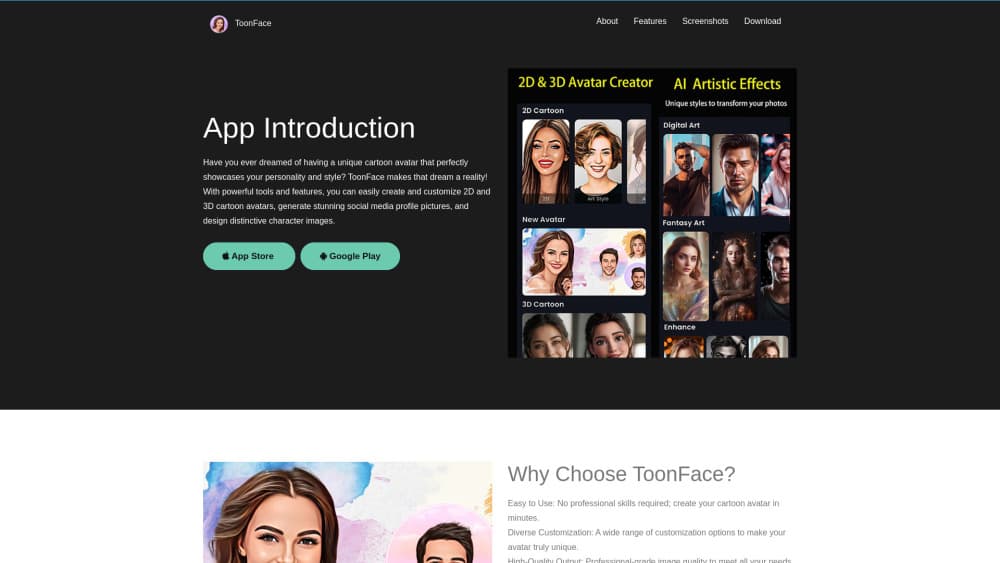
About ToonFace
What Is ToonFace
ToonFace is an iOS photo app that redraws a portrait as a cartoon character. You bring a photo, pick a 2D or 3D look, then adjust the result with templates, backgrounds and a set of AI editing tools. Three Byte, the studio behind the app, lists it under Photo & Video on the App Store, where it arrived in June 2024.
The job it solves is narrow and common: a normal selfie looks like every other selfie, and a cartoon version stands out in a profile picture, a group chat avatar or a birthday post. ToonFace handles the whole photo to cartoon step in one place, so you don't need a design app or a prompt to get a usable image.
Two limits matter before you download it. The app runs on iPhone only, with no Android or web version, and the interface ships in English. The listing also shows version 1.0.3 from August 2024, so the feature set has stayed still for a while.
Getting Started
- Install ToonFace from the App Store. It's free, and the listing shows no in-app purchases, so there's no subscription screen to clear first.
- Open the app and allow access to your photos, then pick the portrait you want to work on. A sharp, front-facing shot gives the style more to work with.
- Choose a 2D or 3D cartoon style from the built-in set.
- Adjust the output. Swap the background, try a different template, or open the AI tools to change hair color, add color to a black and white photo, or sharpen a soft image.
- Save the finished character to your camera roll and post it wherever you need a profile picture.
Product Information
A quick look at ToonFace's pricing, supported platforms, and performance.
Best for
The users, tasks, and scenarios where this tool fits best.
Users
- Social media users who want a new profile picture
- Parents making cartoon versions of family photos
- Hobby artists testing a look before drawing it
- People without design software
Tasks
- Turning a selfie into a cartoon avatar
- Making a group of matching characters
- Colorizing an old black and white photo
- Softening a portrait before sharing
- Restyling a photo as painted art
Scenarios
- A quick avatar refresh before a new job or a new account
- A birthday post or a family group chat
- Testing a character idea for a story or a game
Key features
2D and 3D Cartoon Styles
The app splits its looks into two families. 2D cartoon effects flatten a face into clean outlines and solid fills, close to a comic panel or an animated series still. 3D gives you a rounded 3D cartoon avatar with softer shading, closer to a modern animated film. Having both in one app is the practical part: you can see which one suits a face before committing.
Editable Templates and Backgrounds
A cartoon face on a plain white background looks unfinished, so ToonFace pairs each result with editable templates and backgrounds. You can change the setting behind the character, which is what makes the output usable for a birthday card, a group chat icon or a themed post. The templates also keep the layout consistent when you process several photos for the same project.
AI Hair Color
Hair is the fastest way to change how a cartoon character reads, and the AI hair color tool lets you try shades without editing strand by strand. Blonde, red, dark, pastel: pick a color, look at the result, try another. For anyone using the app to design an original character, this is where most of the personality gets set.
Photo Colorizer and Resolution Boost
Two repair tools sit alongside the cartoon styles. The photo colorizer takes a black and white image and adds plausible color, which is useful for old family photos that were never shot in color. Resolution enhancement cleans up a soft or low-detail image before it goes through a style, and the difference shows most on small faces in group shots.
Face Retouching Tools
Facial beauty and face slimming work like a light retouch pass: even skin, a narrower jaw, a cleaner overall portrait. The tools are aimed at the same audience as the cartoon styles, so the result stays flattering rather than realistic. If you want a documentary-accurate portrait, skip this section entirely.
Style Transfer and AI Painting
Style transfer pushes a photo toward a different artistic look, and AI painting generates a painted version of the scene. These are the loosest tools in the app: the output is more interpretation than likeness, which suits wallpapers, posters and experimental profile images. They're also the place where a bad source photo shows up fastest.
Free Export With No Subscription
The App Store lists ToonFace as free with no in-app purchases, which is rare in this category. Most cartoon camera apps gate exports behind a weekly subscription or a watermark. Here the whole flow, from photo to saved image, runs without a paywall, so the only cost is your time and the app's storage footprint of about 48 MB.
Pros and cons
Pros
- Free with no in-app purchases listed, so there's no watermark or weekly subscription waiting at the export step.
- Both 2D and 3D styles in one app, which lets you compare two very different looks on the same face.
- Templates and backgrounds turn a bare cartoon head into a finished image you can post without another editor.
- The extra AI tools (hair color, photo colorizer, upscaling, style transfer) cover the small fixes that usually send people to a second app.
- Small download at roughly 48 MB, which matters on a phone with little free space.
Cons
- iPhone only. There's no Android build and no web version, so the other half of a group chat can't join in.
- The interface is English only, which makes the tool harder to use for anyone who doesn't read English.
- Last update was August 2024 at version 1.0.3, so new styles and fixes have stopped arriving.
- Styles are preset. You can't describe the look you want, and a photo that doesn't match a preset won't improve with repeated tries.
- No API or batch option, which rules it out for anyone processing a large photo library.
Frequently asked questions
ToonFace turns a photo into a cartoon character. You import a portrait, choose a 2D or 3D style, adjust the background and hair, and save the image. It also includes retouching tools and a photo colorizer for older pictures.
Related content
Explore related tools, skills, and articles for ToonFace.
ToonFace Alternatives

Google EmbeddingGemma 2
Google DeepMind · Writing · Image · CodingGoogle EmbeddingGemma 2 is a 740M-parameter open model that turns text, code, images, audio, and video frames into vectors in one 768-dimension space, running on phones and laptops.

Tractionwave
TractionWave · Image · MarketingTractionWave is an AI attention heatmap tool for static ads. Upload a PNG or JPG and it returns predicted attention, ranked hotspots, and fixes before you spend budget.

Imejis.io
Imejis.io · Image · MarketingImejis.io is an AI design studio for agents and marketing teams. Describe an image in plain words, and it writes the copy, builds the layout, reflows it to every size, then exports a finished file.