

TurboDoc
TurboDoc · Productivity · Business
TurboDoc is an AI document tool that reads invoices, receipts, and bank statements and turns them into structured data, pulling documents from Gmail or Outlook and exporting to CSV or XLS.
About TurboDoc
What Is TurboDoc
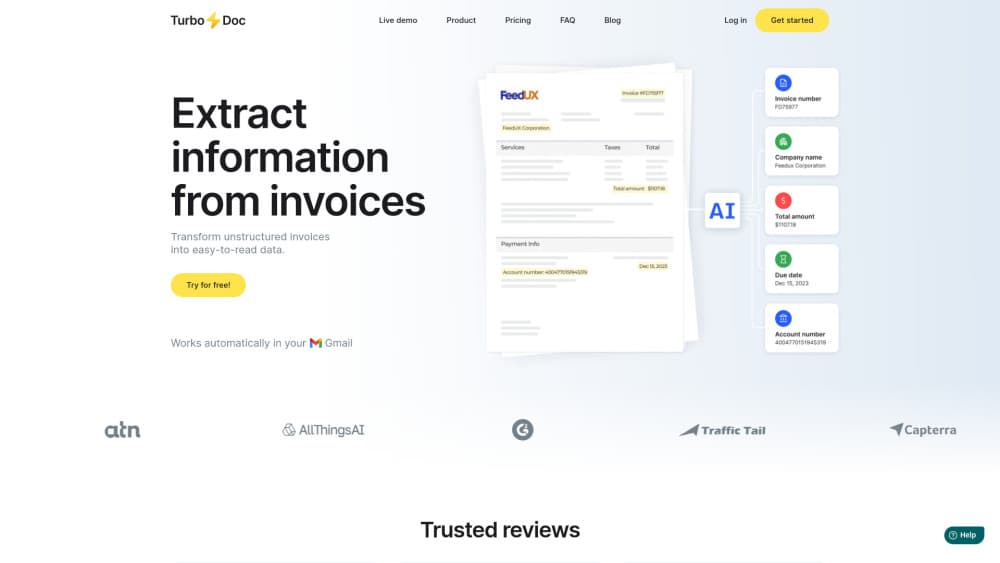
TurboDoc is a web tool that extracts data from financial documents. You upload an invoice, receipt, or bank statement, and an AI model trained on a large document corpus pulls out the fields that matter: company name, total amount, invoice number, dates, and payment details. The point is to end the manual re-typing that eats hours of an accounting week.
The workflow has two paths. You can upload a single file and check the result, or you can link a Gmail or Outlook account and let TurboDoc collect invoices and receipts from the mailbox on its own. Either way the extracted data lands in a dashboard where you can compare it against the original, fix any field, and export the lot as CSV or XLS for bookkeeping.
It is aimed at accounting teams and small businesses handling accounts payable, plus freelancers buried in receipts. The service processes documents in English, Spanish, German, French, Italian, Dutch, Portuguese, and Catalan, and it covers the main document types that invoice processing touches. Data is encrypted with AES256 and stored on servers in the USA. Two edges are worth naming up front: an integrations section is still on a waitlist, so it does not connect to accounting software yet, and the same waitlist copy sits on a product that the site also describes as launching soon, so some features are still landing.
Getting Started
- Sign up on turbodoc.io and open the dashboard, or try the demo on the homepage without an account.
- Upload an invoice, receipt, or bank statement by dragging a file into the box.
- Wait a few seconds while the AI extracts the fields, then open the row to compare the data with the original document.
- Edit any field that needs fixing and save; the correction is stored with the record.
- Link Gmail or Outlook if you want documents pulled in automatically, or export the data as CSV or XLS for your books.
Product Information
A quick look at TurboDoc's pricing, supported platforms, and performance.
Best for
The users, tasks, and scenarios where this tool fits best.
Users
- Accounting teams
- Small business owners
- Accounts payable managers
- Freelancers and sole traders
- Bookkeepers handling many clients
Tasks
- Extracting invoice fields
- Converting bank statements
- Scanning receipts
- Auto-collecting from a mailbox
- Reviewing extracted data
Scenarios
- Month-end accounts payable
- Receipt clear-out before tax season
- Bank reconciliation
- Audit preparation
- Email-based invoice intake
Key features
AI data extraction
TurboDoc runs an AI model trained on a large corpus of documents to pull structured fields from invoices, receipts, and bank statements. It reads the fields that bookkeeping needs, such as totals, dates, vendor names, and payment details, and drops them into a table. The accuracy depends on document quality, and the company recommends clear images for the best results.
Automated intake from Gmail and Outlook
You can link a Gmail or Outlook account so TurboDoc captures invoices and receipts from the mailbox on its own. That removes the step where someone has to forward or upload each document. The number of accounts you can connect depends on the plan, from one on Simple up to ten on Business.
Bank statement conversion
The tool converts bank statement PDFs into clean CSV or Excel files. That is the format reconciliation and bookkeeping work in, so the output drops straight into the next step. It is the same extraction engine pointed at a different document type.
Centralized secure workspace
Everything lands in one dashboard, and the original document is stored alongside the extracted data so you can download it later for accounting or audit. The company states that data is protected with AES256 encryption and kept on servers in the USA. It also states that it does not store or share your information without consent.
View and edit mode
You open a document by clicking a row in the table, and the view shows the original and the extracted data together. From there you can check a field against the source, correct a detail, and save the change. That review step is what keeps a bad extraction from reaching the ledger.
CSV and XLS export
Once data is extracted and checked, you export it as CSV or XLS for further accounting. The export covers a period you choose, so you can pull a month or a quarter into your own systems. It is the bridge between the extraction tool and the software that holds the books.
Pros and cons
Pros
- The AI extraction covers invoices, receipts, and bank statements, so the main document types of an accounts payable pile are handled in one tool.
- Linking Gmail or Outlook means documents are captured automatically rather than uploaded one by one.
- A view and edit mode lets you check extracted fields against the original and correct them before export.
- Originals are stored next to the structured data, which helps at audit time.
- Document languages cover English, Spanish, German, French, Italian, Dutch, Portuguese, and Catalan.
- Data is encrypted and stored in the USA, and the company says it does not share your information without consent.
Cons
- Integrations with accounting software are still on a waitlist, so the tool does not yet push data into your books directly.
- Starter pricing caps processing at 50 invoices a month, which a busy team would outgrow quickly.
- The site also markets the product as launching soon, so some features are still arriving.
- There is no public API listed, so a team that needs a custom pipeline has no documented route.
- Accuracy still depends on document quality, so poor scans may need manual correction.
Frequently asked questions
TurboDoc is an AI tool that extracts structured data from invoices, receipts, and bank statements. You upload a document or link a mailbox, and it pulls out fields such as totals, dates, and payment details, then lets you export them as CSV or XLS.
Related content
Explore related tools, skills, and articles for TurboDoc.
TurboDoc Alternatives

Udon
Udon · Coding · ProductivityUdon turns an Apple Silicon Mac into a home server you run from a browser, with container controls, file shares, and an optional AI sysadmin.

offstage
offstage cloud · Coding · Productivityoffstage gives AI coding agents and CI jobs a real Mac: a fresh macOS account on Apple silicon, driven over an API and billed by the second.

BotBus
Chengdu Tuyang Tusen Technology Co., Ltd. · Coding · ProductivityBotBus lets you control AI coding agents from your phone and watch: approve commands, start tasks and read results while the code stays on your desktop.