

UbiOps
UbiOps · Productivity · Marketing · Leaning · Other
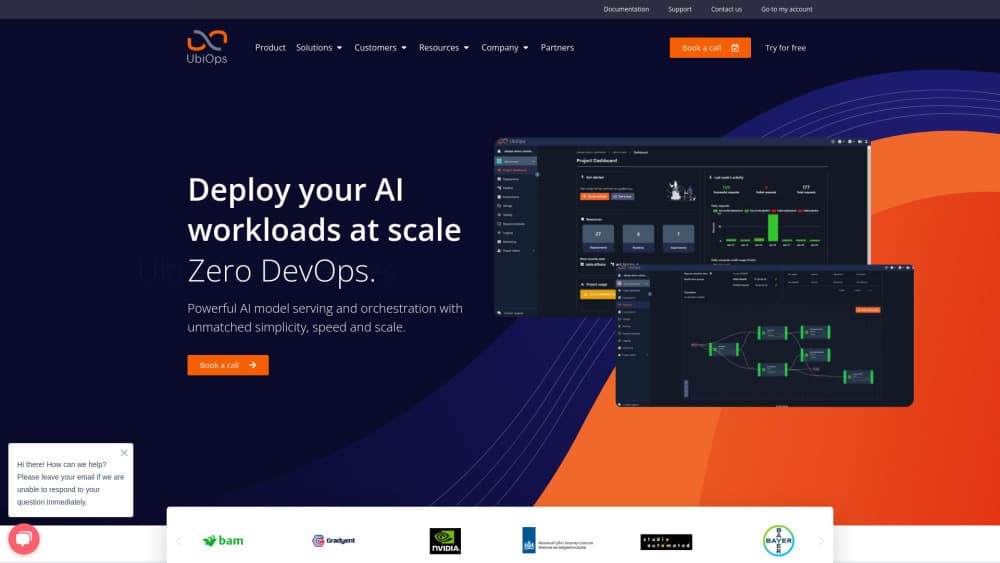
UbiOps is an AI model serving and MLOps platform that turns Python code or an LLM into a scalable API on your own cloud, on-premise hardware, or both at once.
About UbiOps
What Is UbiOps
UbiOps is a Dutch software platform for teams that need to run AI in production without building their own serving stack. You bring the model code or a container image. UbiOps handles the container build, the API endpoint, request queuing, load balancing, autoscaling, and the logs and metrics that come with it.
The core promise is infrastructure freedom. A control plane sits above your compute environments and treats them as one pool, so a workload can run on an on-premise GPU today and burst into a public cloud region tonight. That setup is what people mean by hybrid cloud AI, and it matters to organizations with data residency rules, such as hospitals, utilities, and government agencies, who can't hand their data to a model API vendor.
The limits are worth stating up front. There's no visual model builder and no ready-made app store. You need working code, some Docker familiarity, and a clear idea of what your endpoint should accept. Teams that want a no-code chatbot builder are looking at the wrong product.
Getting Started
- Create an account on the UbiOps web app, then install the Python client or the CLI for scripted work.
- Define an environment for your dependencies, or push your own Docker image if the default Python runtimes don't fit.
- Create a deployment, upload your code, and declare the input and output schema for its API.
- Pick an instance type, set a minimum and maximum number of instances, and enable scale to zero if traffic is spiky.
- Send a request to the deployment endpoint to test it, then chain several deployments into a pipeline when you need a full workflow.
Product Information
A quick look at UbiOps's pricing, supported platforms, and performance.
Best for
The users, tasks, and scenarios where this tool fits best.
Users
- Machine learning engineers
- Data science teams in regulated sectors
- Platform and MLOps engineers
Tasks
- Serving a model as a REST endpoint
- Running LLM inference on your own GPUs
- Chaining preprocessing, model, and postprocessing steps
- Training jobs that need burst capacity
Scenarios
- A computer vision service with unpredictable peaks
- A proof of concept that has to become a product
- A migration off a single cloud vendor
Key features
Deployments with a Managed API Endpoint
Every deployment gets its own versioned HTTP endpoint, request queue, and input validation. You upload code in a supported runtime or your own container, and UbiOps builds it, starts it, and exposes it. New versions can be promoted or rolled back without deleting the old one, which makes a bad release a two-click fix.
Autoscaling with Scale to Zero
The platform watches request volume and adds or removes instances on its own. Scale to zero shuts idle deployments down completely, so a model that gets a handful of calls a day doesn't bill for 24 hours of idle GPU time. Instance type groups let a deployment prefer your on-premise GPUs and fall back to cloud capacity when they're busy.
Pipelines and Workflow Operators
AI orchestration is the part most teams underestimate, and this is where the platform earns its keep. Pipelines connect several deployments into one callable service, and each object inside scales on its own. Built-in operators handle splitting, reassembling, filtering, and conditional routing of data, which covers most of the plumbing that teams normally write by hand. Pipelines can be imported, exported, and shared with colleagues.
Training Experiments and Runs
Beyond serving, UbiOps runs training jobs on the same infrastructure as inference. An experiment fixes the environment, code, and hardware; training runs execute against it, and you can compare results across runs in the web app. Artifacts land in storage you control, so the trained model is one step away from becoming a deployment.
Custom Services and Bring Your Own Docker
Services expose long-lived HTTP servers inside a deployment, which is how teams run high-throughput GenAI servers that don't fit the standard request format. Combined with custom Docker images, this covers vLLM-style inference stacks, multi-endpoint apps, and anything else that expects raw HTTP.
Monitoring, Versioning, and Access Control
Logs, usage metrics, and alerting ship with the platform, so a failing deployment shows up before a user reports it. Role-based access, audit trails, and encryption cover the compliance side, and data handling settings let you decide whether payloads get stored at all.
Pros and cons
Pros
- Runs on your own hardware, a public cloud, or a mix, which few managed inference services allow.
- Autoscaling includes scale to zero, so spiky or rarely used models stay affordable.
- Pipelines with built-in operators cut the glue code needed for multi-step AI workflows.
- Versioning and rollback make model updates less risky for teams without a dedicated release process.
- The same platform serves models and runs training jobs, which avoids a second vendor for compute.
Cons
- No public price list. You have to talk to sales before you can estimate a monthly bill, which slows down budget planning.
- You need to write deployment code and understand containers. Analysts and business users won't get far on their own.
- The interface assumes you know MLOps vocabulary such as environments, instance types, and requests, so the first week involves real reading.
- Nothing here trains or fine-tunes a foundation model for you. It runs your code, so the modeling work stays on your side.
Frequently asked questions
It takes your model or data processing code and runs it as a production API. The platform builds the container, starts the service, balances requests across instances, and scales capacity up or down based on traffic.
Related content
Explore related tools, skills, and articles for UbiOps.
UbiOps Alternatives

Base Code
Base44 (Wix) · Coding · ProductivityBase Code is a shared cloud development environment from Base44. Teammates describe changes to an existing GitHub codebase in chat, preview them live and send them back as pull requests.

Knocket
Knocket (Tencent RTC team) · Productivity · Business · ChatbotKnocket is a free live chat and contact page tool that lets visitors message you from your website, app, or a shareable link, with every reply handled from Telegram or one inbox.

FloorGen
Vinit Kumar (FloorGen) · Productivity · China AIFloorGen is a browser-based floor plan maker that turns a sentence or a sketch into an editable 2D plan and a 3D walkthrough. Export to PDF, DXF or video, and draw without an account.