

uncovr
uncovr · Image · Coding
uncovr is an AI search companion that answers queries with structured results, and adds an AR layer that turns printed pages into interactive content.
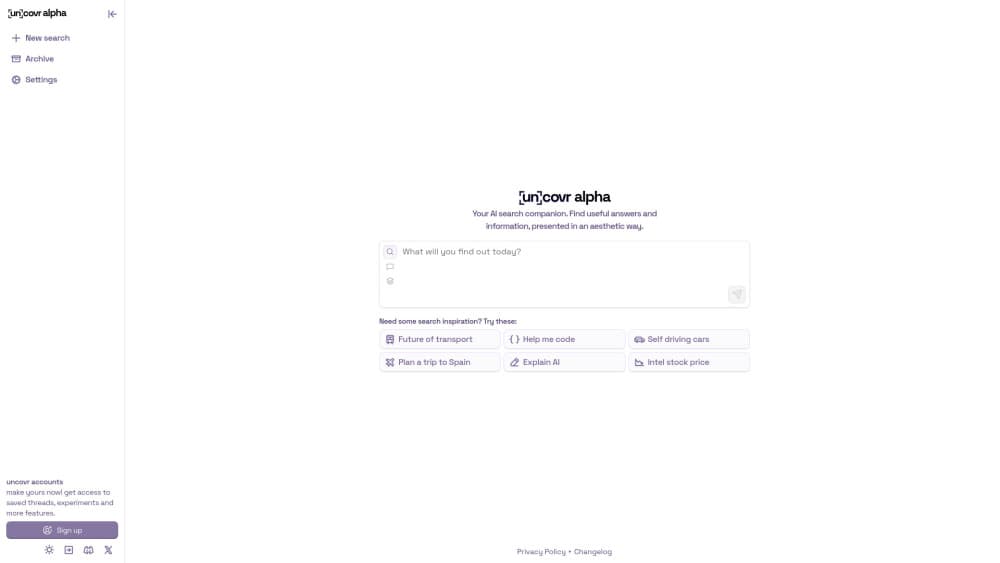
About uncovr
What Is uncovr
uncovr is a web app that sits between a general search engine and a chatbot. You type a question, and it answers with organized results drawn from the web instead of a wall of blue links. The same account also carries an augmented reality side: point your phone at a printed page and uncovr layers interactive material on top of it.
It fits two kinds of users. The first asks a lot of small questions and wants one clean answer with sources, not ten tabs. The second works with printed material in class, on a field trip, or at a museum and wants that page to do something a static sheet can't.
There are limits worth knowing. The AR part depends on a phone with a decent camera, and it only works on pages made for it. The chat side caps how many messages you get before you sign in or pay, and the company keeps the feature list moving, so a few items are still landing rather than finished. It's a browser product first, so you won't find a desktop installer or a deep offline mode.
Getting Started
- Open uncovr.app in a browser. You can try a few messages before you sign in.
- Create an account to unlock saved threads and a higher daily message limit.
- Type a question and read the structured answer, or open the Models menu to pick a model for the task.
- For the AR side, open the camera on a page made for uncovr and point it at the printed content.
Product Information
A quick look at uncovr's pricing, supported platforms, and performance.
Best for
The users, tasks, and scenarios where this tool fits best.
Users
- Students and researchers
- Teachers and museum staff
- Curious everyday users
Tasks
- Quick research questions
- Turning a printed handout into interactive material
- Saving and revisiting threads
Scenarios
- Studying for an exam
- A museum or classroom exhibit
- Checking a claim mid-conversation
Key features
Structured AI answers instead of link lists
The core of uncovr is a search companion that returns answers in a readable shape: a direct response followed by supporting points and sources. You don't scan ten results to assemble one answer yourself. The approach suits quick questions where you want the gist plus a way to verify it.
Augmented reality layer for printed content
uncovr pairs its search side with AR. Point a phone at a printed page built for the app, and it opens interactive content on top of the paper. That turns a handout, a poster, or a worksheet into something readers can touch, which is the part a plain PDF can't do. It depends on the page being made for uncovr, so it works on prepared material rather than any document.
Model selection for different tasks
The app lists a Models menu, so you can pick which engine handles a query instead of taking one default for everything. That helps when a task needs a stronger model, or when you'd rather trade speed for depth. It keeps uncovr useful across questions that don't all call for the same tool.
Saved threads and a personal library
Signing in unlocks saved threads and a higher daily message limit, and the app keeps them in a library you can reopen. If you use search as a working habit, that record matters more than a single answer, since you can return to earlier threads instead of starting over.
Browser-first access with no install
uncovr runs in the browser, so you start from a link rather than a download. You can ask a few questions before you sign in, which lowers the cost of trying it. The trade-off is that a browser product leans on a connection and doesn't offer the offline depth a native desktop app would.
Free to start with a daily limit
uncovr gives you a working free tier with a daily message cap, and signing in raises that cap and unlocks saved threads. You can test the search side on real questions before deciding whether the limits get in your way. Pricing for heavier use is handled through the account rather than a published rate card.
Pros and cons
Pros
- Answers arrive structured with sources, so you can check the claim instead of trusting a single reply.
- The AR layer turns prepared printed pages into interactive content, which most search tools don't attempt.
- A free tier lets you try real queries before you sign in or pay.
- Model selection lets you match the engine to the task instead of using one default everywhere.
Cons
- The AR feature only works on pages made for uncovr, so random documents won't open anything.
- The free tier caps daily messages, which can interrupt heavy research sessions.
- There is no published pricing page, so heavier users learn the cost only after signing in.
- No public API is documented, so you can't wire uncovr answers into your own tools.
Frequently asked questions
uncovr is an AI search companion that answers queries with structured results and sources, and it adds an augmented reality layer that turns printed pages into interactive content when you scan them with a phone.
Related content
Explore related tools, skills, and articles for uncovr.
uncovr Alternatives

Google EmbeddingGemma 2
Google DeepMind · Writing · Image · CodingGoogle EmbeddingGemma 2 is a 740M-parameter open model that turns text, code, images, audio, and video frames into vectors in one 768-dimension space, running on phones and laptops.

Tractionwave
TractionWave · Image · MarketingTractionWave is an AI attention heatmap tool for static ads. Upload a PNG or JPG and it returns predicted attention, ranked hotspots, and fixes before you spend budget.

Imejis.io
Imejis.io · Image · MarketingImejis.io is an AI design studio for agents and marketing teams. Describe an image in plain words, and it writes the copy, builds the layout, reflows it to every size, then exports a finished file.