

Unlevered
Unlevered · Coding · Productivity
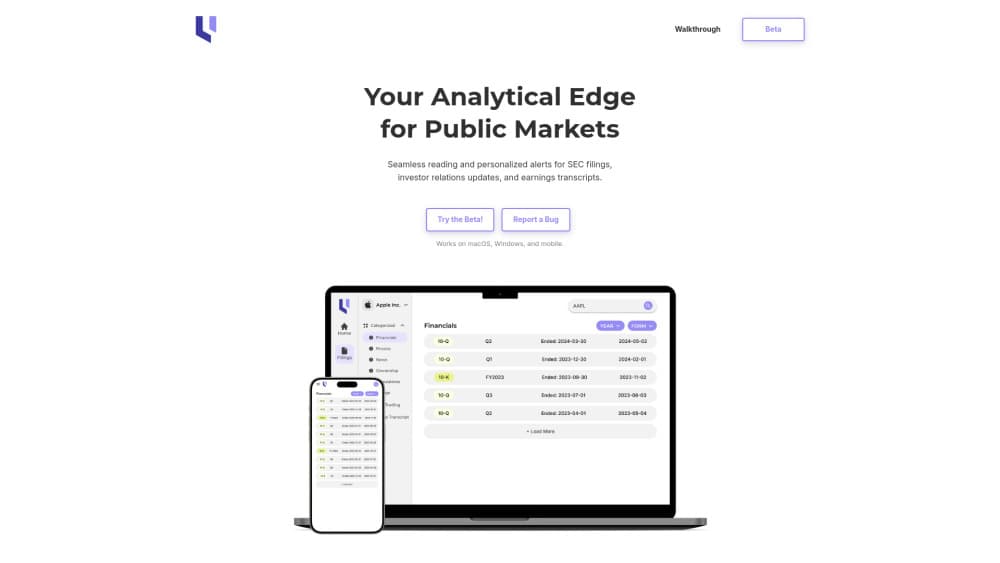
Unlevered is an AI SEC platform that reads filings, investor relations updates, and earnings transcripts, then adds semantic search, summaries, and personalized alerts.
About Unlevered
What Is Unlevered
Unlevered is an AI research platform built for people who read SEC filings and earnings documents for a living. It pulls public filings, investor relations material, and earnings call transcripts into one place, then uses language models to summarize, compare, and surface the parts you actually need.
The core problem it targets is volume. A single 10-K can run past a hundred pages, and analysts, portfolio managers, and students rarely have time to read every line across dozens of companies. Unlevered aims to shrink that reading load by turning long filings into short summaries and letting you search by meaning rather than exact wording.
The tradeoff is that this kind of tool lives or dies on data coverage and freshness. Unlevered depends on filing feeds and transcripts being pulled in on schedule, and on its models interpreting dense financial language correctly. AI summaries can also miss nuance, so anyone making investment decisions should still check the original document before acting. The official site at unlevered.ai now shows a domain sale listing, so the product should be treated as inactive until an official announcement says otherwise.
Getting Started
- Open the Unlevered web app or install the mobile app for your device.
- Create an account and pick the companies or tickers you want to follow.
- Set alerts for the filing types and events that matter to you, such as 10-K, 10-Q, or 8-K.
- Search a topic in plain language or open a filing to read its summary, then compare it against a prior period.
- Review the alerts that land in your feed and open the source filing for anything you plan to act on.
Product Information
A quick look at Unlevered's pricing, supported platforms, and performance.
Best for
The users, tasks, and scenarios where this tool fits best.
Users
- Retail investors
- Equity analysts
- Finance students
- Investor relations teams
Tasks
- Reading a new 10-K
- Comparing two periods
- Checking an earnings call
- Watching a sector
Scenarios
- Pre-earnings prep the night before a call
- Due diligence on a new position
- Class or study sessions
- Quick portfolio check on a phone
Key features
Semantic Search Across Filings
Semantic search lets you ask for a topic in your own words and still find the relevant passage. Instead of matching exact phrases, it looks for meaning, which helps when a filing uses different terms than the ones you typed. This matters most for questions like what management said about supply costs, where the wording shifts from one company to the next.
Document Summaries
Uploaded and tracked filings are reduced to short summaries that point to the parts worth reading. A long 10-K becomes a page you can scan in a few minutes, with the key changes pulled forward. The summary is a starting point, not a replacement for the source document when a decision rides on the detail.
Filing Comparison
Filing comparison puts two reports side by side and flags what changed between them. Analysts use it to catch new risk language or revised guidance that's easy to miss when a document is read in isolation. It turns a slow manual diff into a quick scan.
Personalized Alerts
You choose the companies and the document types you care about, and Unlevered pushes a notification when something new appears. Alerts cover filings, investor relations updates, and earnings transcripts. The point is to stop refreshing company pages and let the relevant items come to you.
Earnings Transcript Access
Earnings call transcripts sit alongside the filings and are searchable the same way. You can pull the comment where an executive addressed a specific metric, then check it against the prior quarter. For anyone tracking guidance, having the transcript and the filing in one place saves switching between tools.
Cross-Device Reading
The platform runs on the web and on iOS and Android, so your watchlist and alerts follow you across devices. A full research session works on a laptop, and a quick alert check works from a phone. That split suits people who start their day on a commute and finish at a desk.
Pros and cons
Pros
- Combines filings, investor relations material, and earnings transcripts in one searchable workspace, so you stop juggling separate tools.
- Semantic search finds passages by meaning, which handles the wording differences between companies well.
- Summaries and comparison views cut the time spent on long documents like 10-K reports.
- Alerts cover the document types investors watch most, and they are personalized rather than a single global feed.
- Works on web, iOS, and Android, so a watchlist is usable on the move.
Cons
- AI summaries can flatten nuance in dense financial language, so decisions still need a check against the original filing.
- Coverage and freshness depend on the platform pulling filings and transcripts on schedule; gaps here weaken the whole tool.
- The official site now shows a domain sale listing, so availability of the service is uncertain and anyone evaluating it should confirm it's still running first.
- Pricing details aren't published in a stable public form, which makes it hard to budget before signing up.
Frequently asked questions
Unlevered is an AI platform for reading SEC filings, investor relations updates, and earnings transcripts. It summarizes documents, lets you search by meaning, compares filings across periods, and sends personalized alerts.
Related content
Explore related tools, skills, and articles for Unlevered.
Unlevered Alternatives

Udon
Udon · Coding · ProductivityUdon turns an Apple Silicon Mac into a home server you run from a browser, with container controls, file shares, and an optional AI sysadmin.

offstage
offstage cloud · Coding · Productivityoffstage gives AI coding agents and CI jobs a real Mac: a fresh macOS account on Apple silicon, driven over an API and billed by the second.

BotBus
Chengdu Tuyang Tusen Technology Co., Ltd. · Coding · ProductivityBotBus lets you control AI coding agents from your phone and watch: approve commands, start tasks and read results while the code stays on your desktop.