

UPDF - AI-Powered PDF Editor
Superace Software Technology Co., Ltd. · Productivity
UPDF is an AI-powered PDF editor for Windows, Mac, iOS, Android, and web that edits, annotates, converts, and chats with documents using built-in AI agents.
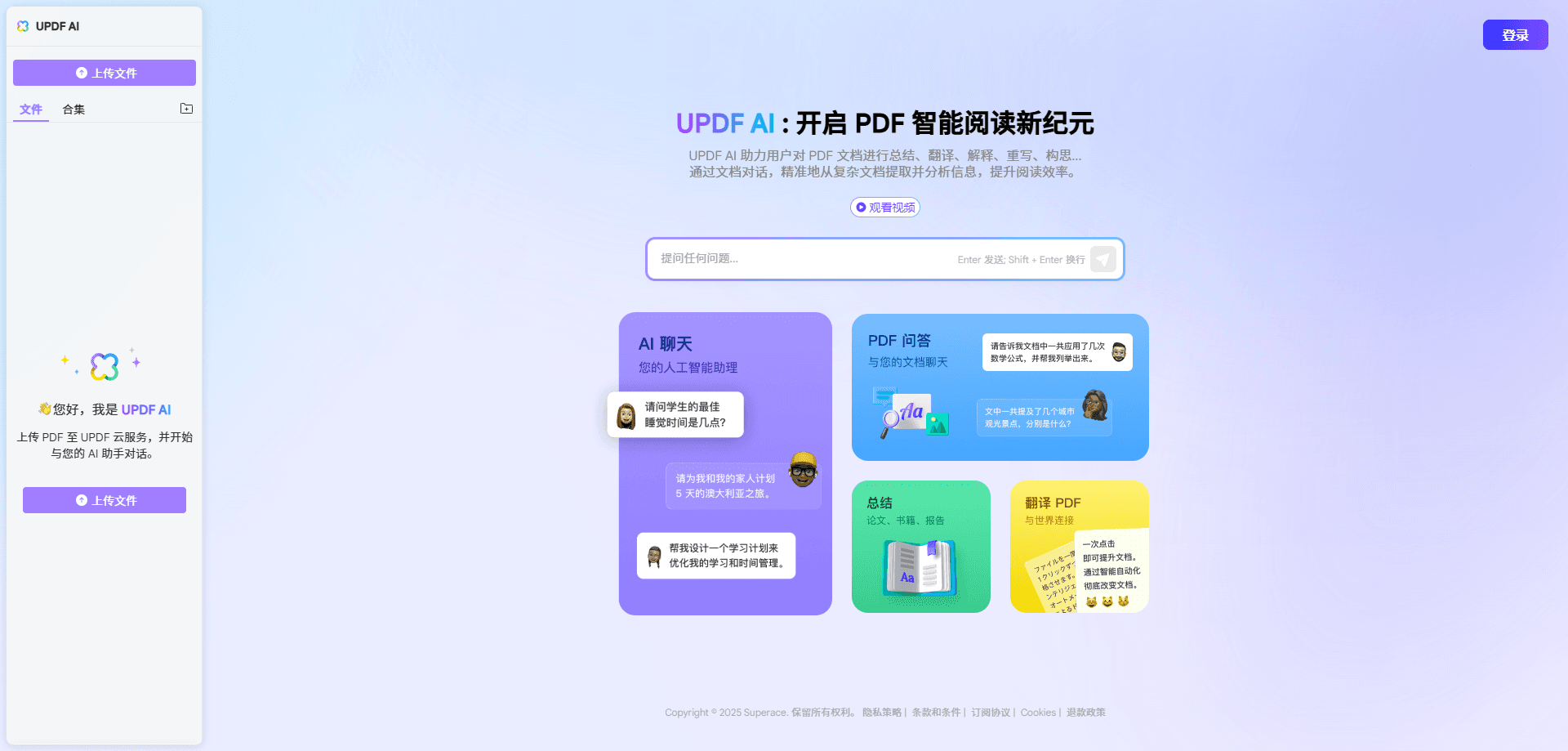
About UPDF - AI-Powered PDF Editor
What Is UPDF
UPDF is a cross-platform PDF editor built by Superace Software. It combines the usual document tools, editing, annotation, conversion, OCR, and signing, with an AI assistant that reads your files and answers questions about them.
The main problem it solves is scattered document work. Instead of juggling one app to edit a contract, another to convert a report, and a chatbot to summarize a research paper, you handle all of it in a single workspace. The AI side runs on OpenAI's GPT models and DeepSeek (R1), and it can summarize long reports, translate across a dozen languages, or turn a dense document into a mind map.
The biggest limits are storage and AI usage caps. The free tier adds watermarks on saves and holds you to 100 pages and 2 conversions per day, while AI chat and file counts depend on which plan you pick. OCR only works on Windows or on Mac with an Apple chip through the official website version.
Getting Started
- Create a free account on the UPDF website or install the desktop or mobile app, and sign in with the same credentials on every device.
- Open a PDF from your computer, cloud storage, or a scanned image to start reading.
- Use the toolbar to edit text, images, and links, or highlight and comment on the page.
- Tap the AI button to summarize, translate, explain, or chat with the document.
- Export the finished file, or share a review copy with comments when you're done.
Product Information
A quick look at UPDF - AI-Powered PDF Editor's pricing, supported platforms, and performance.
Best for
The users, tasks, and scenarios where this tool fits best.
Users
- Students and researchers
- Office and admin workers
- Legal and finance professionals
Tasks
- Summarizing a 100-page report
- Translating a document without breaking formatting
- Editing text and images inside a PDF
- OCR on scans
Scenarios
- Studying a stack of academic papers
- Handling everyday PDF chores at work
- Working across devices
Key features
AI Assistant for Summaries, Translation, and Chat
The AI assistant reads your PDF or image and answers questions about it. You can summarize PDF content, translate PDF files while keeping the format, or ask follow-up questions in a chat. It runs on OpenAI GPT models and DeepSeek (R1) and works on desktop, mobile, and the web.
10+ AI Agents for Document Automation
UPDF 2.5 introduced AI agents that handle repetitive document work. Semantic search finds related passages by meaning, a bookmark agent builds navigation trees, and a summarizer produces quick overviews. Other agents cover page management, editing, and creative image generation.
PDF Editing and Annotation
You edit text, images, and links directly on the page, the way you would in a word processor. Annotation covers highlights, underlines, sticky notes, text boxes, shapes, stamps, and freehand drawing. Comments can be exported as a separate PDF for review.
Conversion and OCR
The built-in PDF converter turns files into Word, Excel, PowerPoint, images, HTML, and text, and it builds PDFs from those formats too. OCR PDF support turns scanned pages into searchable, editable text and recognizes 38 languages, but it only runs on Windows or an Apple-chip Mac through the official website version.
Cross-Platform Access with Cloud Sync
One license covers up to 4 devices, and you can mix Windows, Mac, iOS, and Android freely. The UPDF Cloud keeps files in sync, and the web version runs AI tools in a browser with nothing to install. Encrypted storage is hosted in the US and Europe.
Organizing, Protecting, and Signing Files
Page tools let you reorder, rotate, insert, extract, split, and merge pages. You can password-protect a file, add watermarks, redact sensitive text, and fill or sign forms. Batch processing applies conversions, encryption, or printing across many files at once.
Pros and cons
Pros
- Runs on Windows, Mac, iOS, Android, and the web with one license covering 4 devices, so the same file and AI thread follow you across platforms.
- AI features built into the editor mean you summarize, translate, and ask questions without sending documents to a separate chatbot.
- The lifetime plan at $99.99 is a one-time payment and costs far less than a yearly Adobe Acrobat subscription.
- OCR reads 38 languages, which helps with multilingual scans and older paper records.
Cons
- OCR is limited to Windows and Apple-chip Macs through the official website version, so mobile and Intel Mac users can't use it.
- The free tier adds watermarks on every save and caps files at 100 pages and 2 conversions a day.
- AI chat, file counts, and storage depend on the plan, and unlimited AI costs a separate yearly subscription.
Frequently asked questions
UPDF handles everyday PDF work: reading, editing, annotating, converting, and signing documents. Its built-in AI assistant adds summaries, translation, Q&A, and mind maps, so you can work with a document's content, not just its pages.
Related content
Explore related tools, skills, and articles for UPDF - AI-Powered PDF Editor.
UPDF - AI-Powered PDF Editor Alternatives

Udon
Udon · Coding · ProductivityUdon turns an Apple Silicon Mac into a home server you run from a browser, with container controls, file shares, and an optional AI sysadmin.

offstage
offstage cloud · Coding · Productivityoffstage gives AI coding agents and CI jobs a real Mac: a fresh macOS account on Apple silicon, driven over an API and billed by the second.

BotBus
Chengdu Tuyang Tusen Technology Co., Ltd. · Coding · ProductivityBotBus lets you control AI coding agents from your phone and watch: approve commands, start tasks and read results while the code stays on your desktop.