

Upscales.ai
Upscales.ai · Image
Upscales.ai is an online AI image upscaler that rebuilds blurry or low-resolution photos up to 4x in a browser. It sharpens faces, product shots, and print files with no install.
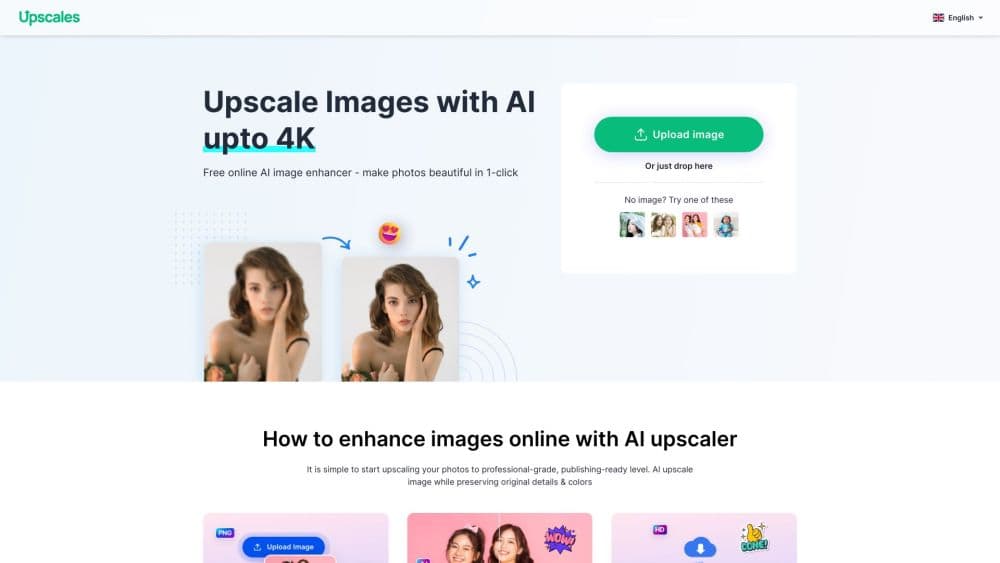
About Upscales.ai
What Is Upscales.ai
Upscales.ai is a web-based AI image upscaler branded around the Upscales name. You upload a photo and the service rebuilds it at a higher resolution instead of stretching the pixels that are already there. The appeal is speed and simplicity: no editor to learn, no software to install, and no export settings to fight with.
The tool centers on everyday images. Portraits, product photos, social posts, and older pictures that look soft after cropping all fit its strengths. It also sharpens facial detail on purpose, which helps on phone selfies and small profile pictures.
Two things shape how people use it. The free tier is small, so anyone with regular jobs hits the credit limit fast. And the upscale tops out at 4x, which is plenty for screens and standard prints but short of the 8x some rivals offer for large-format work.
Getting Started
- Open upscales.ai in any browser and upload a photo, or pick a sample if you just want to test it.
- Choose an upscale level. The free plan handles 2x, while higher plans unlock 4x.
- Keep the detail option on to let the AI rebuild edges and facial motion.
- Wait for processing to finish, then compare the result against the original.
- Download the upscaled image at higher resolution.
Product Information
A quick look at Upscales.ai's pricing, supported platforms, and performance.
Best for
The users, tasks, and scenarios where this tool fits best.
Users
- Online sellers
- Photographers
- Everyday phone users
Tasks
- Enlarging product photos
- Fixing blurry portraits
- Prepping social posts
- Reviving older pictures
Scenarios
- Updating an online shop
- Assembling a slide deck
- Clearing out a photo roll
Key features
AI upscaling up to 4x
The core job is raising resolution with AI rather than plain interpolation. You can upscale image online by 2x on the free plan or 4x on paid tiers, which covers screens, social, and standard prints. Results look sharper than a basic resize, and the difference shows most on edges and texture.
Facial detail enhancement
Beyond raw size, the tool focuses on faces. It rebuilds eyes, skin texture, and contours so portraits do not turn plastic when enlarged. This matters for selfies and profile shots, where a soft face is the whole problem.
Browser-based with no install
Everything runs online, so there is nothing to download and no app to keep updated. That means you can upscale a photo from a phone, a shared computer, or a work laptop without setting up software first.
Before-and-after preview
Every job shows a comparison before you commit. You can tell whether the enlargement looks natural or over-sharpened and redo it if the first pass does not hold up.
Credits-based pricing
The service runs on credits. The free tier includes a small daily or monthly allowance, and paid plans add more credits, with 4x upscaling costing more credits than 2x. This keeps casual use free while charging people who process images regularly.
Multiple export resolutions
The output can be saved at standard or high resolution depending on your plan. Free downloads come at standard resolution, while paid plans unlock high-resolution exports that suit printing and larger displays.
Simple three-step workflow
Upload, pick a level, download. There is no layer panel, no masking, and no settings menu to learn, which keeps the tool approachable for people who just want a cleaner image.
Pros and cons
Pros
- Raises image resolution up to 4x with AI reconstruction rather than pixel stretching
- Runs in the browser on desktop and mobile, with nothing to install
- Free tier lets you test 2x upscaling before paying
- Facial enhancement keeps portraits from looking plastic after enlargement
- Before-and-after view makes it easy to judge a result before downloading
Cons
- 4x is the ceiling, so very large print work may need a different tool
- The free tier's credit limit runs out quickly for anyone with regular jobs
- There is no public API, which rules out automated pipelines
- Batch processing is limited, so larger sets mean repeating each image
Frequently asked questions
Upscales.ai enlarges and sharpens photos online. People use it to raise the resolution of portraits, product images, and older pictures that look soft or pixelated. As a photo upscaler, it fits anyone who wants a quick fix without learning an editor.
Related content
Explore related tools, skills, and articles for Upscales.ai.
Upscales.ai Alternatives

Google EmbeddingGemma 2
Google DeepMind · Writing · Image · CodingGoogle EmbeddingGemma 2 is a 740M-parameter open model that turns text, code, images, audio, and video frames into vectors in one 768-dimension space, running on phones and laptops.

Tractionwave
TractionWave · Image · MarketingTractionWave is an AI attention heatmap tool for static ads. Upload a PNG or JPG and it returns predicted attention, ranked hotspots, and fixes before you spend budget.

Imejis.io
Imejis.io · Image · MarketingImejis.io is an AI design studio for agents and marketing teams. Describe an image in plain words, and it writes the copy, builds the layout, reflows it to every size, then exports a finished file.