
AI Use Cases Repository
Userware AI Labs (Userware) · Business
UseCasesFor.ai is a free, filterable repository of more than 250 AI use cases across 28 industries and five AI disciplines. It exists to answer one question fast: what can AI actually do in my field?
About AI Use Cases Repository
What Is AI Use Cases Repository
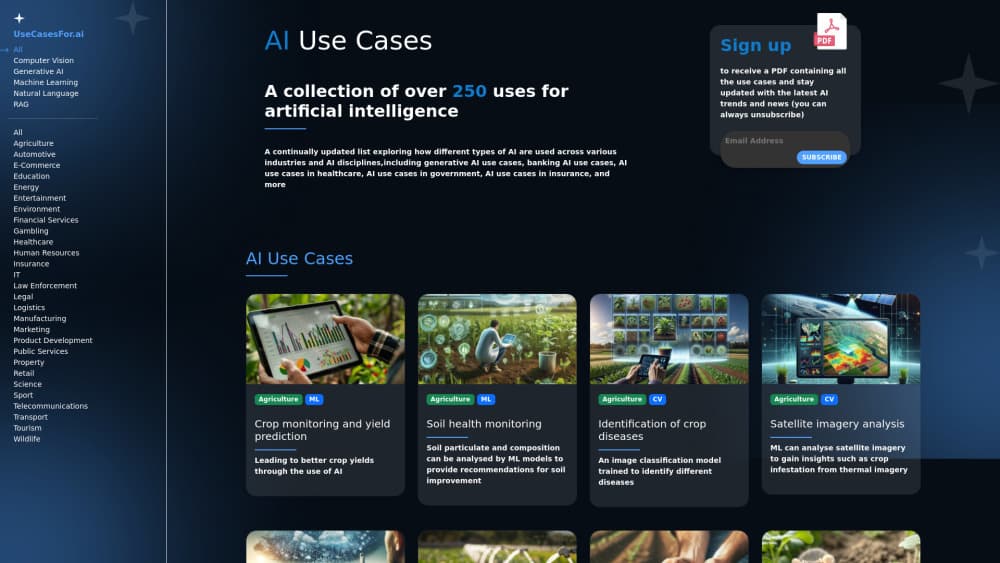
UseCasesFor.ai is a browsable catalogue of real applications of artificial intelligence, organised by industry and by type of AI. It's built and maintained by Userware AI Labs, a division of the software company Userware, which is best known for OpenSilver. The site launched in 2024 and describes itself as a collection of over 250 uses for AI.
The problem it addresses is narrow and practical. Most people outside engineering have a rough sense that AI is important and no clear picture of where it's already working. Sales teams get asked about it. Product managers get told to add it. Analysts get asked to write about it. A filtered list of concrete examples, each with a short write-up, is often more useful at that stage than another opinion piece.
The limits matter as much as the content. UseCasesFor.ai is a directory, not a tool, and it doesn't run any AI. Its own About page says the aim is to inspire rather than to go deep. Pages are a few hundred words of overview, and the technical claims inside them come from vendors and published case studies, so treat the numbers as leads to check rather than settled facts.
Getting Started
- Open usecasesfor.ai in any browser. There's no account, no login and no paywall.
- Narrow the list with the left-hand filters. You can pick one of 28 industries, one of five AI disciplines, or both together.
- Click a card to open its detail page. Each one follows the same five-part layout: Introduction, Challenges, AI Solutions, Benefits, Return on Investment.
- Note the named companies and figures in the AI Solutions section, then verify the ones that matter to you at the source.
- If you want the whole set offline, subscribe with an email address and the site sends a PDF of all the use cases.
Product Information
A quick look at AI Use Cases Repository's pricing, supported platforms, and performance.
Best for
The users, tasks, and scenarios where this tool fits best.
Users
- Product managers scoping an AI feature
- Consultants and analysts building a pitch
- Students and researchers who need concrete AI use case examples
Tasks
- Scanning your own industry for AI activity
- Choosing a technique for a specific problem
- Preparing a workshop or internal briefing
- Testing whether an idea is already common
Scenarios
- First week of a new AI project, when nobody agrees on scope
- Sales or partnership conversations in an unfamiliar vertical
- Writing a proposal that needs named precedent
Key features
Industry Filters Across 28 Sectors
The left sidebar splits the collection into 28 industries, from Agriculture and Automotive to Telecommunications, Tourism and Wildlife. Picking one narrows the grid instantly, and every card keeps its industry label visible so you can see where a use case sits. For anyone researching a single vertical, this is the feature that makes the site usable.
Five AI Discipline Tags
Every entry is tagged with the type of AI involved: Computer Vision, Machine Learning, Natural Language, Generative AI or RAG. Some cards carry more than one tag, which reflects how real projects mix techniques. The distinction matters when you're deciding what to build, because generative AI use cases and computer vision use cases need very different data and skills.
Five-Part Detail Pages
Each use case opens into a page with the same structure: Introduction, Challenges, AI Solutions, Benefits, Return on Investment. The format is predictable enough to skim in two minutes and structured enough to pull a slide from. The Challenges section is the part most vendor material skips, and it's often the most useful for setting expectations.
Named Company Examples Inside Each Page
The AI Solutions sections name real organisations rather than describing capabilities in the abstract. The soil health entry, for instance, points to IBM's AgroPad and to Trace Genomics, which applies machine learning to soil DNA. That level of specificity is what separates an AI use case repository from a list of buzzwords.
Plain-Language Writing for Non-Specialists
Pages avoid maths and architecture diagrams. A reader with no ML background can follow the argument: here's the problem, here's what AI does about it, here's what it's worth. That's the right level for the audience the site targets, and it's why the material works in client conversations.
Free PDF of the Full Collection
An email signup delivers a PDF containing all the use cases, plus occasional updates. It's the only place the site asks for anything in return, and it's optional. Useful if you want to read offline or drop the whole set into a planning document.
Pros and cons
Pros
- Genuinely free, with no account, no trial timer and no upsell inside the catalogue.
- The 28-industry filter is broad enough to cover sectors most AI directories ignore, including gambling, wildlife and public services.
- Every entry separates the problem from the claimed benefit, so you can lift the framing without lifting the conclusion.
- Detail pages name companies and products, which gives you something concrete to search for afterwards.
- The discipline tags make it easy to find AI use cases in healthcare, manufacturing or law that rely on a specific technique rather than a general "AI" label.
Cons
- Depth stops at overview level. If you need data requirements, model choice or implementation cost, the site won't answer, and you'll be back to vendor documentation.
- Claims and figures are carried over from company material without visible citations, so any number needs independent checking before it reaches a client deck.
- There's no API, no export beyond the PDF and no way to save or annotate entries, which hurts anyone tracking a long research list.
- Coverage is uneven by sector: established areas such as retail and healthcare have a dozen or more entries, while newer ones thin out quickly.
Frequently asked questions
Yes. The whole catalogue is open in the browser with no account, no subscription and no locked pages. The only ask is an optional email address if you want the PDF.
Related content
Explore related tools, skills, and articles for AI Use Cases Repository.
AI Use Cases Repository Alternatives
Liveplan
Palo Alto Software · BusinessLivePlan is business plan software that helps founders and small business owners turn an idea into a funder-ready plan. It combines AI-assisted writing, market research with cited sources, and connected financial forecasting so your income statement, cash flow, and balance sheet move together when you change one number. Over 1.5 million businesses have used it to plan, forecast, and track performance against real accounting data. That's a lot of founders. It's also a signal the tooling survived contact with real lenders.

Swms
Swms AI · Writing · Productivity · BusinessSwms is an AI safety compliance tool that turns a plain description of a job into ready-to-use safety documents. Describe your project, trade, and known hazards, and it writes a safe work method statement, job hazard analysis, safe work procedure, RAMS, or safety data sheet in seconds. It also ships with Oscar, a chat assistant that answers workplace safety questions in any language. Teams in construction, mining, transport, and warehousing use it to cut the paperwork that usually eats into a workday.

Rows
Rows (Superhuman) · Productivity · BusinessRows is an AI spreadsheet and data analysis tool that imports live data from more than 50 sources, then lets you work with it using plain language instead of SQL queries or nested formulas. You can pull numbers out of PDFs, connect ad platforms, databases, and bank accounts, and ask the AI to build reports, merge datasets, or set up models that recalculate themselves. It runs in the browser, works like a spreadsheet, and now sits under the Superhuman umbrella.