

Uwear.ai
Uwear · Image
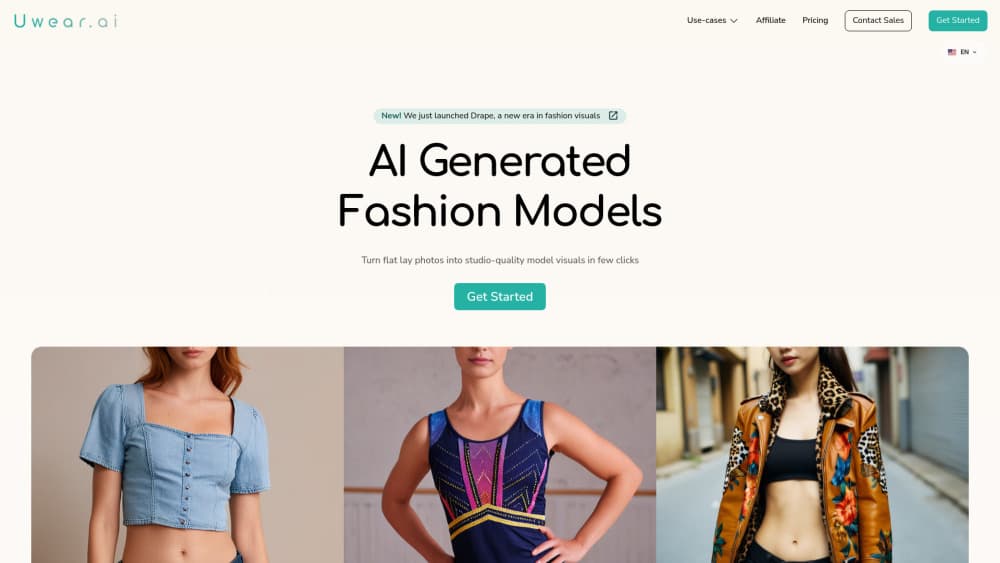
Uwear.ai is an AI fashion photo generator that turns product shots into studio-quality photos and videos for brands, retailers, and marketplaces.
About Uwear.ai
What Is Uwear.ai
Uwear.ai is an AI visual production engine built for fashion. You upload the product photos you already have, whether that's flat-lays, ghost-mannequin shots, or supplier images, and it puts the garment on generated models in a consistent style. The output is ecommerce-ready: product page visuals, shop-the-look sets, and short videos.
The people behind it are engineers and data scientists who started the company in Montreal in March 2023 and trained Drape, their own model for clothing. That background shaped the product's focus. Instead of a single-model toy, Uwear.ai routes each shot to a frontier image or video model, so hard garments can go to a top-tier engine and simple ones to a cheaper, faster option.
The main limit is scope. This is a fashion production tool, not a general image editor or a design app for posters and ads. It also runs on a credit system with no free tier, so you'll pay before you generate anything.
Getting Started
- Create an account and buy a starting credit pack, from about $17.
- Upload your product photos, or send sample garments to Uwear for a scored pilot batch.
- Save an art direction so casting, lighting, framing, and QA criteria stay on brand.
- Run a shoot from Studio, an AI assistant over MCP, or the API.
- Review results in Studio, then export the images and clips you keep.
Product Information
A quick look at Uwear.ai's pricing, supported platforms, and performance.
Best for
The users, tasks, and scenarios where this tool fits best.
Users
- Fashion brands and retailers
- Ecommerce and marketplace teams
- Small labels with tight budgets
- Marketers and art directors
Tasks
- Turning flat-lay or supplier photos into on-model catalog shots for fashion product photography.
- Generating shop-the-look sets that include the exact item a shopper is viewing.
- Creating 360 loops and AI fashion video cuts from approved stills.
- Building ecommerce product photos at scale, so every new upload or tag triggers its own run.
- Running quality checks at volume with an AI reviewer that retries failed images.
Scenarios
- A brand scales from a few SKUs a year to hundreds of thousands without new shoot days.
- A team with no in-house studio still ships a consistent PDP visual standard.
- An assistant-driven workflow where ChatGPT or Claude plans a shoot and runs it after approval.
Key features
AI Fashion Photo Generation
Upload product shots and Uwear.ai puts the clothing on a generated AI clothing model, keeping the garment, not just the vibe, recognizable. Each result moves through prompt building, asset prep, generation, cleanup, and an AI review step before it reaches your library. One credit covers that whole line, not just the model call.
Frontier Model Routing
The best image and video models come from different labs and the leader changes often. So which one should you use? Uwear.ai carries several of them in tiers, so you can route tricky garments to a Best quality engine and simple ones to Fast, and switch the day something better ships. You're not locked to one vendor.
Agent and MCP Shoots
Connect the Uwear MCP server to ChatGPT, Claude, or Codex and let the assistant plan the looks, show the credit cost in a brief, and run the shoot once you approve it. It suits teams who'd rather describe intent than click through panels. Why bother? Fewer clicks, fewer mistakes.
Production Automation
Wire the settings you reuse to a trigger once, and every new upload, tag, or outfit starts its own shoot, edits, video, and quality check. It turns a repetitive production backlog into something that runs without a person watching each item. Big difference.
Saved Art Direction
Save a look from your own samples, including light, framing, models, and set, then reuse it across collections and teams. The direction also carries your QA criteria. So variation controls can explore scenes and poses without drifting off brand. That's the whole trick. And the AI model generator holds the standard across everyone using it.
Automatic QA and Retries
Turn on the AI reviewer and it compares each result against your product photos and prompt. A wrong shot gets rejected with the reason attached and retried, which matters when hand-reviewing thousands of images isn't realistic.
Fashion Video from Stills
Approved catalog images become 360 loops, product page clips, and campaign cuts, so stills you already paid for double as footage. No second shoot and no separate production lane.
Pros and cons
Pros
- One credit pool covers Studio, Agent, API, and MCP, so costs don't fragment across tools.
- Credits never expire and there are no subscriptions or seat fees.
- Frontier model routing lets you match engine to garment instead of settling for one model.
- Automatic QA with retries cuts the manual review load at high volume.
- Enterprise starts with a scored report on your own garments before you commit.
Cons
- No free tier. You spend from the first credit, with entry around $17, which is a hurdle for testing on a whim.
- It stays inside fashion. If you need general image editing or non-apparel visuals, this isn't the tool.
- Output quality leans on your input photos, so poor supplier images can cap the results.
- Enterprise pricing is quoted, not listed, so budgeting takes a sales conversation.
Frequently asked questions
It turns product photos of clothing into studio-quality on-model photos and videos. You upload shots you already have, pick an art direction, and it generates ecommerce product photos, shop-the-look sets, and short AI fashion video clips.
Related content
Explore related tools, skills, and articles for Uwear.ai.
Uwear.ai Alternatives

Google EmbeddingGemma 2
Google DeepMind · Writing · Image · CodingGoogle EmbeddingGemma 2 is a 740M-parameter open model that turns text, code, images, audio, and video frames into vectors in one 768-dimension space, running on phones and laptops.

Tractionwave
TractionWave · Image · MarketingTractionWave is an AI attention heatmap tool for static ads. Upload a PNG or JPG and it returns predicted attention, ranked hotspots, and fixes before you spend budget.

Imejis.io
Imejis.io · Image · MarketingImejis.io is an AI design studio for agents and marketing teams. Describe an image in plain words, and it writes the copy, builds the layout, reflows it to every size, then exports a finished file.