

Vibe n8n - AI Assistant for n8n
Vibe n8n · Coding
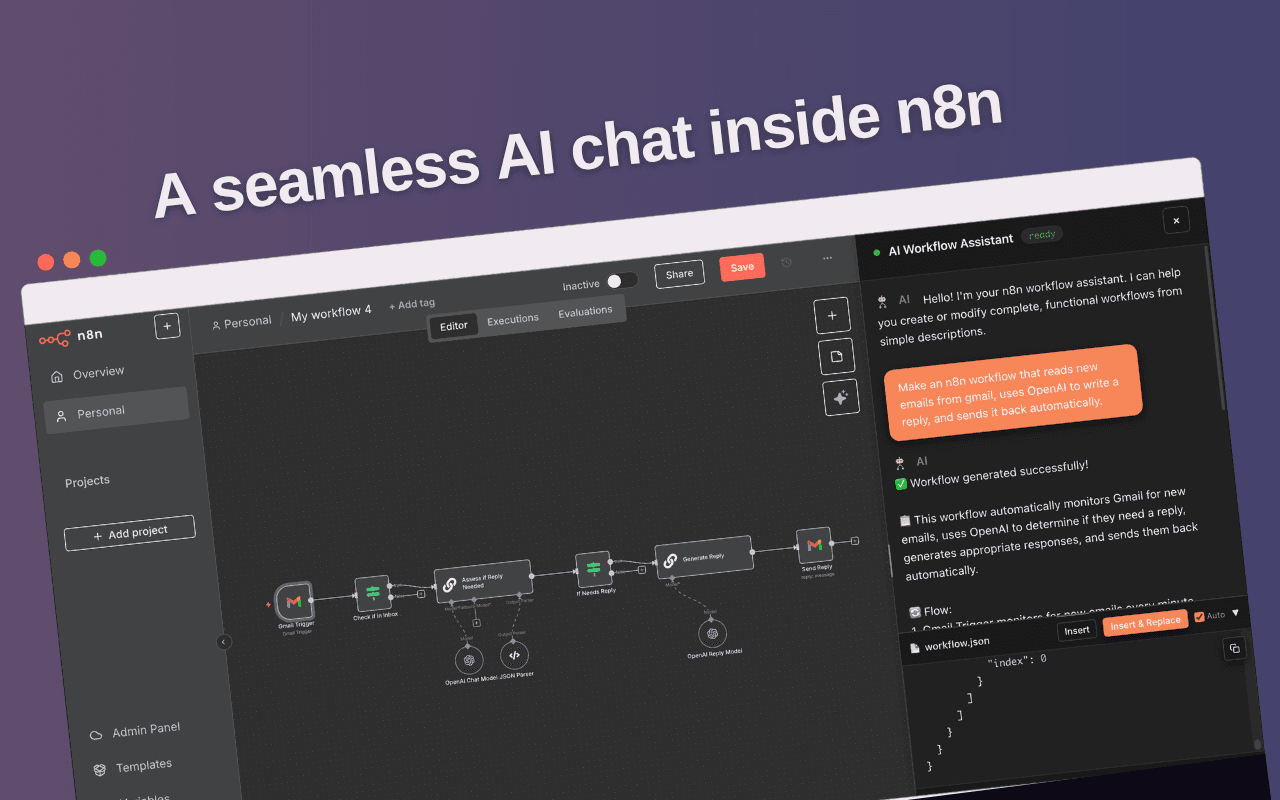
Vibe n8n - AI Assistant for n8n is a Chrome extension that writes, edits, and fixes n8n workflows from plain-language prompts. You describe the automation you want in the extension panel, and it returns the nodes and connections for your n8n canvas. It works with n8n Cloud and self-hosted instances, which matters if your automations touch internal systems you can't move to someone else's servers.
About Vibe n8n - AI Assistant for n8n
What Is Vibe n8n - AI Assistant for n8n
Vibe n8n - AI Assistant for n8n is an AI assistant that lives inside your browser and targets one job: getting an n8n workflow built faster. It's an n8n workflow builder that runs on chat, not on drag-and-drop. Instead of wiring up nodes one by one, you type what you want in plain language. The extension turns that description into a workflow you can drop onto your canvas. A node breaks at 2 a.m.? Hand the error to the assistant and let it debug the n8n workflow instead of hunting through node settings by hand.
It sits on top of n8n rather than replacing it. You still own the workflow, the credentials, and the hosting. That's the point. Teams running n8n on their own infrastructure get AI help without pushing data through a separate platform, and that distinction is what separates this extension from hosted workflow tools that want to own your automations outright. If you want to generate n8n workflows without learning every node's parameters first, that's the value here. It's a speed layer for a tool you already use. Never opened n8n before? This extension won't teach you the platform.
The honest limits are worth stating up front. It's a Chrome extension, so you need a Chromium-based browser on desktop, and there's no mobile version if you work mostly from a phone or tablet. Generated workflows still need a human to check credentials, test runs, and edge cases before they go live.
Getting Started
- Open the Chrome Web Store and install Vibe n8n - AI Assistant for n8n, then pin the icon to your toolbar.
- Open your n8n instance in the same browser, either a cloud workspace or a self-hosted URL, and log in.
- Click the extension and describe the workflow you want, such as "watch a Gmail inbox and post new messages to Slack."
- Review the generated workflow, then add it to your n8n canvas and connect your own credentials.
- Run a test execution and send any errors back to the assistant to fix.
Product Information
A quick look at Vibe n8n - AI Assistant for n8n's pricing, supported platforms, and performance.
Best for
The users, tasks, and scenarios where this tool fits best.
Users
- n8n beginners
- Automation engineers
- Small teams on self-hosted n8n
Tasks
- Drafting a new workflow
- Editing an existing flow
- Debugging failed runs
Scenarios
- Cleaning up a messy canvas
- Onboarding a teammate
- Prototyping an idea quickly
Key features
Natural-language workflow generation
The core feature turns a sentence into an n8n workflow. You type something like "collect form responses and email a summary each morning," and the assistant proposes the trigger, the processing nodes, and the connections. It's a starting point you adjust, not a finished automation. Vague prompts produce vague graphs. So be specific.
Workflow debugging from error context
When a run fails, the assistant can read the error and point at the likely culprit. A missing credential, a mismatched data type, a broken connection. That beats opening every node's settings to find what changed. It won't fix everything. Some failures come down to the external service itself, and no prompt will help there.
Editing existing workflows
You don't have to start fresh every time. The assistant can modify a workflow you already have, adding nodes, changing logic, or restructuring branches from a follow-up instruction. Long-lived automations grow over months. Keeping small changes quick matters more than most people expect.
Works with cloud and self-hosted n8n
The extension supports both n8n Cloud workspaces and self-hosted instances. That dual support is the main reason strict teams can use it at all. You keep execution on your own infrastructure, and the assistant just helps you build the graph. Nothing gets rerouted.
Runs inside the browser
Because it's a Chrome extension, it sits alongside the n8n editor instead of living in a separate tab or desktop app, which keeps your canvas in view the whole time you're prompting. You move between the canvas and the assistant without leaving the browser. The trade-off is desktop-only access. There's no phone or tablet version.
Pros and cons
Pros
- Turns plain English into a working workflow draft, which cuts the blank-canvas problem for new n8n users.
- Debugging help shortens the hunt for broken nodes and connections after a failed run.
- Supports self-hosted n8n, so teams that can't move data to the cloud still get AI assistance.
- Runs in the browser next to the n8n editor, keeping your workflow in view while you prompt.
Cons
- Chrome extension only, so desktop browsers are required and there's no mobile option.
- Generated workflows need human review for credentials and edge cases before they're production-ready.
- Pricing and feature details depend on the vendor's current site, which can change between releases.
Frequently asked questions
It's a Chrome extension that generates, edits, and debugs n8n workflows from natural-language prompts. You describe the automation, and it proposes the nodes and connections for your n8n canvas.
Related content
Explore related tools, skills, and articles for Vibe n8n - AI Assistant for n8n.
Vibe n8n - AI Assistant for n8n Alternatives
Forefront
Forefront · CodingForefront is a web platform for building with open-source AI. It lets you fine-tune leading open-source language models on your own data, evaluate how they perform, and run them through an API or export them to host yourself. Developers who want the convenience of a closed-source platform but insist on owning their models and data are the target audience here.

Startkit
StartKit.AI · CodingStartkit is a boilerplate for building AI SaaS and AI wrapper products. Think of it as an AI startup boilerplate with the boring parts already wired up: authentication, Stripe and Lemon Squeezy payments, usage limits, transactional email, and an AI API starter that talks to OpenAI, Anthropic, Groq, or Llama. You clone the repo, set your price, and start on the part of your product that people actually pay for. It's Next.js under React and Tailwind, so most of the boilerplate code already feels familiar.
Testim
Tricentis · CodingTestim is an AI-powered test automation platform for building and running end-to-end tests across web, mobile, and Salesforce applications. It leans on machine learning to keep tests stable when an interface changes, so teams spend less time fixing broken selectors. Not bad for an automated testing tool you can start using today. You create tests by recording actions in a browser, then optionally add JavaScript when you need more control. It's a solid pick for busy QA teams.