

vibes.rehab
@topcatnocap · AI Assistant
vibes.rehab is a free web tool that takes a project idea and returns a playful "rehab plan," riffing on the joke that vibe coding addiction is real. No account needed.
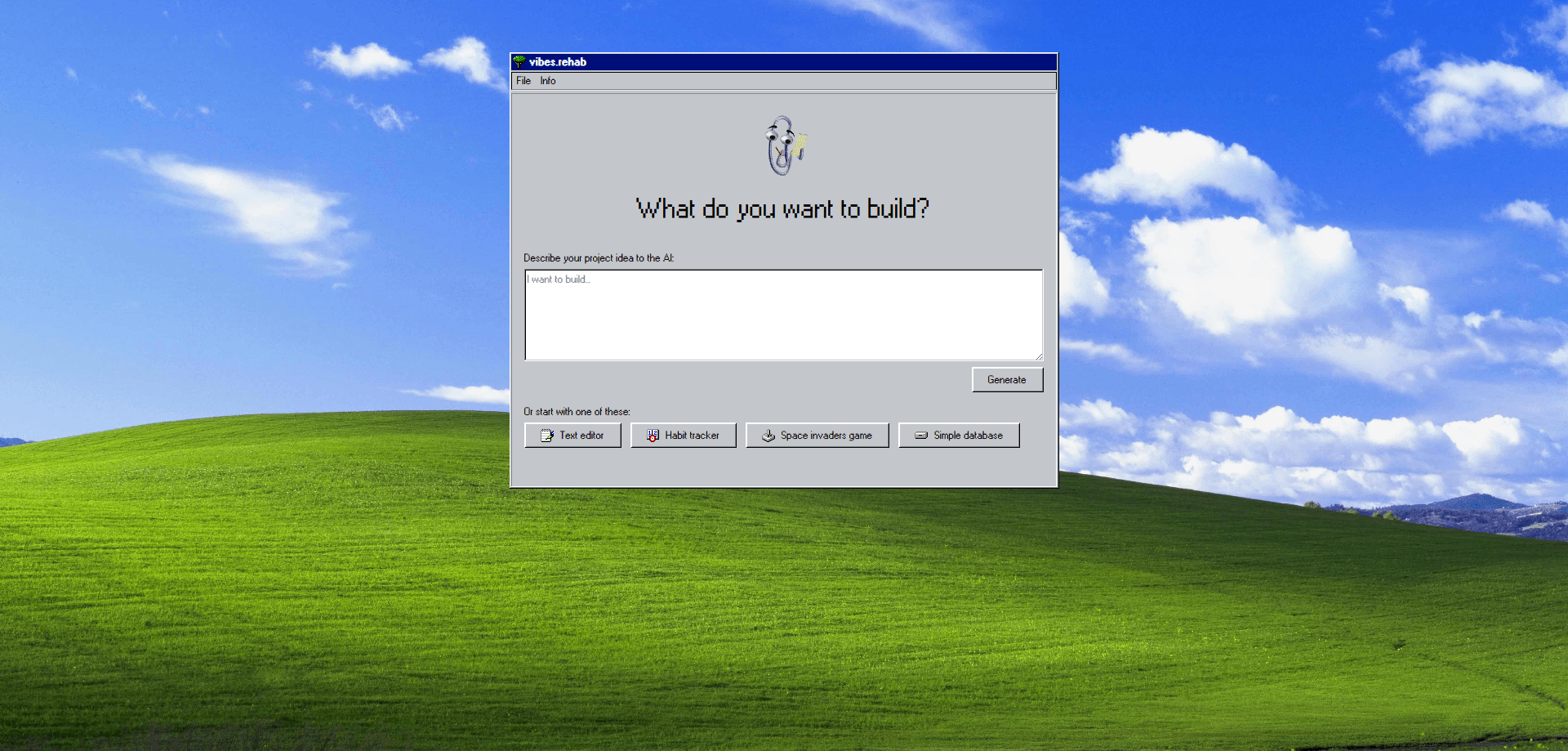
About vibes.rehab
What Is vibes.rehab
vibes.rehab is a single-purpose web app built around one joke: that people who endlessly prompt AI to build things might need treatment. You type what you want to build, and the site answers with a short, mock-clinical "rehab plan" that treats your urge to ship another side project like a condition to manage.
It sits in the same space as AI app idea generators, but it never writes real code. Anyone hoping to build app with AI should look elsewhere. The output is entertainment and gentle self-awareness, not a working project. That's the point. It's a two-minute distraction for developers who already spend their days in tools like Cursor or Replit.
The limits are part of the appeal and the downside. There's no export, no saved history, and no real scaffold you can take into production. If you want an AI code generator or a working build, this won't do it. If you want a quick laugh about why you keep starting new ones, it delivers.
Getting Started
- Open vibes.rehab in any browser. There's nothing to install and no sign-up step.
- Type a project idea into the box, or click one of the ready-made prompts like Text editor, Habit tracker, Space invaders game, or Simple database.
- Wait a few seconds while the site shows "Computer is thinking."
- Read the rehab plan it returns, then optionally share the result on X with the built-in button.
- Refresh the page to start over with a new idea.
Product Information
A quick look at vibes.rehab's pricing, supported platforms, and performance.
Best for
The users, tasks, and scenarios where this tool fits best.
Users
- Developers stuck in a loop of starting new side projects
- AI coding beginners
- Anyone who wants a fast break
Tasks
- Finding a starter project idea
- Turning a vague urge into a phrase
- Making a shareable joke
Scenarios
- A standup or team chat that needs a light moment
- Killing five minutes while a build runs
- Testing a free AI web app's feel before trying heavier builders
Key features
Idea to rehab plan in one step
The tool's whole flow is a single text box. You describe what you want to build, and the AI writes back a short plan framed as treatment. There's no configuration, no model picker, and no settings to learn, which keeps the experience to one screen.
Ready-made project prompts
Four preset buttons, Text editor, Habit tracker, Space invaders game, and Simple database, fill the box for you. They double as samples of the kind of small project an AI coding tool can realistically produce, useful when you can't think of a starting point.
One-tap sharing on X
After a plan is generated, a Share on X button posts the result with one click. That social hook is what gives the joke legs: the site spreads because people post their own "diagnosis" rather than because of any feature depth.
Hidden About panel
A small About vibes.rehab panel credits the creator, @topcatnocap, describing them as a software engineer who still enjoys writing code by hand. It's an easter egg that sets the tone without interrupting the main interaction.
No-account, no-friction design
There's no login, no email capture, and no saved profile. You open the page, use it, and leave. For a tool this small, skipping accounts is the right call, and it keeps the joke from turning into a funnel.
Pros and cons
Pros
- Completely free, with no paywall, credit system, or trial to manage.
- Works instantly in the browser with no install, account, or setup.
- The preset prompts remove the blank-page problem and make the tool usable in seconds.
- One-click sharing on X gives the joke somewhere to go.
Cons
- It doesn't generate code or a working app, so it can't replace a real AI builder like Cursor or Replit.
- Nothing is saved, so closing the tab loses your plan with no history to revisit.
- The output is a novelty, which means repeat use has little value once the joke lands.
- No API or export, so it can't be wired into another workflow or automated.
Frequently asked questions
It's a free web app that turns a project idea into a playful "rehab plan," joking that the urge to keep vibe coding deserves treatment. You type an idea and get a short, mock-clinical response in seconds.
Related content
Explore related tools, skills, and articles for vibes.rehab.
vibes.rehab Alternatives
Agibot
Agibot · Productivity · AI Assistant · ChatbotAgibot is a personal AI agent for Mac that keeps running after you close the window, runs routines on a schedule, and works from Telegram or Slack with your own API keys.

Foley
Hanamori Labs, LLC · Voice & Language · Productivity · AI AssistantFoley is a voice to-do list that turns a spoken sentence into a filed task, complete with project, date and time, then helps you plan the day around what is already there.

Ghost Core
Ghost · Productivity · AI AssistantGhost Core is a $3,499 screenless personal AI computer that runs local AI models on its own hardware, builds context from your apps and devices, and acts without waiting for a prompt.