

VibeShift
GroundNG · Coding
VibeShift is an open source security agent by GroundNG that plugs into AI coding assistants through MCP. It scans AI-generated code for flaws and feeds fixes back to your editor before the code ships.
About VibeShift
What Is VibeShift
VibeShift is an intelligent security agent built for teams that let AI coding assistants write a growing share of their code. Rather than running as a separate dashboard, it connects to tools like Cursor, GitHub Copilot and Claude Code over the Model Context Protocol, so security checks happen inside the editor you already use.
The product targets a specific gap. AI assistants generate code quickly, but that code can carry subtle flaws such as SQL injection, cross-site scripting, insecure configurations or broken logic. Reviewing every AI-written snippet by hand is slow and easy to skip. VibeShift automates the first pass: it analyzes generated code, flags problems with location and severity, and hands remediation hints back to the assistant that wrote the code.
It ships as a self-hosted MCP server, so you run it yourself and connect it to any LLM you have API access to. That gives you control over your code and your model choice. The trade-off is setup work: you need Python 3.10 or newer, an LLM API key, and a working MCP configuration before the agent does anything.
Getting Started
- Clone the VibeShift repository and create a virtual environment with Python 3.10 or newer.
- Install the dependencies and the Playwright browsers, then rename the sample environment file and add your LLM API key.
- Add the VibeShift server to your MCP configuration so your AI assistant can call it.
- Keep the server running and ask your assistant to scan a function, record a test or run a regression suite.
Product Information
A quick look at VibeShift's pricing, supported platforms, and performance.
Best for
The users, tasks, and scenarios where this tool fits best.
Users
- Solo developers who vibe code with AI assistants
- Small product teams without a dedicated security engineer
- QA and test engineers
Tasks
- Scanning AI-generated code for vulnerabilities
- Recording browser tests
- Running regression suites
- Discovering test coverage
Scenarios
- Reviewing a pull request full of AI-written code
- Starting test coverage on an app with no suite
- Keeping tests alive after refactors
Key features
MCP integration with popular assistants
VibeShift runs as a Model Context Protocol server, so it slots into assistants such as Cursor, Windsurf, GitHub Copilot and Roo Code. You add one server entry to your MCP configuration and call it in natural language. The integration means security checks stay in the editor rather than in a separate tool.
Automated security scanning
The agent analyzes code as your assistant generates or edits it. It combines static analysis, which inspects source code, with dynamic checks against running components where they apply. It looks for issues such as XSS, SQL injection, insecure configuration and logic flaws, then reports the type, location and severity.
AI-assisted test recording
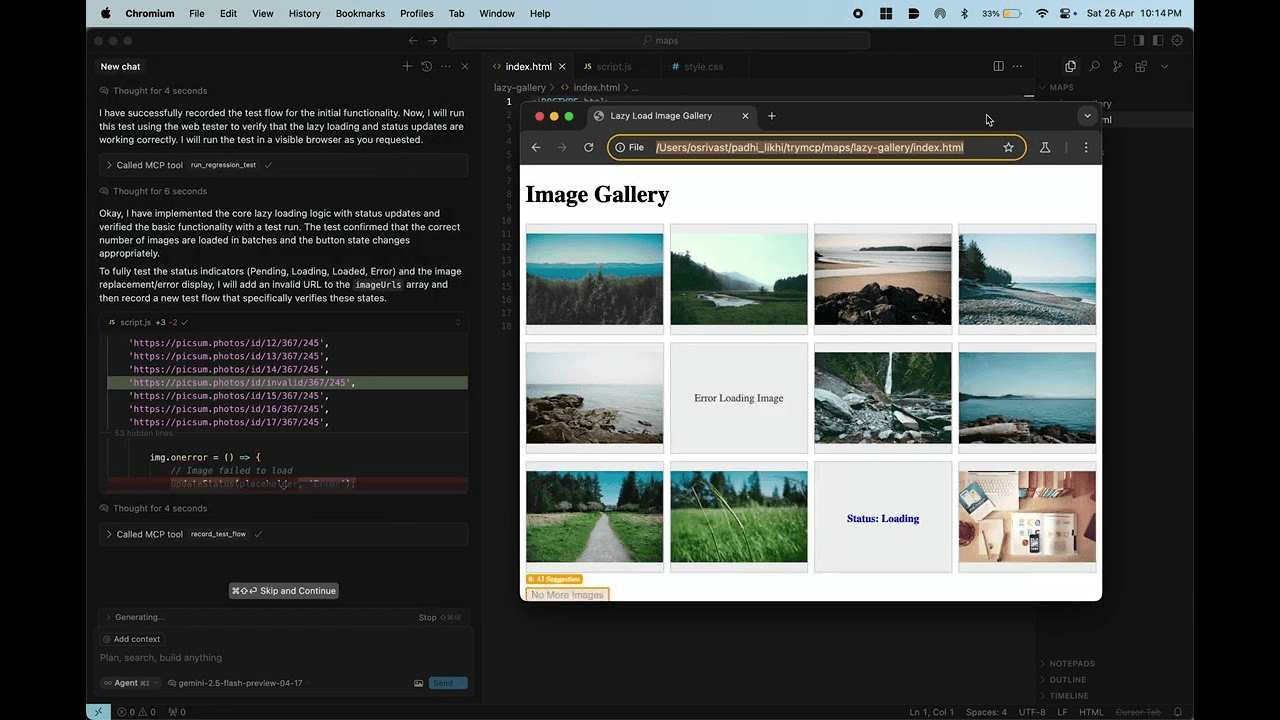
You describe a browser flow in plain language, and VibeShift turns it into a Playwright-based test script. The agent plans the steps, drives a real browser and saves the result as a JSON file. This shortens the gap between describing what a feature should do and having a test that proves it.
Deterministic test execution
Recorded tests run through Playwright in a repeatable way. When a run finishes, VibeShift returns pass or fail status along with errors, screenshots and console logs. That feedback helps an assistant see what broke and suggest a fix.
Self-healing tests
Existing tests adjust when the underlying code or page changes, so simple refactors don't force you to rewrite selectors by hand. The feature cuts down on the maintenance that usually makes small test suites decay.
Test discovery and visual regression
VibeShift can crawl a site and suggest test steps for pages it finds, using any OpenAI-compatible LLM. It also supports visual regression checks that compare screenshots with both pixel matching and a vision model, catching layout changes that text-based tests miss.
Pros and cons
Pros
- Open source under Apache-2.0, so you can read, audit and extend the code.
- Runs locally as an MCP server and works with any LLM you have a key for, which keeps code and model choice under your control.
- Combines security scanning with browser testing in one agent, covering more of the development loop.
- Reports include location, severity and remediation hints, which an AI assistant can act on directly.
Cons
- Setup is developer-oriented: you need Python, dependency installs and a working MCP config before it does anything.
- You supply your own LLM API key, so scan and test quality depends on the model you connect.
- Some capabilities, such as dynamic checks against running apps, only apply when you have a live target to point at.
Frequently asked questions
It scans AI-generated code for security vulnerabilities and feeds the findings, including remediation hints, back to your AI coding assistant. It also records and runs browser tests through the same MCP server.
Related content
Explore related tools, skills, and articles for VibeShift.
VibeShift Alternatives

Udon
Udon · Coding · ProductivityUdon turns an Apple Silicon Mac into a home server you run from a browser, with container controls, file shares, and an optional AI sysadmin.

offstage
offstage cloud · Coding · Productivityoffstage gives AI coding agents and CI jobs a real Mac: a fresh macOS account on Apple silicon, driven over an API and billed by the second.

BotBus
Chengdu Tuyang Tusen Technology Co., Ltd. · Coding · ProductivityBotBus lets you control AI coding agents from your phone and watch: approve commands, start tasks and read results while the code stays on your desktop.