

VibeTrack
VibeTrack LLC · Productivity
VibeTrack is an in-person meeting scheduler for podcasters and traveling professionals. You set meeting types, travel dates, and guest forms, and guests book around your Google Calendar.
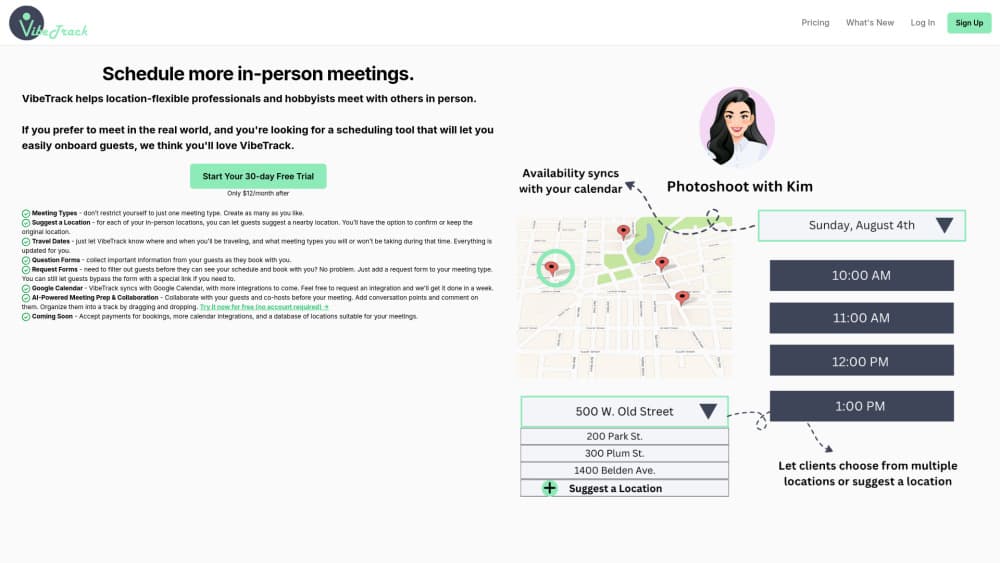
About VibeTrack
What Is VibeTrack
Most booking tools assume the meeting happens on a screen. VibeTrack starts from the other assumption: a meeting is a place, a time, and a person you agreed to sit down with. That's why it markets itself as a Calendly alternative for people who prefer to meet face to face, while still accepting audio and video calls when a guest needs one.
The product comes from VibeTrack LLC and grew out of podcast guest onboarding, which explains the vocabulary. Hosts don't just publish open slots. They define meeting types, say where they'll be and when, and decide which requests reach their calendar at all.
The most useful part is the travel handling, because a host who tours or visits a city for two days has a schedule that changes shape every week. The clearest limit is calendar coverage: Google Calendar is the only native sync today, and everything else is a request.
Getting Started
- Open the free trial from the homepage. VibeTrack lets you build a booking page before you create an account.
- Create a meeting type and choose how the location works: your own address, a spot the guest suggests, or an audio or video call.
- Connect Google Calendar so existing events block the slots guests can see.
- Add a question form when you need details up front, or a request form when you want to approve guests before they see your schedule.
- Share the link. Guests pick a slot from what's left, and you confirm the location.
Product Information
A quick look at VibeTrack's pricing, supported platforms, and performance.
Best for
The users, tasks, and scenarios where this tool fits best.
Users
- Podcasters
- Consultants, sales reps, and realtors
- Producers and co-hosts
Tasks
- Booking an in-person guest interview
- Collecting guest questions before the record
- Managing a travel period
- Screening requests before sharing a calendar
Scenarios
- A two-day city visit with limited hours
- Weekly in-person office hours
- Running several shows with different guest rules
Key features
Meeting Types Without a Cap
The paid plan removes the limit on meeting types, so a host can run a video show, a local interview series, and a consultation offer without merging them. Each type carries its own location rule, forms, and availability.
Guest-Suggested Locations
For each in-person location, you can let guests propose a nearby spot when they book. You then confirm the suggestion or keep your original address, which helps when a guest knows the neighborhood better than you do.
Travel Dates That Update Every Meeting Type
You enter where you'll be and when, plus which meeting types you'll take during that window. VibeTrack updates the affected schedules for you, so a trip doesn't turn into an evening of editing availability by hand.
Question Forms at Booking
A question form collects the details you need before the call happens: topic angle, guest background, technical setup, or anything else you'd otherwise chase over email. Answers arrive with the booking.
Request Forms That Filter Guests
Some hosts want to review a request before a stranger sees the calendar. A request form adds that gate to a meeting type, and a bypass link keeps regulars from filling it out every time they book.
AI Meeting Prep With Shared Tracks
Guests and co-hosts can add conversation points before the meeting, comment on each other's points, and drag them into an ordered track. The AI suggests questions based on the material you and your guest have already put in, which shortens the blank page phase of episode planning.
Google Calendar Sync and Integration Requests
VibeTrack syncs with Google Calendar so booked meetings land next to everything else. Apple Calendar and Outlook aren't native options yet, but the team takes integration requests and advertises about a one week turnaround.
Pros and cons
Pros
- In-person meetings are the default, not an awkward workaround, so the address, the venue suggestion, and the travel window all live inside the booking flow.
- Premium costs $3 per month with no tiers to compare, which is cheap enough to test against a paid Calendly plan.
- Switching costs are low: the team offers free account setup and a transfer from Calendly or another tool.
- The request form doubles as spam control and as a quality filter for interview bookings.
- Travel dates plus guest-suggested locations cover the two things that break most in-person schedules.
Cons
- Google Calendar is the only native integration, so Outlook or Apple Calendar users have to request a connection and wait.
- Payments for bookings are listed as coming soon, which means deposits for in-person sessions still need a separate tool.
- The location database is also still coming, so you type venues and addresses yourself for now.
- The AI prep works on text you and your guest supply. It doesn't record or transcribe the conversation, so notes after the meeting are on you.
Frequently asked questions
VibeTrack schedules meetings that happen in person. You publish meeting types with a location and availability, guests pick a slot, and the booking syncs to Google Calendar. Audio and video calls work as additional location options.
Related content
Explore related tools, skills, and articles for VibeTrack.
VibeTrack Alternatives

Base Code
Base44 (Wix) · Coding · ProductivityBase Code is a shared cloud development environment from Base44. Teammates describe changes to an existing GitHub codebase in chat, preview them live and send them back as pull requests.

Knocket
Knocket (Tencent RTC team) · Productivity · Business · ChatbotKnocket is a free live chat and contact page tool that lets visitors message you from your website, app, or a shareable link, with every reply handled from Telegram or one inbox.

FloorGen
Vinit Kumar (FloorGen) · Productivity · China AIFloorGen is a browser-based floor plan maker that turns a sentence or a sketch into an editable 2D plan and a 3D walkthrough. Export to PDF, DXF or video, and draw without an account.