

Viggle AI
Viggle AI · Image · Video · Chatbot
Viggle AI turns a photo and a motion clip into character videos. The Toronto team's JST-2 model now also builds 3D scenes, and the app runs on web, iOS, and Android.
About Viggle AI
What Is Viggle AI
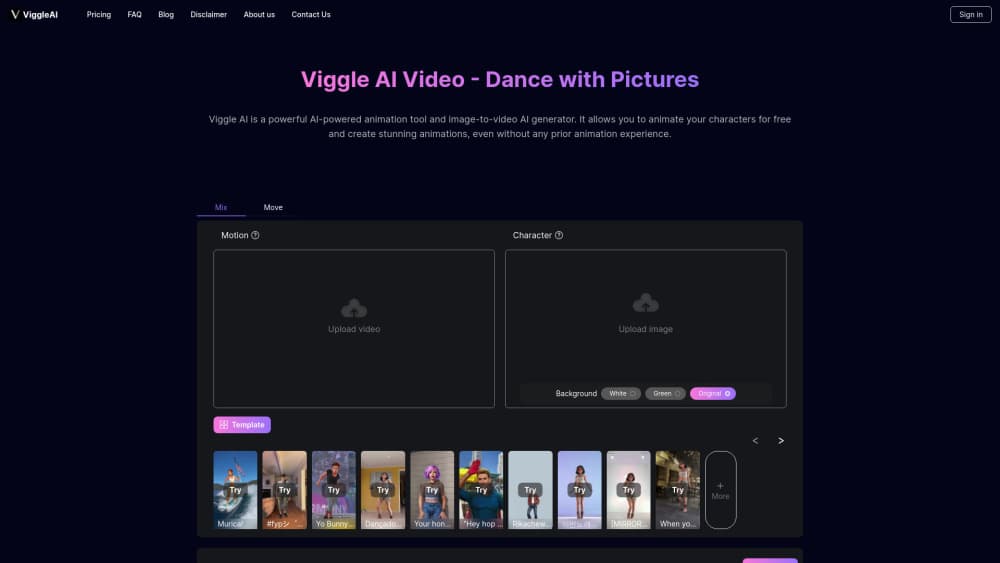
Viggle AI is a video tool built around one trade: you supply the character, it supplies the movement. Upload a still image, hand it a clip of someone dancing, fighting, or walking, and the model moves your character the same way. The company started in Toronto in 2022 and says more than 50 million people have used its app.
The appeal is speed. A trend that took a video editor an afternoon now takes a photo and a two minute wait. Most of the work happens through templates, so a first-time user can post something watchable without learning keyframes or tracking masks.
The AI character animation pipeline is the same across all of them. The limits sit in the source material. A blurry photo, a crowded frame, or a clip where the body leaves the shot all produce wobble and ghosting. Everything runs in the cloud, so output time depends on server load, and the free plan keeps your files for seven days only.
Getting Started
- Sign up at viggle.ai or install the iOS or Android app, then log in with email or a Google account.
- Pick a starting point: choose one of the 8,000+ templates, or upload your own photo with a motion clip up to one minute on the free plan.
- Pick the motion. Tap a dance or action preset, or describe the move you want and let the model interpret it.
- Press generate. Free accounts run one job at a time, paid accounts run up to ten, and a short clip usually lands in a couple of minutes.
- Download the result before the seven day window closes, or upgrade for permanent storage and no watermark.
Product Information
A quick look at Viggle AI's pricing, supported platforms, and performance.
Best for
The users, tasks, and scenarios where this tool fits best.
Users
- Short-form creators
- Meme and anime fans
- VTubers and streamers
- Small marketing teams
Tasks
- Remaking a trending clip with your own face or character
- Making a character talk
- Swapping several characters in one scene
- Blocking out a 3D scene before a shoot
Scenarios
- Keeping a daily posting streak
- Pitching an idea to a client
- Running a live segment with a costume character
Key features
Photo to Character Video
Drop in a single image and the model keeps the face, hair, and clothing consistent while the body moves. Templates cover dances, sports moments, and film scenes, so the motion side needs no input from you. This is the fastest path from a photo to something postable, and the part most people try first.
AI Motion Capture From Your Own Clip
Record yourself, upload the footage, and Viggle maps your movement onto the character frame by frame. Uploads run up to one minute on the free plan and ten minutes on paid plans. Full-body shots work best, since the model needs to see the limbs it has to move.
Character Swap in Existing Footage
The Editor places a new face or figure into footage you already have. Multi-character sessions let you swap two or more people across different scenes and keep each identity stable. Group skits and scene remakes are the obvious use, and this is where the tool saves the most editing time.
Mic and Rap Modes
Mic mode drives lip sync from typed text, a recorded line, or a track from the built-in music library. Rap mode takes custom or generated lyrics and makes the character perform them. Sync drifts on fast delivery and unusual phrasing, so short lines land cleaner than long verses.
Viggle Live Real-Time Swap
Viggle Live swaps your face or character on a live webcam feed. Free accounts get five minutes per session, Pro gets thirty minutes, Live gets six hours, and Max removes the cap. Streaming needs steady light and a still head, because the model chases movement and fills the gaps with guesswork.
JST-2 and PINOC 3D Scene Generation
The JST-2 model, announced on October 19, 2026, generates characters, motion, and 3D scenes from one architecture. According to Viggle, a scene renders in about one second at an inference cost below one cent. PINOC, the 3D creative engine built on it, turns a prompt or a photo into a walkable world in a minute or two, and it is billed separately from Viggle AI plans.
Pros and cons
Pros
- Motion transfer needs no rigging, tracking, or editing skill, so a first video takes minutes rather than hours.
- The template library is large enough to cover current trends without searching elsewhere.
- Paid tiers remove the watermark and keep assets permanently, which matters for client work.
- Real-time swap is included in the subscription instead of sold as a separate product.
- Output quality on clean, full-body source photos is high enough for social feeds.
Cons
- The free plan holds files for seven days only, so anything worth keeping has to be downloaded or paid for.
- Credits are hard to budget: one complex clip can eat several, and the app shows the cost only after you start.
- Results fall apart on crowded frames, partial bodies, and low-light clips, which means reshooting the source.
- There is no documented public API, so teams that need batch automation have to look elsewhere.
Frequently asked questions
It puts a character into motion. You supply a photo and a movement source, and it returns a short video where that character dances, walks, fights, or talks. Memes, social clips, and character-driven skits are the main uses.
Related content
Explore related tools, skills, and articles for Viggle AI.
Viggle AI Alternatives

Google EmbeddingGemma 2
Google DeepMind · Writing · Image · CodingGoogle EmbeddingGemma 2 is a 740M-parameter open model that turns text, code, images, audio, and video frames into vectors in one 768-dimension space, running on phones and laptops.

Tractionwave
TractionWave · Image · MarketingTractionWave is an AI attention heatmap tool for static ads. Upload a PNG or JPG and it returns predicted attention, ranked hotspots, and fixes before you spend budget.

Imejis.io
Imejis.io · Image · MarketingImejis.io is an AI design studio for agents and marketing teams. Describe an image in plain words, and it writes the copy, builds the layout, reflows it to every size, then exports a finished file.