

Visily: AI-Powered Wireframing & Design
Visily · Image
Visily is an AI wireframing and UI design tool built for non-designers. It turns text prompts, screenshots, and sketches into editable wireframes and prototypes.
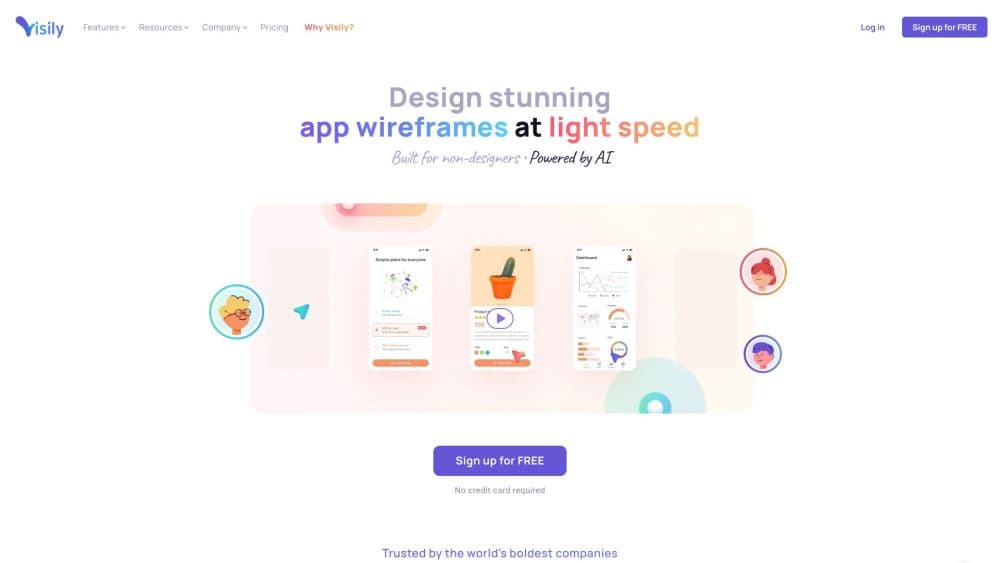
About Visily: AI-Powered Wireframing & Design
What Is Visily
Visily is an AI-powered UI design tool that helps people without design training turn rough product ideas into presentable wireframes and prototypes. You start from a text prompt, a screenshot, a diagram, or a ready-made template, and the tool builds the screen for you. From there you drag, drop, and edit everything on the canvas.
The product targets product managers, founders, marketers, and client-facing teams who need to show an idea clearly but don't want to learn a professional design suite. Its pitch is speed and low friction: you point, click, and share, and the AI handles the parts that usually require design skill. Collaboration features like commenting, cursor chat, and follower mode are built in, so a draft can move through review without exporting files back and forth.
The main limitation is depth. Visily is built for wireframes and early-stage prototypes, not for pixel-perfect production design, and its output is a starting point rather than a final asset. It also runs on credits: AI features and templates consume a shared monthly allowance, which the free plan caps tightly.
Getting Started
- Sign up for a free Visily account, or log in with Google or a work email.
- Pick a starting point: type a text prompt, upload a screenshot, draw a rough sketch, or browse a template.
- Let the AI generate screens or wireframes, then edit elements by dragging, dropping, and restyling.
- Use Smart Components, themes, and preset UI elements to keep screens consistent.
- Invite teammates to comment or follow along, then share a link or export to Figma.
Product Information
A quick look at Visily: AI-Powered Wireframing & Design's pricing, supported platforms, and performance.
Best for
The users, tasks, and scenarios where this tool fits best.
Users
- Product managers
- Startup founders
- Marketers and client-facing teams
- Non-designers on cross-functional teams
Tasks
- Turning text into wireframes
- Converting screenshots to editable designs
- Diagramming and annotating
- Building interactive prototypes
- Collecting team feedback
Scenarios
- Early product ideation
- Client and stakeholder presentations
- Remote and cross-functional collaboration
- Remote usability testing
Key features
Text to Design
You type a description of the screen you want, and Visily generates a wireframe you can edit. It handles the blank-canvas problem, so a non-designer starts from something real instead of an empty grid. This is the core AI feature and the fastest way to get a first draft on the board.
Screenshot to Design
Upload a screenshot of an app or website, and Visily rebuilds it as editable components rather than a flat image. This helps when you want to adapt an existing layout into your own product or study how a competitor structures a screen. You keep the visual reference and gain full editability.
Smart Components and Template Library
Smart Components are reusable UI pieces that stay consistent across screens, and the library adds thousands of pre-built screens, components, and diagrams. Rather than redrawing a nav bar or a card, you drop in a component and restyle it. This keeps a whole project visually aligned with far less manual work.
Auto-Prototyping
Auto-Prototyping connects screens automatically so you can click through a flow and demo it. Instead of linking every hotspot by hand, you let the tool wire up the navigation and then refine it. For presenting to clients or executives, this turns a set of static screens into something that feels like a working product.
Diagramming and Annotation
Visily includes diagramming tools for flows, user journeys, and system logic, and you can annotate screens with notes. Teams use this to keep the reasoning next to the interface rather than in a separate document. It keeps a project's context and its design in the same place.
Real-Time Collaboration
Commenting, cursor chat, and follower mode let a team review and edit one shared board at the same time. Follower mode lets someone watch as another person works through the design, which is useful for remote reviews. The result is fewer exported files and less confusion about which version is current.
Figma Import and Export
Pro users can import from and export to Figma, so a Visily wireframe can feed into a professional design workflow. This matters when a non-designer starts the concept and a design team takes it further. It bridges Visily's approachable start with a production toolchain.
Pros and cons
Pros
- The AI turns a text prompt or screenshot into an editable wireframe, which removes the hardest part of starting from scratch.
- Drag-and-drop components and templates make it usable without any design training.
- Auto-Prototyping builds clickable flows quickly, so demos are ready long before a build exists.
- Built-in collaboration features keep review and editing in one shared board.
- Figma export on the Pro plan lets a wireframe flow into a professional design workflow.
Cons
- It's built for wireframes and early prototypes, so it isn't the right tool for pixel-perfect product design.
- AI features and templates draw on a monthly credit allowance, and the free Starter plan's 300 credits run out fast.
- Figma import and export and the MCP server sit behind the Pro plan, so real workflow integration costs $14 per editor per month.
- The AI output is a solid starting point but usually needs manual cleanup before it looks presentation-ready.
Frequently asked questions
Visily is used to create wireframes, mockups, and prototypes for apps and websites. Teams use the AI wireframing tool to turn a screenshot to wireframe, build mockups, and share clickable prototypes. Non-designers use it to turn product ideas into visuals they can share with clients, executives, and teammates.
Related content
Explore related tools, skills, and articles for Visily: AI-Powered Wireframing & Design.
Visily: AI-Powered Wireframing & Design Alternatives

Google EmbeddingGemma 2
Google DeepMind · Writing · Image · CodingGoogle EmbeddingGemma 2 is a 740M-parameter open model that turns text, code, images, audio, and video frames into vectors in one 768-dimension space, running on phones and laptops.

Tractionwave
TractionWave · Image · MarketingTractionWave is an AI attention heatmap tool for static ads. Upload a PNG or JPG and it returns predicted attention, ranked hotspots, and fixes before you spend budget.

Imejis.io
Imejis.io · Image · MarketingImejis.io is an AI design studio for agents and marketing teams. Describe an image in plain words, and it writes the copy, builds the layout, reflows it to every size, then exports a finished file.