
VMagic
VMagic · Image · Video
VMagic is a browser-based AI video generator that restyles clips into about 20 looks, swaps faces in photos and videos, and turns text or a single image into short clips.
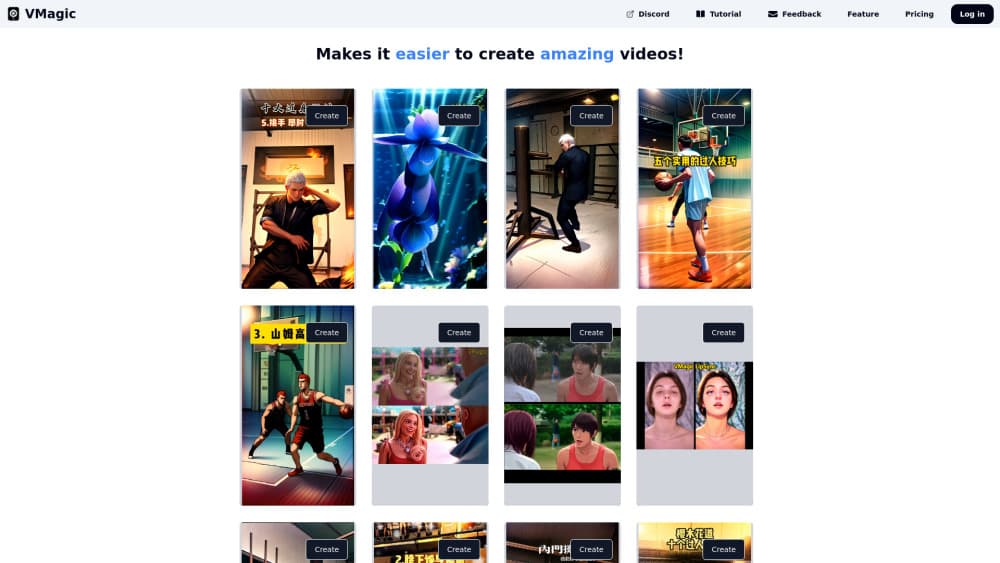
About VMagic
What Is VMagic
VMagic is a web app that pulls several video models into one workspace. Instead of paying Kling, Runway, Luma, Pika, Hailuo, Vidu, and Veo separately, you buy credits from VMagic and spend them on any of those engines, plus a set of editing tools built on top.
The editing side is where the product has its own identity. Video restyle pushes existing footage through roughly 20 visual styles, from cartoon and caricature to painterly abstractions. Face swap works on both stills and video clips, and lipsync redubs a clip so the mouth matches new audio. Everything runs in the browser, so there's nothing to install.
The limits matter as much as the features. Generated clips run 5 or 10 seconds, which rules out long scenes without stitching. Credits drain quickly on premium models, and the cheapest plan only covers 2,000 credits a month. VMagic also publishes no developer API, so teams that need programmatic access have to look elsewhere.
Getting Started
- Create an account on vmagic.app with an email address or a Google login.
- Pick a tool from the left menu: video restyle, face swap, text to video, or image to video.
- Upload your source clip, photo, or prompt, then choose the model or style you want.
- Check the credit cost shown on the generate button, then submit the job.
- Download the finished file from your history once the render finishes.
Product Information
A quick look at VMagic's pricing, supported platforms, and performance.
Best for
The users, tasks, and scenarios where this tool fits best.
Users
- Short-form video creators
- Small marketing teams
- Beginners testing AI video
Tasks
- Restyling existing footage
- Face swapping in video
- Drafting b-roll from a prompt
- Animating a product photo
Scenarios
- Comparing video engines before you subscribe
- Quick parody edits for social posts
- Pre-visualizing an ad concept
Key features
Video Restyle with About 20 Styles
Upload a clip and VMagic rebuilds it in a new visual style: cartoon, caricature, watercolor, or abstract treatments such as dancing plants. Faces stay recognizable in most styles, which is the part that usually breaks in cheaper restyle tools. Style choices apply to the whole clip, so a two minute source becomes a two minute animated piece rather than a single transformed frame.
AI Face Swap for Photos and Video
The face swap tool accepts a single image or a full clip and maps one face onto another. Motion tracking keeps the swap attached through head turns, but fast cuts and heavy occlusion still produce artifacts. Free credits cover a few test swaps, which is enough to judge whether the likeness holds on your own footage.
Text to Video Across Seven Engines
You type a prompt and pick the engine: Kling 2, Veo 2, Runway, Luma, Vidu, Hailuo, or Pika. VMagic handles the routing and shows the credit cost before you commit. Running the same prompt through several models back to back is the fastest way to see which one handles your subject matter.
Image to Video with 5 or 10 Second Output
A single photo becomes a short clip with natural motion added, and you choose between 5 and 10 second lengths. It works well for product shots, portraits, and stills that need a bit of movement for a feed. Longer sequences need several generations stitched together in a separate AI video editor.
Lipsync and Character Animation
Lipsync matches a character's mouth to a new audio track, which covers dubbed clips and talking-head skits. Image dance and face motion push a still portrait into a short dance or expression loop. Both are aimed at social formats rather than dialogue-heavy scenes.
Image Generation in the Same Account
Credits also buy still images from GPT-4o Image, Ideogram, Hidream, and Flux Pro. That matters for storyboard work: you can generate a keyframe, animate it with image to video, and keep everything on one balance. The image tools sit in the same menu as the video tools, so switching costs nothing.
Pros and cons
Pros
- One subscription covers seven video engines and four image models, which is cheaper than stacking separate plans.
- Video restyle keeps faces readable across roughly 20 styles.
- The free tier lets you test face swap and short generations before paying.
- Everything runs in the browser, including on a laptop without a dedicated GPU.
- Output downloads are clean files with no watermark on paid plans.
Cons
- Credits disappear fast on premium engines, so the $9.90 plan runs out after a handful of Veo 2 or Kling 2 jobs.
- Clips stop at 5 or 10 seconds, which means multi-shot scenes need outside editing.
- Unlimited restyle and face swap on the Pro plans only apply in relax mode, and that queue can take much longer.
- No public API, so you can't wire VMagic into an automated pipeline.
Frequently asked questions
VMagic combines AI video generation with AI video editing. You can generate clips from text or a photo, restyle existing footage, swap faces, and add lipsync, all from one dashboard.
Related content
Explore related tools, skills, and articles for VMagic.
VMagic Alternatives

Google EmbeddingGemma 2
Google DeepMind · Writing · Image · CodingGoogle EmbeddingGemma 2 is a 740M-parameter open model that turns text, code, images, audio, and video frames into vectors in one 768-dimension space, running on phones and laptops.

Tractionwave
TractionWave · Image · MarketingTractionWave is an AI attention heatmap tool for static ads. Upload a PNG or JPG and it returns predicted attention, ranked hotspots, and fixes before you spend budget.

Imejis.io
Imejis.io · Image · MarketingImejis.io is an AI design studio for agents and marketing teams. Describe an image in plain words, and it writes the copy, builds the layout, reflows it to every size, then exports a finished file.