

VSDECO | Virtual Home Staging, Interior Design Ideas Generator
VSDECO · Image
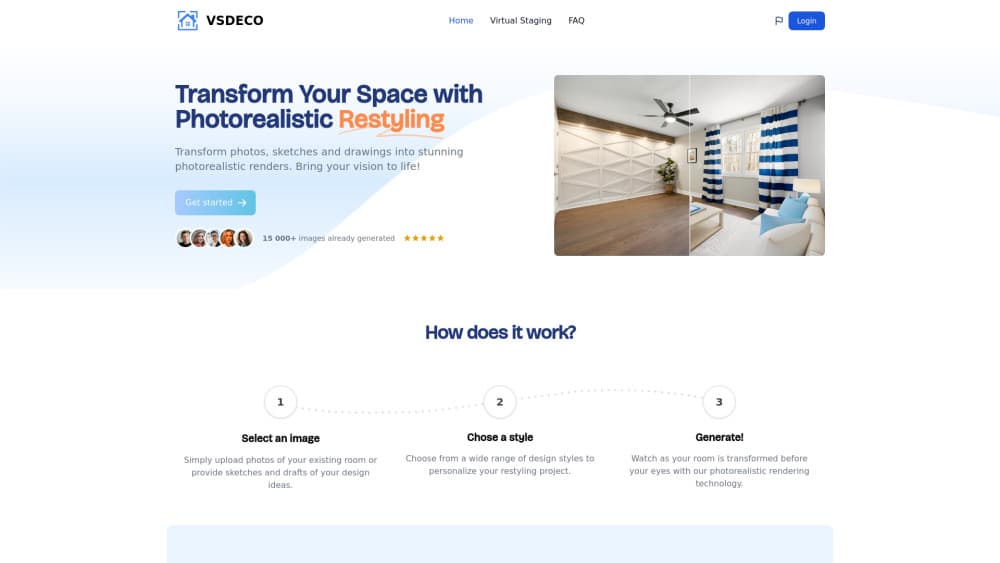
VSDECO is a web app for virtual home staging. It turns photos, sketches, and SketchUp models into photorealistic furnished rooms, with a style picked before each render.
About VSDECO | Virtual Home Staging, Interior Design Ideas Generator
What Is VSDECO
VSDECO is a browser-based image generator built around one job: showing a room as it could look. You upload a photo of the empty space, choose an interior style, and the service returns a furnished version of the same room. The company also accepts hand drawings and SketchUp models, so the input doesn't have to be a camera photo.
The product sits where AI interior design meets property marketing, and the marketing pushes three audiences at once: agents who need listing photos that don't look vacant, designers who want a fast concept image for a client, and homeowners testing ideas before spending money on furniture. That breadth shows up in the style list, which mixes safe choices like Modern and Scandinavian with louder ones like Bohemian and Industrial.
Limits are worth knowing before you pay. Renders are flat images, not 3D walkthroughs, and the tool doesn't measure your room or produce floor plans. There's no documented API, so anything you want inside another system has to be downloaded and moved by hand. The interface ships in English, Spanish, and French.
Getting Started
- Create an account on vsdeco.com and pick a plan. A credit card is required up front, and no free trial is offered.
- Upload a photo, a sketch, or a SketchUp model of the space you want to change.
- Choose an interior style, then generate the render and compare it with the original.
- Download the image, or keep it in your render library if your plan includes storage.
Product Information
A quick look at VSDECO | Virtual Home Staging, Interior Design Ideas Generator's pricing, supported platforms, and performance.
Best for
The users, tasks, and scenarios where this tool fits best.
Users
- Real estate agents
- Interior designers and home stagers
- Homeowners planning a renovation
- Property photographers and marketers
Tasks
- Furnishing an empty room photo
- Restyling a furnished room
- Turning a SketchUp model into a client-ready image
- Cleaning up clutter in listing shots
Scenarios
- Listing a vacant apartment or house
- Testing a renovation direction before committing
- Building a portfolio or social feed
Key features
Virtual Staging for Empty Rooms
This is the feature the product is named after. Upload a photo of a bare room and VSDECO fills it with furniture, rugs, and decor that match the perspective of the shot. The result is a still image you can drop straight into real estate listing photos. Quality depends heavily on the source photo, so wide angle shots with visible corners tend to work better than phone snaps taken from a doorway.
Room Restyling for Occupied Spaces
For rooms that already have furniture, the restyle mode changes the look rather than adding pieces. It's the faster path when a seller wants to know how a space would read in a different style, or when a designer needs a visual argument for replacing a sofa. The original layout stays roughly intact, which keeps the room recognizable.
SketchUp and Sketch to Photo
VSDECO accepts SketchUp models and hand drawings as inputs, then renders them as photorealistic interiors with lighting, texture, and material detail. Architects and visualization freelancers get a SketchUp render without setting up a full path tracing job. The tradeoff is control: you're steering the look with a style choice, not with material parameters.
A Style Library Built for Property Marketing
Nine named styles cover the range most listings need: Minimalist, Modern, Scandinavian, Coastal, Rustic, Bohemian, Mediterranean, Farmhouse, and Industrial. Each one has a short guide page explaining the palette and materials behind it, which doubles as an interior design ideas generator when you're stuck on a direction. For virtual staging for real estate work, the safer styles tend to photograph better in markets where buyers expect neutral finishes.
Declutter Mode
Decluttering removes furniture, boxes, and counter clutter from a photo without redrawing the architecture. Agents use it on occupied properties where the owner's belongings would distract from the space. For declutter room photos that would otherwise need a reshoot, it's the practical answer.
Render Credits and Commercial Rights
Every plan is priced by monthly render volume: 35, 100, or 300 images, at $29, $59, and $149 per month. All three tiers include every room type and style, and none of them add a watermark. Images can be used commercially, which matters if you're delivering them to a client or running paid ads with them. Annual billing sits next to the monthly toggle at checkout.
Pros and cons
Pros
- One tool covers empty rooms, occupied rooms, sketches, and SketchUp models, so you're not juggling separate subscriptions.
- The style list is broad enough for both conservative listings and more expressive design work.
- Commercial use is allowed on every plan, with no watermark on the output.
- Declutter and restyle modes solve two problems that usually require a photo editor.
- Pricing scales with volume, so a solo agent can start at 35 renders and move up when listings grow.
Cons
- No free trial and no refunds, which means the first payment is also your first real test of output quality.
- Renders are still images only, so you can't walk a buyer through a room or show a second angle from the same file.
- Everything runs through the browser with no documented API, so bulk workflows and automated pipelines aren't possible.
- The interface is limited to English, Spanish, and French, which rules out some international teams.
Frequently asked questions
It's used to stage and restyle interior photos. You upload a room, pick a style, and get a furnished image for a listing, a client pitch, or a renovation plan.
Related content
Explore related tools, skills, and articles for VSDECO | Virtual Home Staging, Interior Design Ideas Generator.
VSDECO | Virtual Home Staging, Interior Design Ideas Generator Alternatives

Google EmbeddingGemma 2
Google DeepMind · Writing · Image · CodingGoogle EmbeddingGemma 2 is a 740M-parameter open model that turns text, code, images, audio, and video frames into vectors in one 768-dimension space, running on phones and laptops.

Tractionwave
TractionWave · Image · MarketingTractionWave is an AI attention heatmap tool for static ads. Upload a PNG or JPG and it returns predicted attention, ranked hotspots, and fixes before you spend budget.

Imejis.io
Imejis.io · Image · MarketingImejis.io is an AI design studio for agents and marketing teams. Describe an image in plain words, and it writes the copy, builds the layout, reflows it to every size, then exports a finished file.