

Wanderboat
UTA AI Inc. · AI Assistant
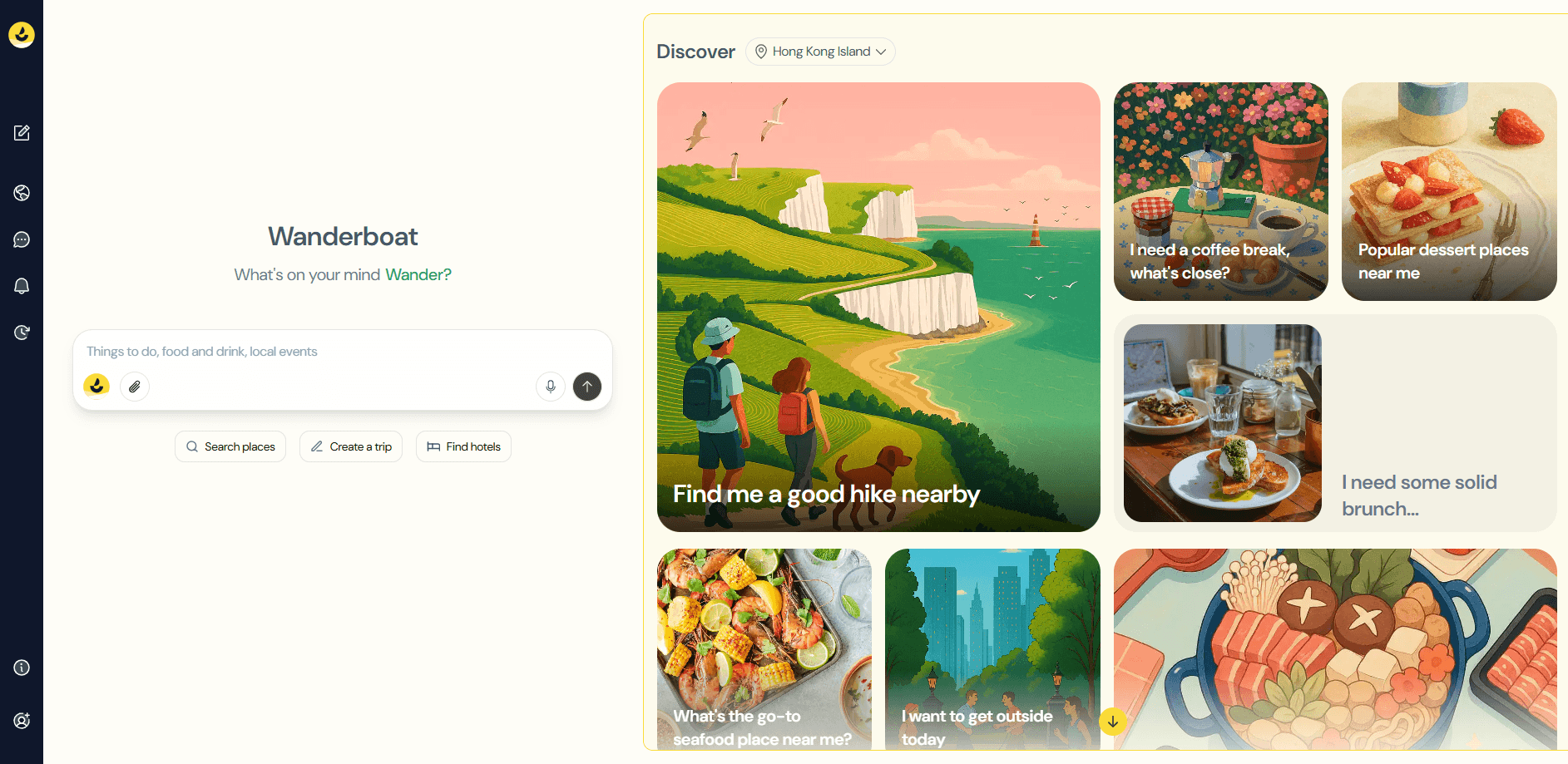
Wanderboat is an AI travel planner and local guide app that turns a chat, a map tap, or a pasted booking into a full trip itinerary, with dining spots, attractions, and traveler tips in one place.
About Wanderboat
What Is Wanderboat
Wanderboat is a travel companion app built by UTA AI Inc., a California company founded by former AI researchers from Microsoft and Meta. It handles the messy middle of trip planning, the part where you have a destination in mind but no idea how to fill the days. Instead of bouncing between review sites, map tabs, and saved screenshots, you describe what you want in plain language and get back a structured plan with places to eat, things to see, and events worth your time. As an AI trip planner, it doubles as an itinerary builder that you can edit stop by stop.
The platform leans on a search engine built specifically for travel content, so a restaurant recommendation arrives with photos and context, not just a pin on a map. It pulls from reviews, social media posts, and videos rather than one narrow database. You can plan by chatting, tapping around an interactive map, or uploading an existing itinerary and letting the tool fill in the gaps. According to the company, the app passed 3.5 million users and its community has shared more than 10,000 posts.
The catch is internet dependence. Wanderboat works best when you are online, since its live suggestions and real-time updates pull fresh data. Offline use is limited, and as a trip planning tool the quality of its recommendations dips for remote or thinly documented destinations where little travel content exists to draw from.
Getting Started
- Sign up for free at wanderboat.ai or install the iOS or Android app. No credit card is required to start.
- Tell the AI about your trip, either by typing a prompt, tapping a spot on the map, or pasting a link or uploading a booking document.
- Review the generated itinerary, then swap stops, adjust timing, or ask follow-up questions to fine-tune it.
- Explore nearby options and community posts, then save your plan and share it with the people traveling with you.
Product Information
A quick look at Wanderboat's pricing, supported platforms, and performance.
Best for
The users, tasks, and scenarios where this tool fits best.
Users
- Busy professionals
- Families with mixed age groups
- Solo and spontaneous travelers
Tasks
- Building a multi-day itinerary
- Finding places to eat
- Turning a booking into a plan
Scenarios
- Planning a city trip before you arrive
- Figuring out a free afternoon on the road
- Group trips where plans keep shifting
Key features
Conversational Trip Planning
The core of Wanderboat is a chat that behaves less like a search box and more like a well-traveled friend. You can type something as loose as a weekend escape idea or as specific as a seven-day Milan trip over the holidays, and it builds a plan around your dates, group, and interests. Every recommendation comes with a short reason, so you can see why a place made the list before you commit to it.
Multiple Ways to Start a Plan
Not everyone wants to type out a paragraph. Wanderboat accepts several inputs: you can chat, tap around an interactive map, or paste a link and upload documents like a PDF itinerary or a flight confirmation. That last option is handy when you already have pieces of a trip locked in and just need the gaps filled. The flexible entry points set it apart from planners that expect you to start from a blank page.
Interactive Map View
Every place you add drops onto a map, so you can see how far apart your stops are before you build a route that zigzags across town. Switching between a list view and a map view helps you group activities by neighborhood and spot the days where you have packed in too much. It is a simple feature, but it prevents the classic mistake of scheduling two far-apart sights back to back.
Personalized Recommendations
Wanderboat tailors suggestions to your preferences, group type, and travel dates rather than serving the same top-ten list to everyone. Over time it learns from the choices you make and the plans you adjust. The dining side works the same way, filtering by cuisine, price, and reviews so you find a spot that fits your budget and mood, not just the most-reviewed restaurant in the city.
Real-Time Plan Updates
Plans fall apart when a museum closes early or rain cancels an outdoor afternoon. Wanderboat checks live signals, including weather and venue status, and suggests alternatives when something changes. Because it responds to shifting conditions, you spend less time hunting for a replacement and more time enjoying the trip. This is the feature that justifies keeping the app open while you are actually traveling.
Community and Shared Ideas
Beyond the AI, Wanderboat runs a community layer where travelers post collections, tips, and photos. You can browse other people's itineraries and borrow ideas, or publish your own to help the next person. With more than 10,000 posts shared, it adds a human counterweight to the automated suggestions, and it gives you a reason to revisit the app between trips.
Pros and cons
Pros
- Costs nothing to start, since the free plan covers itinerary building and community content with no card required.
- Accepts chat, map taps, and uploaded documents, so you can pick up a plan from wherever you left it.
- Food and activity suggestions come with photos, reviews, and reasons, which beats juggling several research tabs.
- Community posts add real traveler input on top of the AI, useful for spotting spots the algorithm might miss.
- Map view keeps multi-stop days organized and reveals when a route is spreading you too thin.
Cons
- Needs a steady internet connection for live suggestions and updates, so it's weak in areas with poor coverage or when you want to fully disconnect.
- Offline access is limited, and major changes to a plan require getting back online.
- Remote or niche destinations with little online travel content can produce generic results, since the recommendations depend on what the search engine can find.
- First-time setup takes some effort, as the AI needs a few rounds of feedback before its suggestions match your taste.
Frequently asked questions
Wanderboat is an AI travel planner and local guide. It turns a chat message, map interaction, or uploaded booking into a personalized itinerary with restaurants, attractions, and events, and it keeps updating those suggestions while you travel.
Related content
Explore related tools, skills, and articles for Wanderboat.
Wanderboat Alternatives
Agibot
Agibot · Productivity · AI Assistant · ChatbotAgibot is a personal AI agent for Mac that keeps running after you close the window, runs routines on a schedule, and works from Telegram or Slack with your own API keys.

Foley
Hanamori Labs, LLC · Voice & Language · Productivity · AI AssistantFoley is a voice to-do list that turns a spoken sentence into a filed task, complete with project, date and time, then helps you plan the day around what is already there.

Ghost Core
Ghost · Productivity · AI AssistantGhost Core is a $3,499 screenless personal AI computer that runs local AI models on its own hardware, builds context from your apps and devices, and acts without waiting for a prompt.