

Wannafake
Wannafake · Image · Video
Wannafake is an online AI face swap tool that turns one photo into a face on any video. You upload a clip, pick the face, and pay only for the seconds you use.
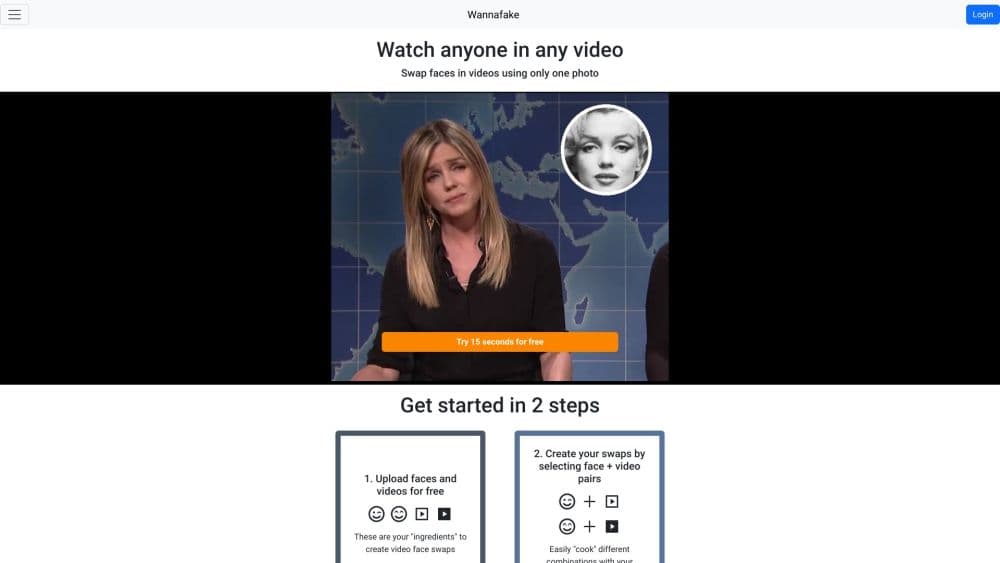
About Wannafake
What Is Wannafake
Wannafake is a browser-based AI face swap tool, and it works on video. You bring two things: a source face from a single photo, and a target video clip. Acting as a simplified deepfake video maker, the tool lines the photo's face up with the person in the clip and produces a new video where the on-screen person wears that face. There's no software to install and no model to train. Everything happens in the browser.
What it removes is the setup. Traditional face swap work means collecting training images and running a model on a decent GPU. Wannafake skips all of that. One good photo is enough. The trade-off is creative control. You get the whole frame replaced rather than granular control over masks, lighting, and individual frames, so clip quality depends a lot on how well the source photo matches the target video.
The billing model is the other thing that sets it apart. Instead of a monthly subscription, this pay per second face swap service charges for video length and spends the balance as you create. That fits occasional use and punishes heavy use, which is worth knowing before you commit.
Getting Started
- Sign up at wannafake.com with an email and password, then verify your account through the link in your inbox.
- Buy a recharge in the shop. Small gives you 120 seconds for $2.99, Medium gives you 600 seconds for $12.99, and Large gives you 3,600 seconds for $69.99, payable by card or PayPal.
- Upload a photo as the source face. The tool checks it for a single, clear face and lets you crop and zoom before you continue.
- Upload the target video, then drag the ends of the blue bar to trim it to just the part you need. The trim length is what gets charged.
- Pick the face you want to replace on the video, then hit Create swap. Your seconds are deducted as the job runs, and the finished clip lands in your gallery.
- Download the result. Keep in mind that uploads and swaps are deleted automatically after 24 hours, so save anything you want to keep.
Product Information
A quick look at Wannafake's pricing, supported platforms, and performance.
Best for
The users, tasks, and scenarios where this tool fits best.
Users
- Meme and short-video creators
- Face swap hobbyists
- Social media editors
- Occasional users
Tasks
- Swapping a face onto a short clip
- Making a novelty video from a phone photo
- Reproducing a look for a gag or reaction clip
- Roughing out a concept before a bigger edit
Scenarios
- Building a one-off viral clip for a weekend post
- Testing whether a face fits a clip before a paid job
- Producing a batch of short swaps for a channel
- Acting on a trend the same day it appears
Key features
One-Photo Face Swap
The core workflow is this photo to video face swap, taking a single photo as the source face and mapping it onto a person in a video. You don't collect reference images or train anything. Upload the photo, validate that it contains one clear face, then crop and zoom to frame it. That low input requirement is the main reason the tool is accessible to people who've never made a deepfake before.
Pay-Per-Second Billing
This is a pay per second face swap model, so Wannafake charges by the second of video you process rather than by month. Three recharges cover most needs: 120 seconds for $2.99, 600 seconds for $12.99, and 3,600 seconds for $69.99. You pay by card through Stripe or with PayPal. For anyone who only needs a handful of clips, this avoids paying for idle capacity.
Clip Trimming Before You Spend
You trim the target video by dragging the ends of a timeline bar before you create the swap, as you would in a basic AI video editor. The interface shows the selected duration in seconds and the running cost against your balance, so you know what a job costs before you start it. Trimming first is the simplest way to keep spending under control.
Face Detection and Validation
When you upload a source photo, the tool scans it and tells you if it can't find a face or finds more than one. You get a clear message in each case and a retry option, which saves seconds that would otherwise be spent on a job that can't finish. Images up to 30MB and videos up to 500MB are accepted.
Automatic Cleanup and Download Options
Uploads and finished swaps are deleted automatically after 24 hours, so there's no long-term storage of your faces or clips on the service. When a swap is done, you download it with a direct button or an alternative download for devices where the first option fails, and failed jobs restore the seconds they used.
Swap Gallery and Media Management
Every swap you make lands in a gallery where you can review and download results. The same area manages your uploaded faces and videos, and you can hide or delete items, keep up to 50 of each, and see how many hours are left before an item auto-deletes. It's basic housekeeping, but it matters when you're running several clips in a session.
Pros and cons
Pros
- One photo is all you need as a source, so you can start a face swap without a photo shoot or a training set.
- Pay-per-second billing ties cost to actual use, which suits occasional creators better than a monthly subscription.
- The browser workflow runs on any device without installing software or owning a GPU.
- Trimming the clip before you create the swap shows the cost up front, and failed jobs refund the seconds.
- Automatic 24-hour deletion keeps your uploaded faces and clips off the service after you're done.
Cons
- There's no free tier and no trial balance, so you have to buy a recharge before you can test a single swap.
- Seconds burn at video duration, meaning longer clips get expensive fast, and heavy use outruns any single recharge.
- You get no fine-grained control over lighting, masks, or frame-by-frame corrections, so poor matches between the photo and the video show.
- Face swap tools carry real consent and impersonation risks, and using someone's face without permission can break the law and the service's terms.
Frequently asked questions
Wannafake is used to put a face from a photo onto a person in a video. You upload a source photo and a target clip, pick the face to replace, and the tool produces a new video with that face on screen. It's built for short-form clips rather than long edits.
Related content
Explore related tools, skills, and articles for Wannafake.
Wannafake Alternatives

Google EmbeddingGemma 2
Google DeepMind · Writing · Image · CodingGoogle EmbeddingGemma 2 is a 740M-parameter open model that turns text, code, images, audio, and video frames into vectors in one 768-dimension space, running on phones and laptops.

Tractionwave
TractionWave · Image · MarketingTractionWave is an AI attention heatmap tool for static ads. Upload a PNG or JPG and it returns predicted attention, ranked hotspots, and fixes before you spend budget.

Imejis.io
Imejis.io · Image · MarketingImejis.io is an AI design studio for agents and marketing teams. Describe an image in plain words, and it writes the copy, builds the layout, reflows it to every size, then exports a finished file.