

Web Bench
Skyvern and Halluminate · Coding · Productivity
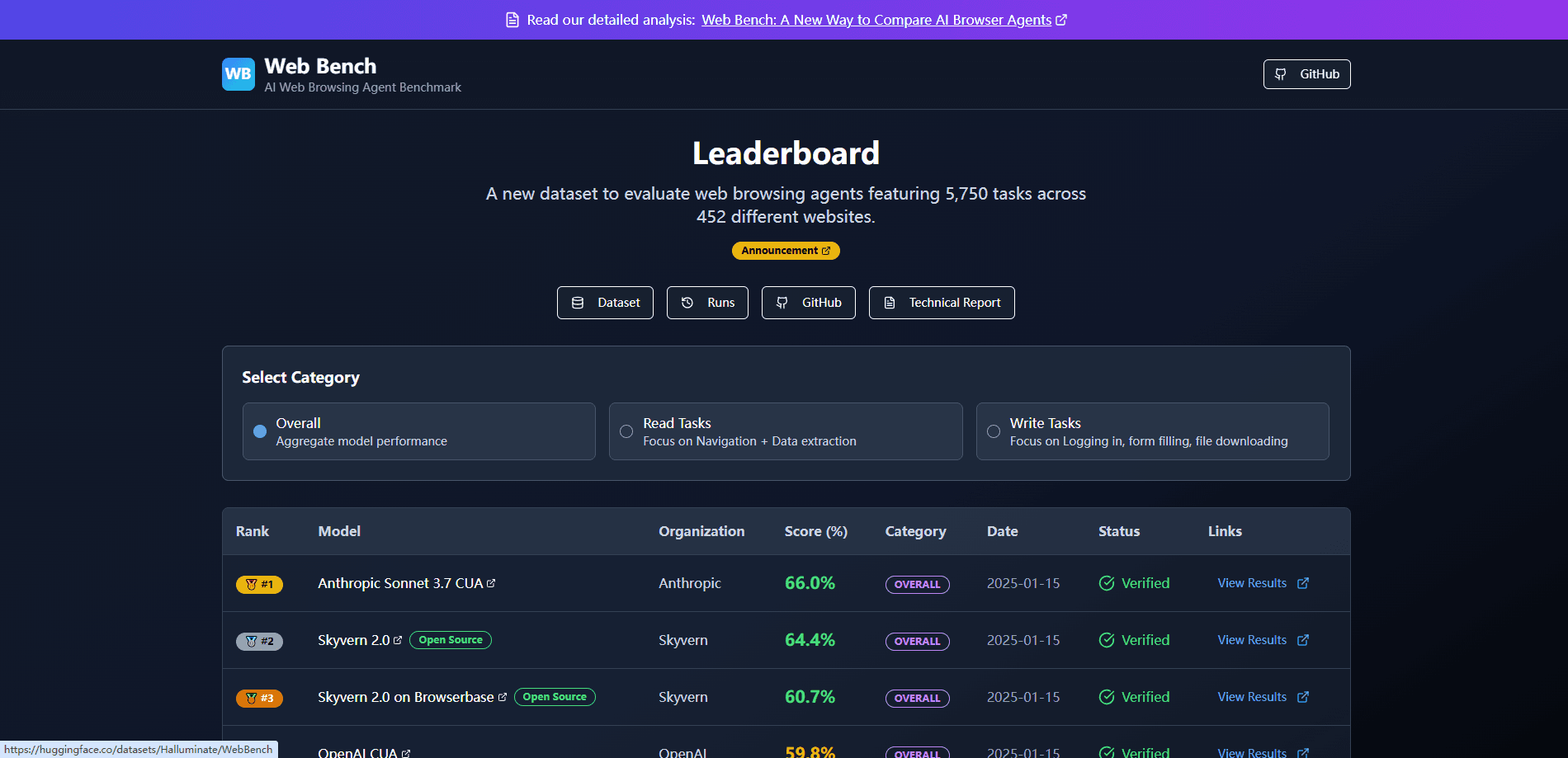
Web Bench is an AI web browsing agent benchmark built by Skyvern and Halluminate, scoring agent performance on 5,750 tasks across 452 websites.
About Web Bench
What Is Web Bench
Web Bench is a benchmark that measures how well AI browser agents complete real tasks on live websites. Skyvern and Halluminate released it to replace WebVoyager, an older test set that covered only 643 tasks on 15 sites. Agents that control a browser now handle job applications, invoice downloads, and tax form filings, so a wider scoring system was overdue.
The benchmark splits every task into two groups. Read tasks ask an agent to navigate a site and pull out information. That design makes it a browser agent evaluation tool, not a general chatbot test. Write tasks ask it to log in, fill a form, solve two-factor prompts, or download a file. Write tasks were rare in earlier benchmarks and are where most agents fall short.
The main limits are scope and cadence. It scores English-language websites from the global top 1,000, only a slice of the web, and results update only when the team reruns the set. It measures accuracy, cost, and speed, not whether an agent is safe to leave alone with your accounts.
Getting Started
- Open the public leaderboard at webbench.ai to compare agents by overall, read, or write score.
- Browse the open-source dataset on GitHub or Hugging Face to inspect the exact tasks and website list.
- Read the technical report to understand how each run was scored and validated.
- If you build agents, contact the Halluminate team to submit your own results for the board.
Product Information
A quick look at Web Bench's pricing, supported platforms, and performance.
Best for
The users, tasks, and scenarios where this tool fits best.
Users
- AI engineers
- Product teams
- Researchers
Tasks
- Benchmarking an agent build
- Choosing between agents
- Diagnosing weak spots
Scenarios
- A team ready to deploy a computer-use agent and needing proof it clears login and checkout flows. Computer use agents that act inside a browser get the most direct signal here.
- A startup weighing two browser automation vendors and wanting a shared yardstick.
- A writer or analyst citing current browser agent accuracy numbers in a report.
Key features
Read and Write Task Split
Web Bench separates tasks that pull data from tasks that change it. Read tasks cover navigation and extraction, while write tasks cover logins, form entries, 2FA, and downloads. The split matters because agents that look strong on reading often stumble on anything that mutates a site.
5,750 Tasks Across 452 Websites
The set runs 5,750 tasks on 452 sites drawn from the global top 1,000 by traffic. That breadth is the point: earlier benchmarks tested a handful of sites, so agents could memorize layouts. More sites means results travel better to the pages you actually use.
Open-Source Task Data
Roughly 2,454 tasks ship as open data on GitHub and Hugging Face. Anyone can inspect the instructions, rerun the set, or fine-tune against it. For teams that distrust closed leaderboards, this keeps the scoring auditable.
Separated Agent and Infrastructure Failures
Every failed run is tagged by cause. Agent errors cover bad navigation, hallucinated success, timeouts, and wrong extractions. Infrastructure errors cover proxy blocks, captchas, and bot detection on login. The split tells you whether to fix your model or your browser stack.
Cost and Speed Metrics
Beyond accuracy, Web Bench tracks runtime duration and step count per task. Step count drives cost for most agents, so the numbers help you estimate what a real deployment will spend. It also tests whether per-hour or per-step pricing fits the job.
Copilot and Autonomous Modes
The board scores two setups. The autonomous benchmark runs agents with no help. The copilot benchmark runs them with a human in the loop. Comparing both shows how much a person in the workflow changes the outcome.
Pros and cons
Pros
- Tracks real friction like logins, captchas, and form entries that older benchmarks skipped.
- Open dataset and open run logs let teams verify scores rather than trust them.
- Read and write splits make the results actionable for specific workflows.
- Includes step and time data, so you can weigh cost alongside accuracy.
Cons
- Covers only English websites, so multilingual agents get no signal here.
- Samples from the top 1,000 sites, which leaves niche or regional pages untested.
- Scores refresh only when the team reruns the set, so they can lag behind new agent releases.
- Write-task ceilings sit low across the board, so it reports weak numbers even for the current best agents.
Frequently asked questions
It measures how accurately AI browser agents complete real tasks on live websites, plus how many steps and how long each run takes. Every result mixes accuracy with cost and speed signals.
Related content
Explore related tools, skills, and articles for Web Bench.
Web Bench Alternatives

OpenPilot
ibmshaikh · Coding · ProductivityOpenPilot is a free, MIT-licensed desktop AI agent that runs on your own model. Point it at an OpenAI-compatible API, open a folder, and it edits files, runs shell commands, and searches the web.

Udon
Udon · Coding · ProductivityUdon turns an Apple Silicon Mac into a home server you run from a browser, with container controls, file shares, and an optional AI sysadmin.

offstage
offstage cloud · Coding · Productivityoffstage gives AI coding agents and CI jobs a real Mac: a fresh macOS account on Apple silicon, driven over an API and billed by the second.