

Webcam Motion Capture
KWCL Inc. · Image · Video
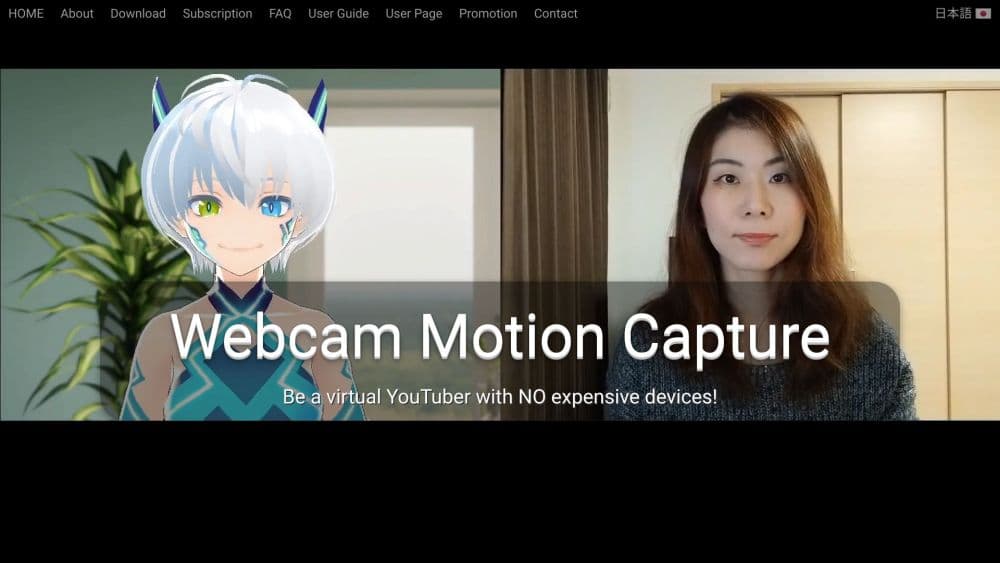
Webcam Motion Capture is Windows and Mac tracking software from KWCL that drives a 3D VTuber avatar with a plain webcam, covering hands, fingers, head, face, eyes, and upper body.
About Webcam Motion Capture
What Is Webcam Motion Capture
Webcam Motion Capture is a desktop app that reads your webcam feed and converts what it sees into avatar movement. You point a camera at yourself, the software tracks hands, fingers, head pose, facial expressions, eye gaze, blinks, lip sync, and upper body posture, and a separate receiver window shows the result on a 3D avatar.
KWCL, the Tokyo company behind it, launched the app in November 2021. The site reports more than 41,400 subscribers across 120 countries. That count comes from the vendor, so treat it as a marketing figure rather than an audited number.
The limitation sits in physics. A single camera sees one angle, so tracking quality depends on light, distance, and how much of your arms stay in frame. Rooms that are dim or cluttered produce shaky hands, and a webcam can't capture depth the way a VR tracker can.
Getting Started
- Download the Windows or macOS build from webcammotioncapture.info and unzip it. On Mac, right-click each app icon and choose Open the first time.
- Open both windows, Webcam Motion Capture for tracking and Webcam Motion Receiver for the avatar.
- Pick your camera at the bottom of the capture window, then set the resolution to 640x360 unless you're tracking the full body, where 1280x720 works better.
- Load a VRM avatar into the receiver, or keep the default model while you test the tracking.
- Add OBS Studio if you want to stream or record, hide the interface, and set a transparent background so your own scene shows through.
Product Information
A quick look at Webcam Motion Capture's pricing, supported platforms, and performance.
Best for
The users, tasks, and scenarios where this tool fits best.
Users
- VTubers starting without hardware
- Streamers who talk with their hands
- Animators testing scenes quickly
- Casual creators on modest laptops
Tasks
- Live streaming with a 3D avatar
- Adding hands to an existing rig
- Recording a motion clip for animation
- Loading a VRChat avatar into a stream
Scenarios
- A first VTuber live stream on a tight budget
- Remote collaboration with a phone as the camera
- Weeknight animation practice
- Podcast recording with a live avatar
Key features
Hand and Finger Tracking From One Camera
Webcam hand tracking is the reason most people find this app. It reads finger positions from a standard webcam, which means you can wave, point, and make small gestures without gloves or a depth sensor. The company says the tracking holds up when your hands move fast, and results improve a lot when your elbows and forearms stay visible.
Full Face Tracking With Perfect Sync Support
Beyond head rotation, the app reads facial expressions, eye gaze, and blinks, and it speaks the Perfect Sync format used by iPhone and iPad face tracking apps. If you already own one of those phones, pairing it with the desktop app gives much richer expressions than a webcam alone.
Upper Body Tracking
Shoulder and torso movement come through along with the hands, which keeps an avatar from looking stiff during long streams. It's the feature that separates this from face-only tools, and it's also the first thing to degrade in low light.
VMC Protocol Output
Tracking data can be sent to any app that supports VMC protocol, including VSeeFace, Virtual Motion Capture, and game engines through free Unity and Unreal plugins. That turns the app into an add-on for whatever avatar software you already use rather than a replacement.
FBX Export for Animation Work
For motion capture export, you can record a session and save it as an FBX file, which opens in Blender, Maya, and 3ds Max. For indie animators this is a low-cost way to capture reference motion, and the output needs cleanup before it looks like finished animation.
VRM and VRChat Avatar Support
The receiver loads standard VRM files, including characters made in VRoid Studio, and it handles VRChat avatars with custom shaders intact. Skin tone, outline settings, and toon shading survive the import, so your avatar looks the way it does in VRChat.
Free Tracking With a Paid Hide UI Option
Every tracking feature works without a subscription. Payment unlocks hiding the interface for streams and video, plus use of the tracking data in outside apps through VMC protocol or FBX. Referrals can offset that cost, since each new subscriber using your code earns a free month.
Pros and cons
Pros
- Cheap entry point: $1.99 a month for stream-ready output, and the free version already tracks hands and face.
- Broad app compatibility: VMC protocol support means it helps VSeeFace, Virtual Motion Capture, and engine plugins rather than competing with them.
- One-time payment path: prepaid plans cover 90 days, 360 days, or a lifetime license, and past subscription fees count toward the lifetime price.
- Commercial use allowed: streams, videos, animations, and games can be monetized, as long as you don't resell the app itself.
Cons
- Subscription for basic output: hiding the interface and sending data to other apps both require payment, so the free version can't power a public stream.
- Hardware-sensitive tracking: dim light, covered forearms, or an off-axis camera all hurt accuracy, and a slow PC forces lower resolution that costs precision.
- Depth is missing: one camera can't match VR trackers for full body or fast turns, and feet aren't tracked at all.
Frequently asked questions
The tracking features are free to use. A subscription at $1.99 a month unlocks hiding the interface for streams and videos, and lets you send data to other apps through VMC protocol or FBX export.
Related content
Explore related tools, skills, and articles for Webcam Motion Capture.
Webcam Motion Capture Alternatives

Google EmbeddingGemma 2
Google DeepMind · Writing · Image · CodingGoogle EmbeddingGemma 2 is a 740M-parameter open model that turns text, code, images, audio, and video frames into vectors in one 768-dimension space, running on phones and laptops.

Tractionwave
TractionWave · Image · MarketingTractionWave is an AI attention heatmap tool for static ads. Upload a PNG or JPG and it returns predicted attention, ranked hotspots, and fixes before you spend budget.

Imejis.io
Imejis.io · Image · MarketingImejis.io is an AI design studio for agents and marketing teams. Describe an image in plain words, and it writes the copy, builds the layout, reflows it to every size, then exports a finished file.