

Recipe Keeper: WhatsCook
Malupp GmbH · AI Assistant
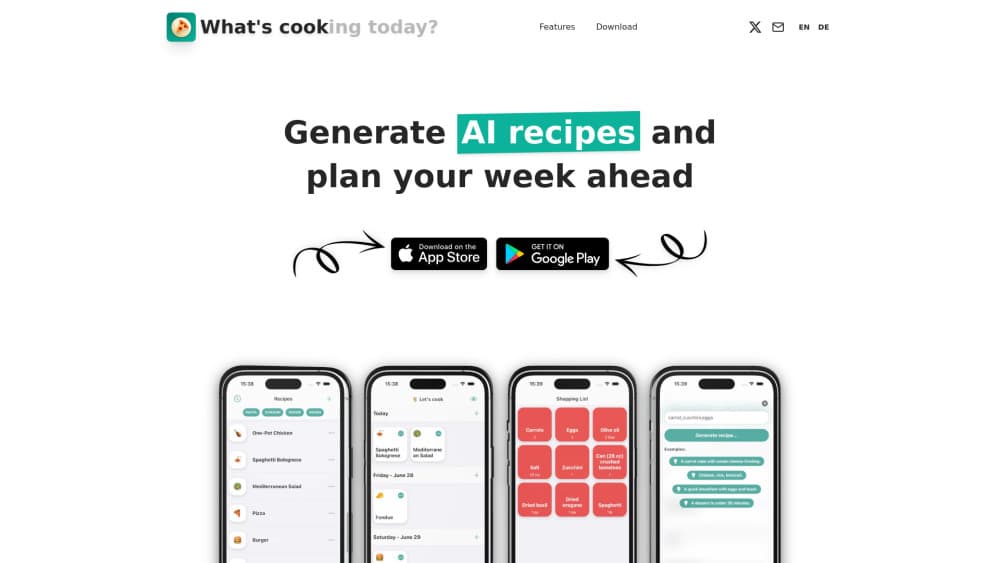
WhatsCook (My Recipe Keeper) is an AI recipe keeper and meal planner that imports recipes from links, photos or prompts, then builds your week and a sorted shopping list.
About Recipe Keeper: WhatsCook
What Is Recipe Keeper: WhatsCook
WhatsCook is a recipe organizer app for people who collect recipes faster than they cook them. You share a link from Instagram, TikTok or a food blog, snap a page of a cookbook, or type what you feel like eating. The app pulls out ingredients and steps and files the result in your own collection. It runs on iPhone, Android and in a browser, with one account across all three.
The pitch is not a bigger recipe database. It's the handoff between finding a recipe and putting dinner on the table. Most people keep saved posts in one place, a meal plan in another, and a shopping list on the back of an envelope. WhatsCook puts those three in the same app and lets a household share them.
The limits matter as much as the features. There's no free tier beyond a 7 day trial on the annual plan, the AI import works best on clean recipe pages, and everything depends on a connection for syncing. If you cook mostly from memory and hate subscriptions, this isn't the app for you.
Getting Started
- Create an account at web.whatscook.app or install the app from the App Store or Google Play.
- Start the 7 day trial on the annual plan if you want to test the full feature set.
- Share a recipe link to the app, photograph a cookbook page, or describe a dish and let the AI write it.
- Drop meals onto the week in the calendar view or the drag and drop list.
- Open the grocery shopping list app view before you leave for the store and tick items off as you shop.
Product Information
A quick look at Recipe Keeper: WhatsCook's pricing, supported platforms, and performance.
Best for
The users, tasks, and scenarios where this tool fits best.
Users
- Busy home cooks who plan dinners on Sunday and want the list ready before the shop
- Couples and flatmates who split cooking
- People with a folder of saved Instagram and TikTok food videos
Tasks
- Turning a food video into a written recipe
- Planning a week of dinners
- Building a grocery list from the plan
- Passing a family recipe to someone else
Scenarios
- Sunday evening planning with a laptop open and the phone on the counter
- Cooking a new dish on a Tuesday with one hand free
- Reproducing a dish from a cookbook you don't want to splash on
Key features
Save Recipes From a Link, a Photo or a Prompt
The import is the reason most people install WhatsCook. It's the fastest way to save recipes from Instagram, TikTok and food blogs in one place. Share a link from Instagram, TikTok, Pinterest or any cooking site and the AI extracts the ingredients and the method. A photo of a cookbook page works the same way, which is the part that saves real time if your shelf is full of old paperbacks. You can also describe what you want, like a quick chickpea curry with what's in the cupboard, and get a written recipe back. Imported recipes need a read through before you cook: user-written social captions often leave out times and quantities, and the app can't invent what isn't there.
A Meal Planning App You Can Rearrange
Two views, one plan. The calendar shows the week at a glance. The list lets you drag meals between days, and anything you haven't scheduled waits at the top until you find a slot. The toggle at the top right remembers which view you used last. This sounds small, and it is, but it's the difference between a planner you open and one you abandon after a week. Changes to a meal carry through to the shopping list without a second pass.
A Grocery Shopping List App That Writes Itself
Every meal in the plan feeds one list, and the list sorts items for the shop instead of dumping them in recipe order. Move a meal to Thursday and the list follows. Tick items off in the aisle, and the list keeps its state between trips. It doesn't order groceries for delivery or compare prices at different stores, so it replaces your notes app and not your supermarket.
One Shared Kitchen
You can invite the people you live with into the same kitchen. Everyone sees and edits the same recipes, the same weekly meal plan and the same list. That's a real fix for the household problem where one person plans and everyone else eats. Two people editing the list at once can overwrite each other's tick marks, so it works better when one person owns the shop.
Follow the Cooks You Know
This is the feature that separates WhatsCook from the usual cookbook app. You follow friends and family by @username, their recipes show up in a Following feed, and nothing is public until they approve you. Followers read your recipes, they can't change them. Copy one into your own collection and you keep your own notes on it.
Copies That Stay in Sync
When you copy a friend's recipe and they later change the original, you get a notification and one tap brings your copy up to date. Your own edits and notes stay put. It's a small piece of plumbing that solves an old problem: two versions of the same family recipe drifting apart for years.
Pros and cons
Pros
- Import from Instagram, TikTok and plain websites cuts the copy and paste work that makes recipe collecting tedious.
- Plan and shopping list stay linked, so moving a dinner updates the ingredients you need.
- The shared kitchen is genuinely useful for couples and flatmates, not a bolted on social feed.
- Following people you actually know is more useful than browsing a public recipe wall.
- Browser access covers planning on a laptop without another install.
Cons
- No lasting free tier: after the 7 day trial, the annual plan is the only way in, which rules it out for casual users.
- Imported recipes from social captions often need manual cleanup of quantities and cooking times.
- Simultaneous edits on a shared list can clash, so a household needs one person shopping at a time.
- No public API and no export path worth relying on, so your collection lives inside the app.
Frequently asked questions
No. The app is free to download and the annual plan comes with a 7 day free trial, then it's a paid subscription. There's no ad-supported free tier, so you'll know within the trial week whether the import and planner earn their keep.
Related content
Explore related tools, skills, and articles for Recipe Keeper: WhatsCook.
Recipe Keeper: WhatsCook Alternatives
Agibot
Agibot · Productivity · AI Assistant · ChatbotAgibot is a personal AI agent for Mac that keeps running after you close the window, runs routines on a schedule, and works from Telegram or Slack with your own API keys.

Foley
Hanamori Labs, LLC · Voice & Language · Productivity · AI AssistantFoley is a voice to-do list that turns a spoken sentence into a filed task, complete with project, date and time, then helps you plan the day around what is already there.

Ghost Core
Ghost · Productivity · AI AssistantGhost Core is a $3,499 screenless personal AI computer that runs local AI models on its own hardware, builds context from your apps and devices, and acts without waiting for a prompt.