
Whistle
Vogelhaus Apps GmbH · AI Assistant
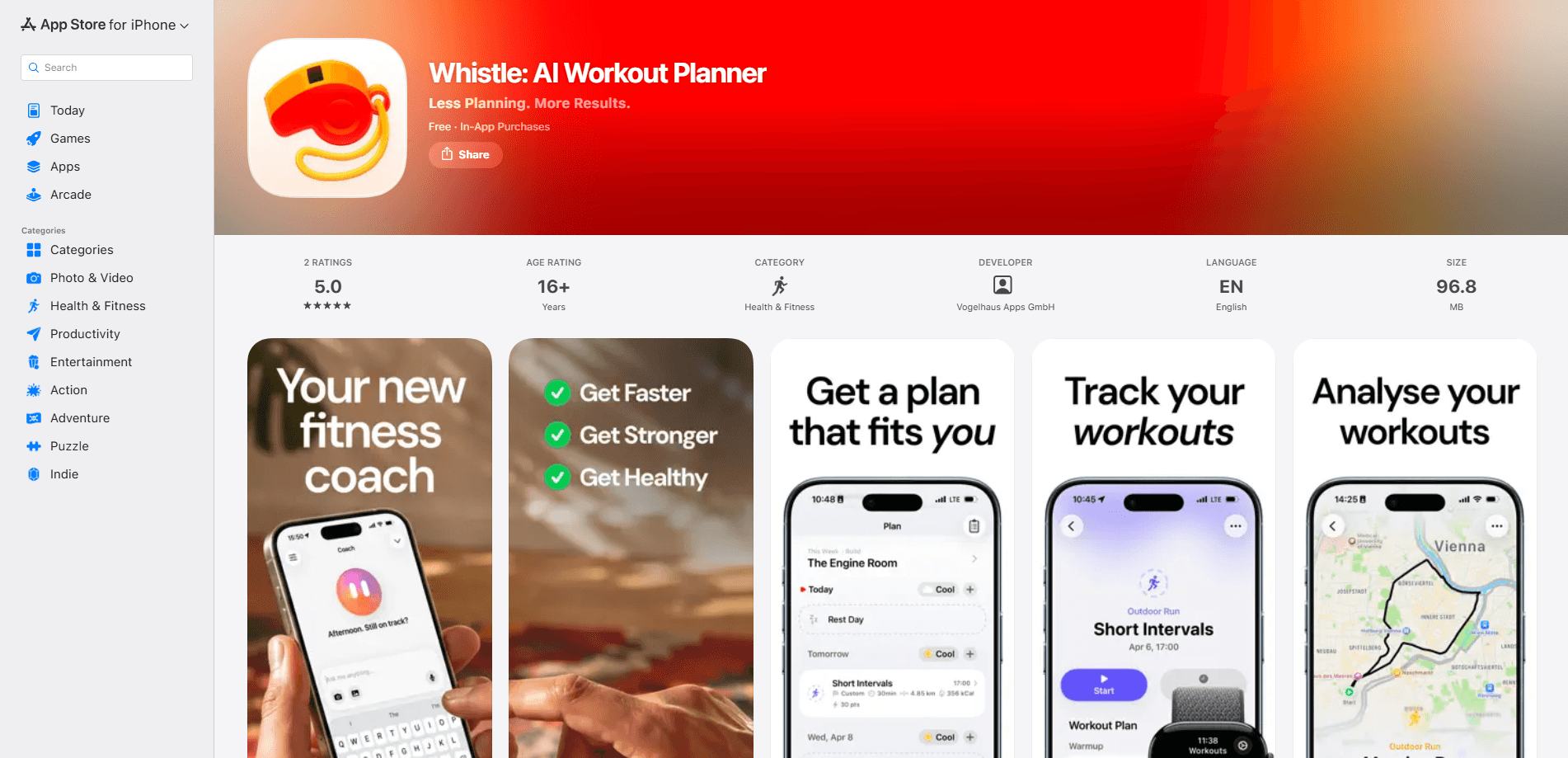
Whistle is an AI workout planner for iPhone, iPad, and Apple Watch that builds structured training plans around your goals, schedule, and Apple Health data. It covers running, cycling, swimming, and strength work, adjusts when your week falls apart, and shows how your training load and recovery are tracking over time. If you've been piecing workouts together from a spreadsheet or a stack of screenshots, this is the app that does that thinking for you. No more guesswork.
About Whistle
What Is Whistle
Whistle is a training planner built by Vogelhaus Apps GmbH for people who want a structured plan without a human coach checking in every week. You tell it what you're training for, and it turns your goals, available time, recent workouts, and recovery data into a week-by-week program. The AI coach sits on top of that plan. You can ask it to build a training week, swap a workout, or explain what your overnight vitals are telling you.
It's an adaptive training plan at heart, not a static PDF you print once and abandon. The app leans on Apple Health, so the more you share, the more personal the guidance gets. Training load, recovery, sleep, and heart rate flow into the planning instead of sitting in a separate dashboard you never open. That's the whole point.
There's a real limit worth knowing before you start. Some features sit behind the Pro and Ultra tiers, and health, weather, watch, and AI features depend on your device, permissions, region, and whether the data is actually there. A first-generation Apple Watch won't cut it here. A stale Health history gives the coach little to work with. Check your setup first.
Getting Started
- Download Whistle from the App Store and open it on your iPhone or iPad.
- Walk through the guided setup and tell the app what you're training for, plus how many days a week you can realistically train.
- Grant Apple Health access for workouts, activity, heart rate, sleep, and vitals so the coach has context to work with.
- Ask your coach to build a training week or a longer program, then adjust any session to fit your schedule.
- Send planned workouts to your Apple Watch and start them from your wrist when you head out.
Product Information
A quick look at Whistle's pricing, supported platforms, and performance.
Best for
The users, tasks, and scenarios where this tool fits best.
Users
- Runners training for a specific race
- Cyclists and triathletes juggling three sports
- Busy people with unpredictable weeks
Tasks
- Building a structured training week
- Reusing sessions you like
- Reviewing progress over time
Scenarios
- Planning outdoor sessions around the weather
- Checking readiness before a hard session
- Tracking training load across a build phase
Key features
AI Coach That Understands Your Week
The coach is the center of the app. Ask it to build a training week, create a longer program, adjust a single workout, or explain what your body is telling you. It pulls from your goals, schedule, recent workouts, recovery, sleep, vitals, and local weather, so the answers reflect your actual situation instead of a generic template. If life interrupts, you can reopen the conversation and reshape the week. No guessing required.
Training Programs, Not Just Single Workouts
Whistle starts with a guided setup that asks what you're training for, then hands back a structured program you follow week by week. Already committed to a plan from somewhere else? You can bring that structure into Whistle and let the coach help keep it organized. It's built for the people who need a season-long arc, not a one-off workout. That distinction matters.
Flexible Workout Planning
Plan for today, the week ahead, or a longer training block. Sessions include warmups, intervals, targets, cooldowns, and activity-specific goals, and you can save the good ones as templates. That matters when you're repeating a weekly interval set and don't want to rebuild it from scratch each time. Build once. Reuse often.
Training Load and Context
Raw metrics only tell part of the story, so Whistle processes your health and workout data into higher-level signals like training load and projected load. You can see how much work you're absorbing, how planned workouts will shape the week, and where recovery, sleep, and overnight trends sit. It works as a training load tracker across a build phase. The goal is a training decision you can act on, not a wall of numbers.
Apple Watch Workouts
Send planned workouts to Apple Watch and start them from your wrist. Whistle also works with Apple's Workout app experience, so sessions fit into the tools you already use rather than demanding a new habit. After a session you can review distance, duration, effort, heart rate, pace, power, and elevation, plus how the session compares to your usual training. Data you can actually use.
Weather-Aware Planning
Multi-day forecasts feed into the plan, so you can spot the best slots for outdoor running or cycling before committing. It's a small thing that saves you from scheduling a long ride into a washout. Small things add up.
Privacy-First Design
No account is required. Your workout and health data is stored locally and in your personal iCloud where possible. When cloud processing is needed for an AI task, Whistle uses only the data required for that task instead of building a long-term personal profile on its servers. The app states clearly that it offers training insight, not medical advice. Worth repeating.
Pros and cons
Pros
- The AI coach uses real context like recovery, sleep, and weather, so guidance reflects your week rather than a fixed script.
- One planner covers running, cycling, swimming, and strength, which cuts down on app-hopping for multi-sport athletes.
- Apple Watch integration sends workouts straight to your wrist and works with the Workout app you already know.
- Privacy-first setup with no account required and local or iCloud storage for health data.
- Smooth handling of missed sessions: the plan reshuffles around what you can actually do. Nothing lost.
Cons
- Several features sit behind the Pro and Ultra tiers, so the free experience is limited.
- It's Apple-only. There's no Android version, which rules it out if you're on anything but iPhone, iPad, or Apple Watch.
- The coach is only as good as your Health data. Sparse history or denied permissions weaken the guidance.
- No public API, so you can't wire Whistle into your own dashboards or tools.
Frequently asked questions
Whistle builds structured training plans for running, cycling, swimming, and strength work, then adapts them as your week changes. An AI coach sits on top to answer questions, adjust workouts, and explain your training data.
Related content
Explore related tools, skills, and articles for Whistle.
Whistle Alternatives

Iplan AI
Iplan AI · Productivity · AI AssistantIplan AI is an AI travel planner that turns a few trip details into a full day-by-day itinerary in seconds. You answer questions about your destination, interests, budget, and travel companions, and the tool builds a plan you can edit, share, and carry with you on any device. It targets travelers who want a solid draft without spending hours in spreadsheets and browser tabs. Think of it as an itinerary generator that does the tedious part for you.

Screenhelp
Screenhelp · Productivity · AI AssistantScreenhelp is an AI screen assistant that turns a single keyboard shortcut into real-time help. You press Ctrl+Shift+Space, it captures what's on your screen, and it streams an answer into a private panel in about two seconds. Think of it as an AI screenshot helper you trigger on demand. It runs on Mac, Windows, and the web, starts free with 30 answers a month, and stays invisible during screen sharing on Zoom, Teams, and Google Meet.

Rainbow
Rainbow · AI AssistantRainbow is an AI weather forecast app built around short-term precipitation nowcasting. Its engine pushes min-by-min rain and snow predictions up to four hours ahead, blending live satellite and radar feeds into hyperlocal forecasts. The app adds live rain radar, a seven-day outlook, precipitation alerts, home-screen widgets, and a hurricane tracker, and it runs on both Android and iOS with a free tier plus paid upgrades.