

WindyFlo
Hamadalabs Inc. · Coding · Other
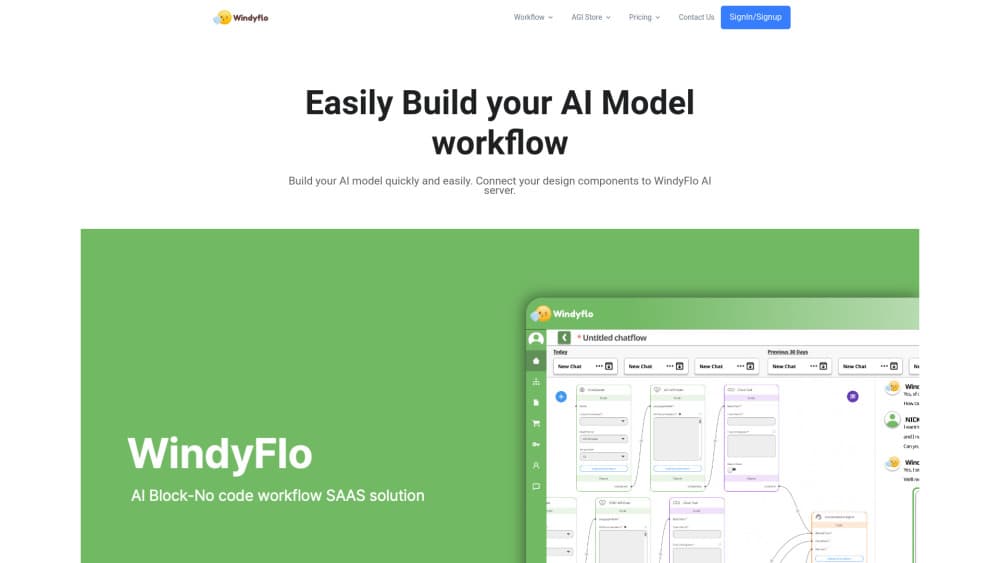
WindyFlo is a no-code AI pipeline builder from Hamadalabs. You drag node blocks into a visual workspace, test the flow, then ship it as an API call or an embedded chatbot.
About WindyFlo
What Is WindyFlo
WindyFlo is an AI pipeline engineering platform that turns a chain of model calls into something you can build on a canvas. The company behind it is Hamadalabs Inc. The pitch is narrow and clear: if your site needs a document Q&A bot, a support assistant, or a CSV analysis tool, you shouldn't have to stand up servers and write glue code first.
An AI pipeline is the sequence of steps between a user request and a finished answer. WindyFlo splits that sequence into nodes. You pick a loader, a model call, a formatter, connect the outputs to the inputs, and run it. The platform hosts the compute, so you don't rent infrastructure for a prototype that might get ten users.
The limits show up early on the pricing page. The free tier caps you at three private pipelines and blocks ChatGPT and Claude API calls entirely. Paid tiers meter model calls per day, not per month. That's worth knowing before you plan a launch.
Getting Started
- Create an account at windyflo.com, then open My Pipelines and click Create Pipeline.
- Fill in the pipeline name, description, and tags, then choose public or private visibility.
- Click Add Node, drag the blocks you need onto the workspace, set their parameters, and connect matching input and output types.
- Click Save, then Run, and type a test command to check the output.
- Share the result as an API snippet in HTML, React, Python, JavaScript, or CURL, or publish it as a chatbot with a custom title and welcome message.
Product Information
A quick look at WindyFlo's pricing, supported platforms, and performance.
Best for
The users, tasks, and scenarios where this tool fits best.
Users
- Product managers
- Founders validating an idea
- Developers prototyping
Tasks
- Building a document retrieval Q&A bot
- Running a CSV agent
- Launching a support chatbot
Scenarios
- A marketing site that needs an assistant for pricing and policy questions, with answers drawn from your own pages.
- An internal tool team that wants a searchable knowledge base before the next planning cycle.
- A small business testing whether customers will use an AI chat window at all, before paying for a custom build.
Key features
Drag and Drop Pipeline Canvas
The workspace is the product. You search for a node, drag it onto the canvas, and wire outputs to inputs of the same type. There's no YAML file and no deployment script. For anyone who has spent a weekend fighting container configs, this is the part that sells the tool.
Node Configuration Without Code
Each node exposes its own parameters in a side panel. Model choice, prompts, and data handling live there, so changing behavior means editing a field, not a file. The tradeoff is that you work inside the node types WindyFlo ships.
Pipeline Hub and Forking
Pipeline Hub is a public library of pipelines you can search and fork. Forking copies the structure into your account, and you customize from there. It's the fastest path for a beginner who wants a document retrieval Q&A bot without designing the graph from scratch.
One-Call Deployment
Once a pipeline passes a test run, WindyFlo generates a code snippet for it. You pick HTML, React, Python, JavaScript, or CURL and paste the call into your service. Once it's saved, you can deploy AI model API access with one paste, and the hosted endpoint means you don't manage a backend for the model side.
Embeddable AI Chatbot
Any pipeline can also run as a chatbot on a shareable link, which turns an AI chatbot embed into a copy-paste job. You set the title and welcome message, launch it in a new tab, and test with real questions. Small teams use this as a stopgap while the real interface is being built.
Model Swapping and Version History
Changing the underlying model takes a few clicks instead of a code rewrite. Paid plans add version history, so you can compare what changed between iterations. Private messages keep internal test conversations out of public view.
Pros and cons
Pros
- No infrastructure to provision, which removes the usual first week of setup.
- Test runs happen inside the editor, so you see the output before you deploy.
- Public pipelines give you a working starting point for common jobs like document Q&A and CSV queries.
- The generated API snippets cover five common languages and frameworks.
- Pricing steps up in clear increments, from a free tier to a $130/mo team plan.
Cons
- The free plan blocks ChatGPT and Claude API calls, so you can't judge real model quality until you pay.
- Daily call caps of 50, 80, or 300 per day will throttle anything with steady traffic.
- Solo plans allow one user, so a second collaborator pushes you to the Team tier.
- Building outside the shipped node types means writing code elsewhere, which undercuts the no-code promise for unusual workflows.
Frequently asked questions
WindyFlo builds AI features that live inside a website or app. Typical jobs are a document retrieval Q&A bot, a conversational support agent, and a CSV agent that answers questions about spreadsheet data.
Related content
Explore related tools, skills, and articles for WindyFlo.
WindyFlo Alternatives

Udon
Udon · Coding · ProductivityUdon turns an Apple Silicon Mac into a home server you run from a browser, with container controls, file shares, and an optional AI sysadmin.

offstage
offstage cloud · Coding · Productivityoffstage gives AI coding agents and CI jobs a real Mac: a fresh macOS account on Apple silicon, driven over an API and billed by the second.

BotBus
Chengdu Tuyang Tusen Technology Co., Ltd. · Coding · ProductivityBotBus lets you control AI coding agents from your phone and watch: approve commands, start tasks and read results while the code stays on your desktop.