

Withkumo Com
Kumo · Business
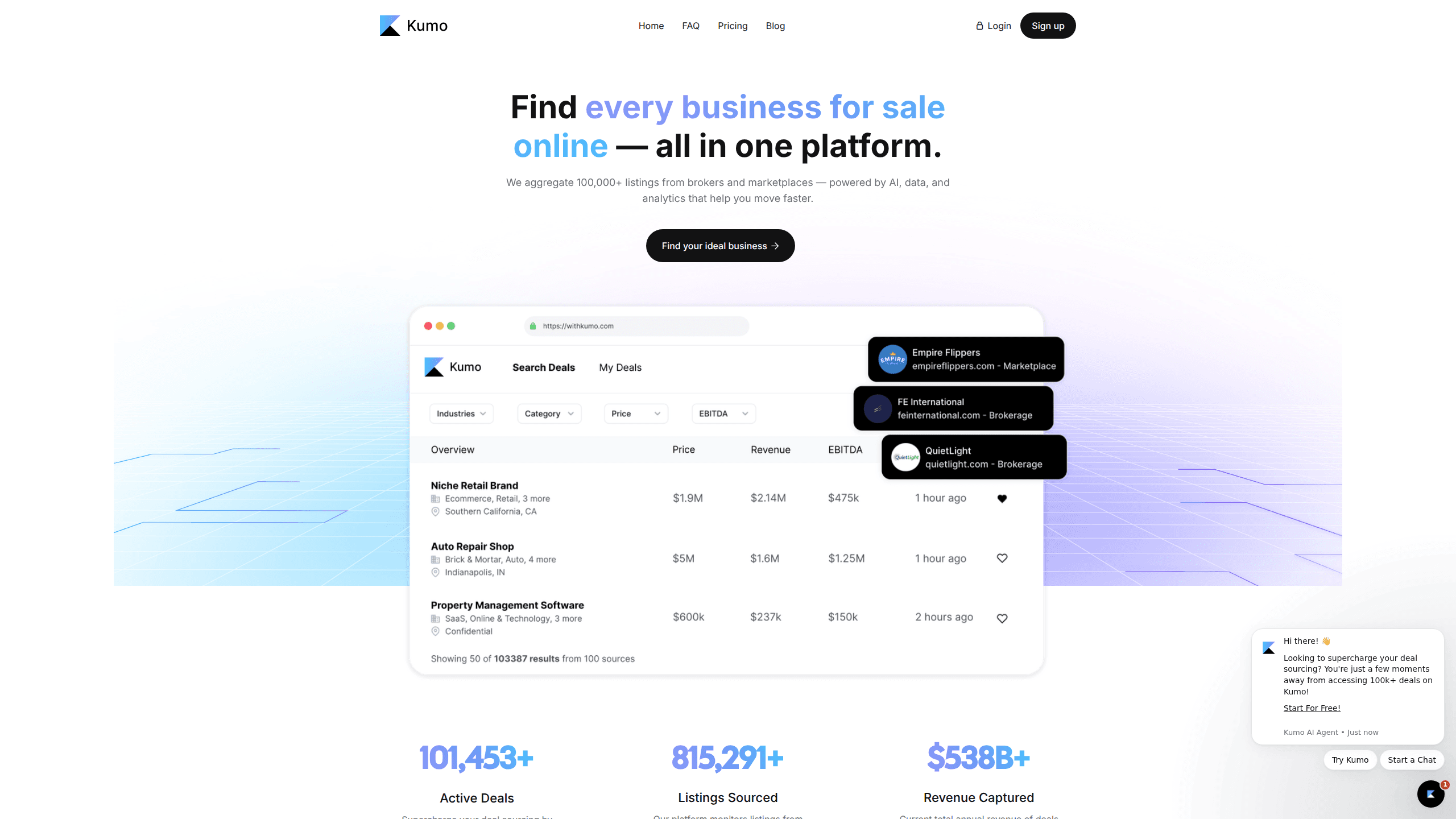
Withkumo Com, better known as Kumo, is a deal sourcing platform for people who want to buy a business. It pulls listings from thousands of marketplaces, brokerages, and proprietary sources, cleans the messy descriptions with AI, and merges duplicates so you see one clean opportunity instead of five copies of the same one. The pitch is simple: spend less time hunting through listing sites and more time talking to sellers.
About Withkumo Com
What Is Withkumo Com
Kumo is a search and screening tool for business acquisition. If you're trying to buy a small business, an online store, or a service company, your first problem isn't negotiating, it's finding enough deals worth looking at. Listings sit scattered across BizBuySell, broker sites, and niche marketplaces, each with its own format and its own jargon. Kumo collects them in one place and runs AI over the text to produce short, readable bullet points about each one. That's the whole idea. Less scrolling, faster decisions. That's the promise anyway.
As business acquisition software, its real value is scale. The platform currently tracks over 101,000 active deals, and that number matters more than any feature list. Deal flow is the bottleneck in acquisition. With roughly $2 billion in combined annual revenue flowing through the listings it captures, Kumo gives buyers of every size and industry a starting pool to filter down from.
The catch is scope and depth. Kumo is a sourcing and screening layer, not a full due diligence suite. The deeper financial analysis tools, like DealScreen.ai, sit in the top tier, and some features, including BuyerProfile, are still marked beta. The free plan only shows deals older than 30 days, so if you're serious about moving fast, you'll end up paying. There's no way around it.
Getting Started
- Create a free account on the Kumo app (no credit card needed for the Basic plan).
- Save up to two customized searches that match your target industry, size, and location.
- Browse the cleaned-up AI summaries and use Mini Screens to pull industry insights on any deal that interests you.
- Upgrade to Pro when you want real-time access to all 100,000+ deals plus broker contact info.
- Reach out to brokers and sellers directly, then move into deeper financial review if the deal holds up.
Product Information
A quick look at Withkumo Com's pricing, supported platforms, and performance.
Best for
The users, tasks, and scenarios where this tool fits best.
Users
- First-time acquisition buyers
- Search fund operators and serial buyers
- Small business owners expanding through acquisition
Tasks
- Finding businesses for sale in a specific industry
- Screening deal flow quickly
- Tracking a listing's changes over time
Scenarios
- Starting a weekend research session on acquisition targets
- Running a serious, time-boxed acquisition search
- Preparing to negotiate with a broker
Key features
Aggregated Listings from Thousands of Sources
Kumo monitors listings from thousands of brokers and marketplaces, then merges duplicates so a single business doesn't show up several times under different titles. For buyers, this means one searchable pool instead of a dozen browser tabs. The platform reports 101,453+ active deals at the time of writing. That's a lot of ground to cover. Checking it all by hand is a losing game.
AI-Cleaned Listing Summaries
Raw business listings are full of vague, jargon-filled descriptions that make it hard to tell what a company actually does. Kumo runs each listing through AI and condenses it into clear bullet points, so you can judge whether a business is worth a closer look without parsing a wall of text. This is the feature that separates it from plain listing aggregators. It works, and it saves real time. Why waste hours reading listings that aren't a fit?
AI-Powered Cross-Platform Deal Matching
When new listings appear, Kumo uses AI to match them against your saved searches and interests. You get relevant deals surfaced without manually re-running the same query. It's a small time saver that adds up if you're watching multiple industries at once. Small edge, real payoff.
Mini Screens
Mini Screens give you deal-specific industry insights on demand, and the free plan includes unlimited use of them. If you don't know much about a niche, this is a fast way to get context before reaching out to a seller. It won't replace real diligence, but it saves the first round of Googling. Not bad for free.
Deal History Tracking and Analytics
Available in the top tier, this tracks changes made to a listing over time, including price changes. If you've been watching a target drop its asking price, you'll see the trail. It's a useful signal about seller motivation. Watch it closely.
DealScreen.ai Analysis
This AI deal analysis tool, bundled with the highest plan, reads confidential information memorandums and financials. It helps normalize SDE and stress-test scenarios, which shrinks the manual spreadsheet work in early-stage diligence. It's a screening tool, not a substitute for an accountant.
BuyerProfile and BuyerFit Scoring
BuyerProfile lets you build a professional profile that brokers and sellers can see, and the beta BuyerFit Scoring system rates deals against that profile. The idea is to help you stand out and focus on deals where you're a strong fit. Both are still in beta, so expect rough edges. Test them early.
Saved Searches and Deal Alerts
Pro and up let you save unlimited searches and add custom notes to deals. Daily or weekly email alerts bring new listings to you instead of you checking the site. Combined with basic pipeline management, it turns Kumo into a lightweight acquisition workflow rather than just a search box. Set it up once. Let it work while you sleep.
Pros and cons
Pros
- One feed for 100,000+ deals that would otherwise be scattered across many sites.
- AI summaries cut screening time significantly compared with reading raw listings.
- A genuinely useful free tier that needs no credit card, so you can test it before paying.
- Broker contact info and pipeline tools at the Pro level make it workable as a daily driver.
Cons
- The free plan hides deals newer than 30 days, so the most time-sensitive opportunities are locked behind a paid tier.
- Key features like BuyerProfile and BuyerFit Scoring are still beta, which means behavior can change and bugs happen.
- No public API, so it won't plug into your own tools or automation without workarounds.
- Deeper financial analysis is limited to the top $200/mo tier, which is a steep jump for buyers who only need screening.
Frequently asked questions
It's a deal sourcing platform for buying a business. It gathers business-for-sale listings from many sources, cleans them up with AI, and lets you search and screen them in one place. Think of it as a search engine built for acquisition rather than a marketplace where you transact.
Related content
Explore related tools, skills, and articles for Withkumo Com.
Withkumo Com Alternatives
Liveplan
Palo Alto Software · BusinessLivePlan is business plan software that helps founders and small business owners turn an idea into a funder-ready plan. It combines AI-assisted writing, market research with cited sources, and connected financial forecasting so your income statement, cash flow, and balance sheet move together when you change one number. Over 1.5 million businesses have used it to plan, forecast, and track performance against real accounting data. That's a lot of founders. It's also a signal the tooling survived contact with real lenders.

Swms
Swms AI · Writing · Productivity · BusinessSwms is an AI safety compliance tool that turns a plain description of a job into ready-to-use safety documents. Describe your project, trade, and known hazards, and it writes a safe work method statement, job hazard analysis, safe work procedure, RAMS, or safety data sheet in seconds. It also ships with Oscar, a chat assistant that answers workplace safety questions in any language. Teams in construction, mining, transport, and warehousing use it to cut the paperwork that usually eats into a workday.

Rows
Rows (Superhuman) · Productivity · BusinessRows is an AI spreadsheet and data analysis tool that imports live data from more than 50 sources, then lets you work with it using plain language instead of SQL queries or nested formulas. You can pull numbers out of PDFs, connect ad platforms, databases, and bank accounts, and ask the AI to build reports, merge datasets, or set up models that recalculate themselves. It runs in the browser, works like a spreadsheet, and now sits under the Superhuman umbrella.