

WorkbookPDF
Marc Lou · Productivity · Leaning
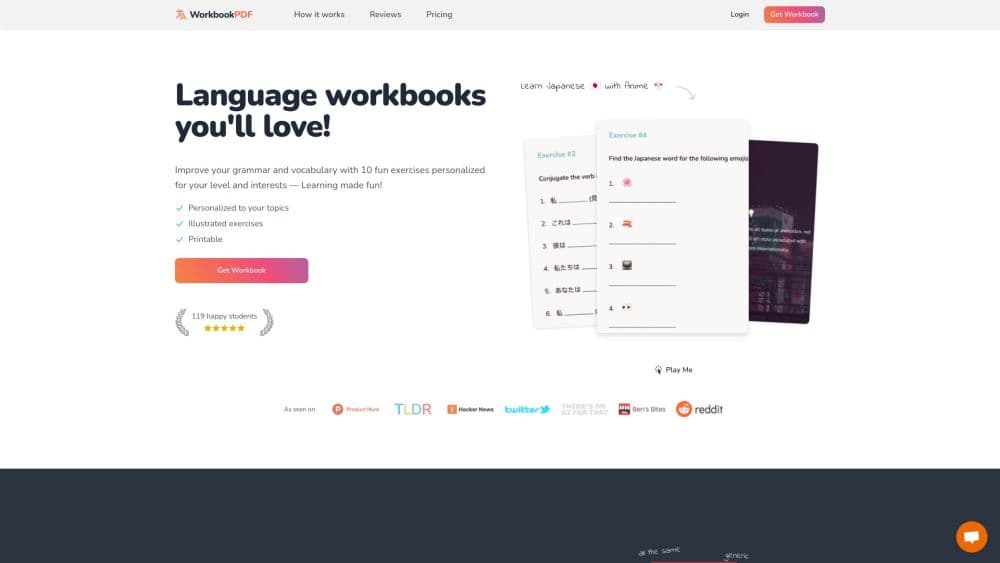
WorkbookPDF is an AI language workbook generator that turns a topic and a CEFR level into a printable PDF with grammar and vocabulary exercises plus answer keys.
About WorkbookPDF
What Is WorkbookPDF
WorkbookPDF is a web tool that writes language practice material on demand. You name the language you're studying, set a level from A1 to C2, and describe a topic you actually care about. It returns a PDF of exercises built around that topic, mixing fill in the blanks, multiple choice, translation, and word matching, with every answer collected at the back.
The problem it solves is generic material. Most free worksheet packs cover the same textbook themes, so you end up drilling the words for train stations when you wanted the vocabulary of ceramics or basketball. Here the topic drives the words and the level drives the grammar, so one format works for a beginner and for someone brushing up at C2.
Two limits matter before you pay. Workbooks are practice, not a course: there are no rule explanations and no tutor feedback. A pass also buys a window for creating workbooks rather than permanent access to the generator, so unlimited files last as long as the pass does. Files you already downloaded keep working after it ends.
Getting Started
- Open workbookpdf.com and create an account with Google or an email address.
- Download a free sample workbook first if you want to see the exercise style before buying.
- Choose the target language, set the level, and describe your topic in the topic field.
- Generate the workbook, skim the pages, then download the PDF. Print it or open it on a tablet.
Product Information
A quick look at WorkbookPDF's pricing, supported platforms, and performance.
Best for
The users, tasks, and scenarios where this tool fits best.
Users
- Independent learners who already follow a course
- Tutors and language teachers
- Parents helping a child with a second language
- Travelers preparing for one specific trip
Tasks
- Drilling a single grammar point
- Building vocabulary around a hobby
- Producing printable homework
- Practicing translation
Scenarios
- A two-hour study session away from screens
- A long flight or a daily commute
- A classroom warm-up
Key features
Topic-Driven Workbooks
You type the subject and the vocabulary follows. A workbook about French pastry or Korean pop uses words from that field rather than a generic unit on family and weather. That's the difference between this AI worksheet generator and a printed workbook series, where the syllabus is fixed before you arrive, and it's why the output reads as personalized language worksheets rather than a course book.
Level Control Across the CEFR A1 to C2 Scale
The level selector follows the Common European Framework, so the same topic yields short sentences at A1 and subordinate clauses at C2. If you sit between two levels, take the lower one first. A workbook that's too hard burns the pass window and teaches little.
Several Exercise Formats in One File
Fill in the blanks, multiple choice, true or false, translation, word matching, emoji vocabulary, and negation drills can all appear in the same workbook. Mixing formats keeps a long session from turning into the same task seven times.
Answer Keys at the Back
Every exercise set ends with answers, which is what makes the format work without a teacher. You attempt a page, then check it right away. For self-study that loop matters more than the exercise design, because mistakes get corrected while the rule is still fresh.
A Printable Language Workbook
Output is a PDF, so it prints cleanly and opens on a phone, tablet, or laptop without an app. Print one copy for a child and keep the file for later. Sending a copy to a friend costs nothing extra.
23 Target Languages
The list runs from Spanish, French, and Japanese to Ukrainian, Hindi, Thai, and Taiwanese. The less common options are the real draw, since most worksheet publishers stop at five or six languages and rarely cover Afrikaans or Romanian at several levels.
Pros and cons
Pros
- Custom topics beat generic worksheets: the vocabulary matches what you're studying, which makes new words easier to retain.
- One tool covers beginners and advanced learners: A1 through C2, with grammar that shifts to match the level.
- A printable language workbook that works offline: the downloaded PDF needs no account, no app, and no connection.
- Answers included: self-checking works without a tutor, and a parent can hand over a page without preparing it first.
- Wide language list: 23 options include Ukrainian, Thai, and Taiwanese, which most worksheet sites skip.
Cons
- Access is time-limited: a pass runs for 7, 30, or 180 days, and new workbooks stop when it ends, so a slow learner may need a second pass.
- No placement test: you pick the CEFR level yourself, and a wrong guess produces either baby exercises or pages above your head.
- Practice only, no instruction: there are no grammar explanations, so the workbook assumes you studied the rule somewhere else.
- Commercial use costs extra: teachers who reuse exercises with students pay $9 per workbook on top of the pass.
Frequently asked questions
WorkbookPDF is a web tool that generates language practice workbooks as PDFs, built around a topic and a CEFR level you choose. Each file contains grammar and vocabulary exercises with answers at the end.
Related content
Explore related tools, skills, and articles for WorkbookPDF.
WorkbookPDF Alternatives

Base Code
Base44 (Wix) · Coding · ProductivityBase Code is a shared cloud development environment from Base44. Teammates describe changes to an existing GitHub codebase in chat, preview them live and send them back as pull requests.

Knocket
Knocket (Tencent RTC team) · Productivity · Business · ChatbotKnocket is a free live chat and contact page tool that lets visitors message you from your website, app, or a shareable link, with every reply handled from Telegram or one inbox.

FloorGen
Vinit Kumar (FloorGen) · Productivity · China AIFloorGen is a browser-based floor plan maker that turns a sentence or a sketch into an editable 2D plan and a 3D walkthrough. Export to PDF, DXF or video, and draw without an account.