
Workdiary
Workdiary · Productivity
Workdiary is a career tracking app that records achievements, goals and projects as you work, then uses AI to shape them into review and interview material. Free, with your own API key for AI.
About Workdiary
What Is Workdiary
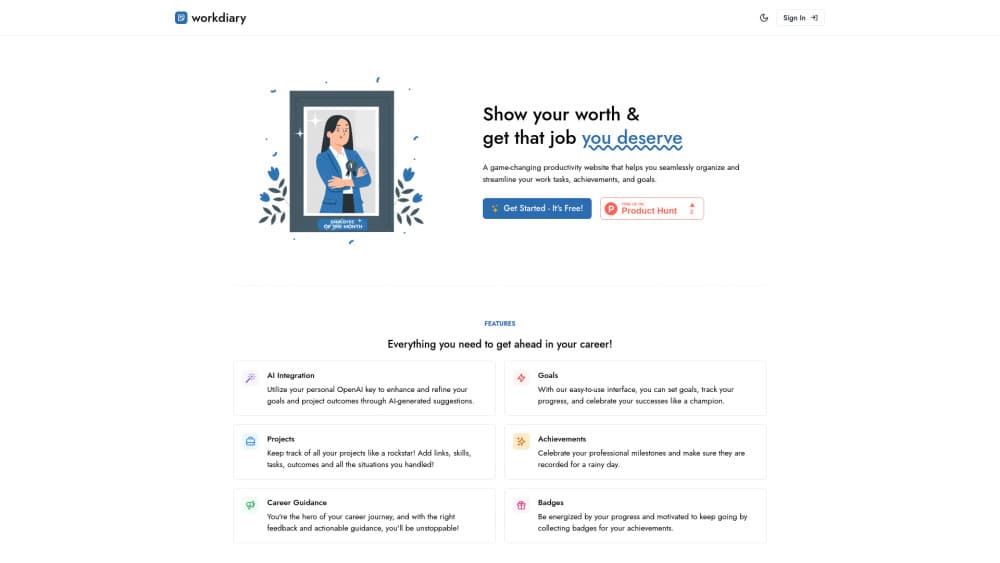
Workdiary is a browser-based work journal for people who want a reliable record of what they actually did. You log roles, goals, projects and wins in one place, and the app keeps them sorted by date and career stage instead of leaving them scattered across notes apps and old emails.
The problem it solves shows up at review time. Most people remember the last three weeks of work and forget the nine months before that. Workdiary asks you to capture projects with their outcomes and achievements as they happen, so the evidence is already there when you need to argue for a raise, a promotion or a new job.
The AI side is optional and deliberately hands-off. A copilot lets you pick the education, projects, goals, achievements and career entries you want included, then writes summaries and analysis from that selection. You supply your own API key, and the site says it doesn't store the data sent to the model.
The limits are worth knowing up front. Workdiary doesn't manage your tasks or your calendar, so it won't replace a to-do app. Everything lives in a browser, and there's no native mobile app listed on the site. AI features also depend on a third-party key and whatever that provider charges.
Getting Started
- Open workdiary.app and create an account. The site says setup takes about two minutes.
- Add your current role and the responsibilities that come with it.
- Log a project with links, skills, tasks and the outcome, then add any achievement you want to keep.
- Set a few goals with target dates and pick a weekly or monthly slot to update progress.
- Paste your own API key into the AI settings, select the entries you want used, and ask the copilot for a summary.
Product Information
A quick look at Workdiary's pricing, supported platforms, and performance.
Best for
The users, tasks, and scenarios where this tool fits best.
Users
- Individual contributors building a case for promotion
- Managers who run one-on-ones
- Career changers
Tasks
- Writing a self-review
- Building a promotion portfolio
- Preparing for an interview
- Setting career goals
Scenarios
- End of quarter, when the review form is due and your memory is fuzzy
- Active job search
- First 90 days in a new role
Key features
Career Timeline
Workdiary keeps a running view of your roles, the responsibilities attached to each one, and how your position changed over time. You can look back at a year of work and see the arc rather than a pile of separate entries. That matters when you need to explain a promotion or a lateral move in a couple of sentences.
Goals With Progress Tracking
You set goals, attach them to a timeframe, and update progress as you go. The app treats goals as living records rather than a one-time checklist, so a goal you abandoned in March still shows the reasoning behind it. Reviews and one-on-ones get easier when both sides can see the same history.
Project Records With Outcomes
Each project can hold links, skills, tasks and the result it produced. That structure pushes you to write down what changed because of the work, which is the part most people leave out. It also makes the achievement tracker useful for resumes, since you get numbers and context in the same place.
Achievement Log and Badges
Small wins get their own entry, and the badge system gives you a reason to keep logging them. Over a year, those entries turn into a promotion portfolio you can filter by project, skill or date. The value is in the accumulation, not in any single entry.
AI Copilot on Your Own API Key
The copilot reads only the items you select, then writes summaries, insight lists or analysis from them. You bring the key from a model provider, and the site says the data isn't stored on its side. That setup keeps the AI career insights cheap to run, but it also means you handle billing and key security yourself.
Review and Interview Write-Ups
The copilot can shape a set of entries into a review narrative or a set of interview answers. It's aimed at performance review prep rather than general chat, so the output tends to stay close to the facts you recorded. Expect to edit the draft. The raw material is yours, the phrasing is a starting point.
Pros and cons
Pros
- The free plan covers the core tracking features, so you can test the habit before paying anything.
- Project entries combine links, skills, tasks and outcomes in one record, which cuts down on scattered notes.
- Bring-your-own-key AI keeps model costs transparent and lets you pick the provider you trust.
- Achievements stay dated and searchable, which is exactly what performance review prep needs.
- The interface stays close to a diary, so logging an entry takes less effort than filling out a spreadsheet.
Cons
- No task management or calendar sync, so you still need a separate tool for daily planning.
- The AI features stop working without a valid API key, and setup assumes you know where to get one.
- Browser-only access means no offline mode and no native mobile app for quick capture on the go.
Frequently asked questions
It's a work journal for recording projects, goals, achievements and career history, then turning that record into material for reviews, promotions and interviews. Think of it as a paper trail you build on purpose.
Related content
Explore related tools, skills, and articles for Workdiary.
Workdiary Alternatives

Udon
Udon · Coding · ProductivityUdon turns an Apple Silicon Mac into a home server you run from a browser, with container controls, file shares, and an optional AI sysadmin.

offstage
offstage cloud · Coding · Productivityoffstage gives AI coding agents and CI jobs a real Mac: a fresh macOS account on Apple silicon, driven over an API and billed by the second.

BotBus
Chengdu Tuyang Tusen Technology Co., Ltd. · Coding · ProductivityBotBus lets you control AI coding agents from your phone and watch: approve commands, start tasks and read results while the code stays on your desktop.