

WriterZen
WriterZen · Productivity · Marketing
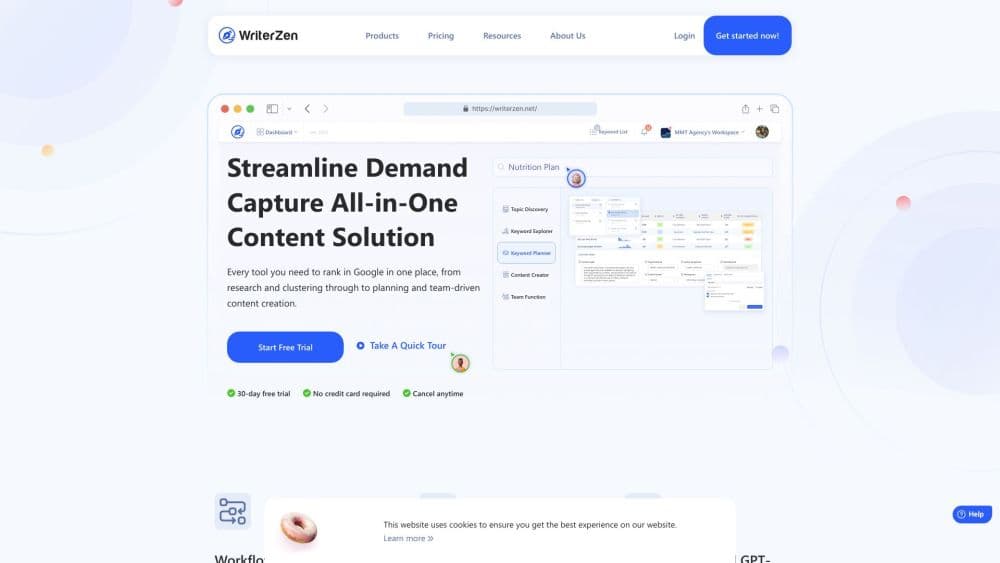
WriterZen is an SEO content workflow platform that puts topic discovery, keyword research, content planning, and a GPT powered editor in one workspace.
About WriterZen
What Is WriterZen
WriterZen is a browser based SEO content workflow tool. It covers the path most content teams already walk in pieces: finding topics, pulling keyword data, grouping those keywords into clusters, building briefs, drafting, and checking the draft before it goes live. Instead of paying for a keyword research tool, a spreadsheet, an outline doc, and a separate AI writer, you run the whole sequence inside one account.
The product is aimed at people who publish on a schedule. Freelance SEO writers, in-house content marketers, and agencies with several writers all hit the same wall: research lives in one tab, the brief in another, and the draft in a third. WriterZen's pitch is that the handoffs disappear, because the keyword list you built on Monday is the same list the outline pulls from on Tuesday.
The limits matter as much as the features. There's no free tier beyond a 15 day trial, the plans run on credit allowances that can run dry before the month ends, and the Google NLP analysis that scores your draft against the SERP is sold as a separate credit pack. Teams that publish a handful of posts a month will feel those ceilings sooner than agencies running a full editorial calendar.
Getting Started
- Create an account at writerzen.net and start the 15 day trial. No card is required.
- Open Topic Discovery and enter one seed keyword to generate clustered topic ideas.
- Move the topics you like into Keyword Planner, then group them into clusters and a publishing order.
- Build an outline in Content Creator, which reads the top 20 SERPs, Reddit threads, and Google Suggests for the target term.
- Draft in the editor with the AI writing tool, run the plagiarism checker, export the finished piece to your CMS.
Product Information
A quick look at WriterZen's pricing, supported platforms, and performance.
Best for
The users, tasks, and scenarios where this tool fits best.
Users
- Freelance SEO writers
- In-house content marketers
- Agencies with several writers
Tasks
- Turning one seed keyword into months of topics
- Building a keyword list without a spreadsheet
- Writing an outline that matches what already ranks
- Checking a draft for copied text before publishing
Scenarios
- Planning a quarterly content calendar
- Onboarding a new writer
- Reviving a page that lost rankings
Key features
Topic Discovery
Topic Discovery takes one keyword and returns hundreds of grouped topic ideas, each tied to a search intent and a difficulty signal. The clustering is the useful part. You get batches of related subjects you can assign to different writers or spread across a quarter, instead of a flat list you still have to sort by hand. For a new site with no content map, this is the fastest way to see the shape of a niche.
Keyword Explorer
Keyword Explorer pulls from Google's search data and shows volume, competition, and an estimated revenue potential for each term. The revenue estimate is the differentiator: it pushes you toward low competition terms that can actually carry traffic with commercial value, not just high volume head terms. Filtering is quick enough to run several passes on one seed before you commit to a list.
Keyword Planner
Keyword Planner is where research becomes a plan. Import a keyword list, analyze it, cluster it by theme, and set the order in which pages get written. Everything stays editable, so when a client adds a product line you can slot new clusters in without rebuilding the sheet. Writers see the same plan you do, which removes the usual round of clarification emails.
Content Creator
Content Creator builds outlines from the top 20 SERPs for a target term, plus Reddit threads and Google Suggests. The outline arrives with headings, subheadings, and the terms competitors cover, so the first draft starts from a real brief instead of a guess. The same editor holds a GPT powered AI writing tool for drafting, rewriting, and paraphrasing, and you can accept or reject each suggestion as you go.
Plagiarism Checker
The plagiarism checker runs inside the editor and flags passages that match existing sources before you publish. That placement matters more than the feature itself: catching a copied sentence during drafting takes a minute, while catching it after a client review costs a rewrite and some trust. It's a basic safeguard, not a full originality audit, so treat the result as a first pass.
Team Workspace
Team Workspace brings content, writers, and deadlines into one view. Owners assign tasks, members create and edit drafts, and every credit spent in the workspace counts against the owner's plan. Roles are simple: everyone can see workspace settings and data, but only the owner can change them. For an agency running five clients at once, that single view replaces a stack of status documents.
Pros and cons
Pros
- Research, outlining, drafting, and checking live in one account, which removes most tool switching on a normal post.
- Topic clustering turns a single seed keyword into a content plan you can schedule for months.
- The outline builder reads real SERP, Reddit, and Google Suggests data, so briefs track what currently ranks.
- Shared workspaces and task assignment are included from the Lite plan up, which suits small agencies.
- The 15 day trial needs no credit card, so you can test a full project before paying.
Cons
- There's no free plan. After the trial, the cheapest option is $39 per month, which is steep for someone publishing two posts a month.
- Google NLP analysis is not part of any plan. You buy NLP credits separately, and each scanned article costs three credits.
- Monthly credit allowances cover research and checks from the same pool, so heavy keyword work can leave you short before the billing date. One-time packs fill the gap at extra cost.
- There's no native publishing step. Finished drafts move to WordPress or another CMS by copy and paste, which adds a manual handoff at the end.
Frequently asked questions
WriterZen is used to run an SEO content workflow from research to finished draft. You find topics, pull keyword data, cluster terms into a plan, build an outline from live SERP data, then write and check the draft in the same workspace.
Related content
Explore related tools, skills, and articles for WriterZen.
WriterZen Alternatives

Base Code
Base44 (Wix) · Coding · ProductivityBase Code is a shared cloud development environment from Base44. Teammates describe changes to an existing GitHub codebase in chat, preview them live and send them back as pull requests.

Knocket
Knocket (Tencent RTC team) · Productivity · Business · ChatbotKnocket is a free live chat and contact page tool that lets visitors message you from your website, app, or a shareable link, with every reply handled from Telegram or one inbox.

FloorGen
Vinit Kumar (FloorGen) · Productivity · China AIFloorGen is a browser-based floor plan maker that turns a sentence or a sketch into an editable 2D plan and a 3D walkthrough. Export to PDF, DXF or video, and draw without an account.