
Yesicon
Yesicon · Image
Yesicon is a free icon search engine that gathers nearly 400,000 open-source vector icons from 240 sets into one searchable site, with color and size controls and one-click SVG, PNG, or code export.
About Yesicon
What Is Yesicon
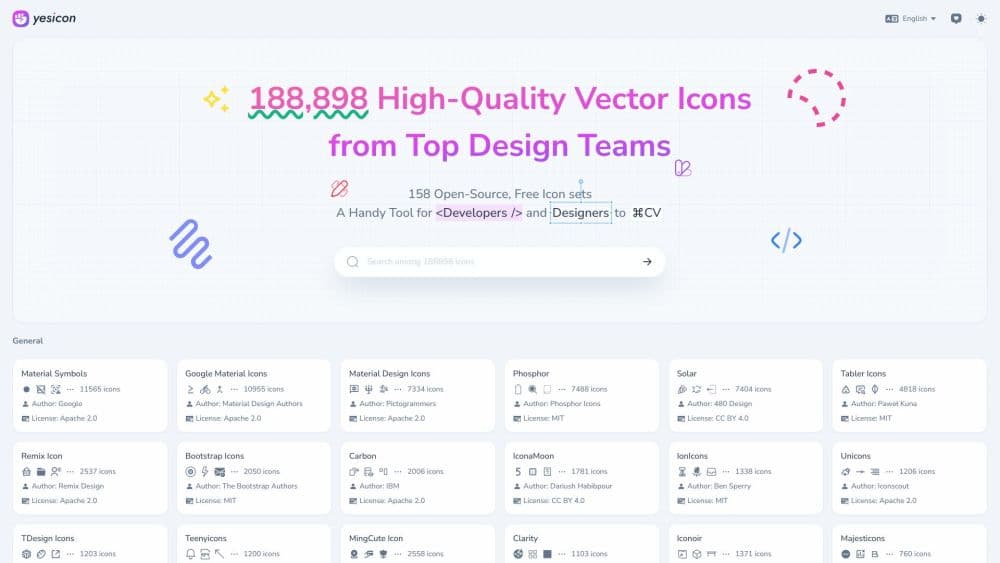
Yesicon is a web-based icon search engine for designers and developers, and it works as a free open source icon library you never have to host yourself. It pulls icons from many open-source sets, from Material Symbols and Tabler to Phosphor and Lucide, and puts them behind a single search box. You type "download" or "cart", filter by style or category, and land on the one icon that fits.
The data comes from Iconify, an open-source project that already normalizes hundreds of icon collections. Yesicon is the browsing layer on top of it. That means search quality depends on how well the upstream sets name their icons, and a very specific glyph may simply not exist yet.
The site is free and needs no account. Everything is designed around getting an icon out of the page and into your project in seconds, not around building a design library you manage inside Yesicon.
Getting Started
- Open yesicon.app and type a keyword in the search box. Press Ctrl K to jump straight into the field from anywhere on the page.
- Narrow the results with the filters. You can pick a style such as outline, solid, or two-tone, a category such as UI actions or brands, and a source set if you already trust one designer.
- Set the color and the pixel size in the preview panel. The icon redraws as you change them.
- Copy the output in the format you need. That may be raw SVG, a PNG at your chosen size, or a code snippet for React, Vue, Svelte, TailwindCSS, or UnoCSS.
- Check the license before you ship. Each icon belongs to the set it came from, so the terms follow that project, not Yesicon itself.
Product Information
A quick look at Yesicon's pricing, supported platforms, and performance.
Best for
The users, tasks, and scenarios where this tool fits best.
Users
- Frontend developers
- UI and product designers
- Students and hobby projects
- Solo makers shipping a small app
Tasks
- Finding a matching icon for a UI component
- Picking a consistent icon set for a new project
- Recoloring an icon to fit a brand palette
- Grabbing framework-ready code
- Assembling social or brand marks
Scenarios
- Working on a landing page late at night
- Cleaning up a mixed icon set in an old codebase
- Prototyping before a design system exists
- Building a slide deck or PDF that needs PNG icons
Key features
One Search Across 240 Icon Sets
A single query scans nearly 400,000 icons from open-source sets that include Material Symbols, Material Design Icons, Tabler, Solar, Remix Icon, Lucide, Phosphor, Heroicons, and Font Awesome. You do not have to remember which project owns which glyph. The results page shows the set name next to every icon, so you always know where a piece came from.
Style, Category, and Set Filters
Filters run on three axes. Style splits outline, solid, two-tone, and rounded variants. Category groups icons by purpose, from UI actions and navigation to brands, food, and gaming. The set filter narrows everything to one collection when visual consistency matters more than choice. Combining all three usually cuts thousands of results down to a screenful.
Live Color and Size Controls
The preview panel lets you change the color and the pixel size before you export. What you see is what lands in your clipboard. This matters most for developers who need an icon to match a CSS variable, and for anyone who has ever pasted a black SVG into a dark theme and had to fix it by hand.
Copy as SVG, PNG, or Code
Each icon offers a raw SVG file, a PNG at the size you set, and a ready-made snippet for React, Vue, Svelte, TailwindCSS, and UnoCSS. That range covers both designers pasting into Figma or Sketch and developers dropping a component straight into a template. The code is generated from the same source as the preview, so the output matches.
Trending Keywords Page
The Trending page ranks the keywords English-speaking users searched most often over the past six months, refreshed at the end of each month. Terms like plus, user, star, and search sit at the top, which tells you how the wider community labels common actions. It doubles as a sanity check when you cannot remember the conventional name for an icon.
Eight Interface Languages
The interface is available in English, Simplified Chinese, Traditional Chinese, Spanish, German, French, Japanese, Korean, and Portuguese. The SEO-friendly language paths mean a team spread across regions can each work in their own language without a separate account. Search itself accepts English keywords, so non-English users should know the English term for the concept they want.
Pros and cons
Pros
- For an icon library for developers, the catalog stands out because it is enormous and free. Four hundred thousand icons across 240 sets covers almost any UI scenario without a subscription.
- Search, filter, and copy live on one page, which cuts the back-and-forth that usually comes with hunting across separate icon sites.
- The live color and size preview removes a manual edit step, because you copy the icon in the state you want.
- Framework snippets for React, Vue, and TailwindCSS save hand conversion, and the output matches the preview exactly.
- No account and no usage limit, so you can keep searching through a long design session.
Cons
- There is no official API or bulk download workflow, so pulling 200 icons into a repo still means clicking through them one at a time.
- Each icon carries the license of its source set, and those licenses vary. You have to check each project's terms before commercial use, which adds work on a large project.
- There is no Figma, Sketch, or VS Code plugin from the developer, so designers lose a step compared with icon tools that live inside the canvas.
- Search quality depends on the upstream icon names. Undocumented or oddly named icons can be hard to surface, even when they exist in the catalog.
Frequently asked questions
Yes. The site has no paid plan, no account, and no download limit. You can search and copy icons without signing up, and there is nothing to cancel later.
Related content
Explore related tools, skills, and articles for Yesicon.
Yesicon Alternatives

Google EmbeddingGemma 2
Google DeepMind · Writing · Image · CodingGoogle EmbeddingGemma 2 is a 740M-parameter open model that turns text, code, images, audio, and video frames into vectors in one 768-dimension space, running on phones and laptops.

Tractionwave
TractionWave · Image · MarketingTractionWave is an AI attention heatmap tool for static ads. Upload a PNG or JPG and it returns predicted attention, ranked hotspots, and fixes before you spend budget.

Imejis.io
Imejis.io · Image · MarketingImejis.io is an AI design studio for agents and marketing teams. Describe an image in plain words, and it writes the copy, builds the layout, reflows it to every size, then exports a finished file.