

YouLearn: AI Study Tutor
YouLearn Inc. · Leaning
YouLearn is an AI study tutor that turns PDFs, lecture recordings, and YouTube videos into summaries, quizzes, podcasts, and answers you can chat with.
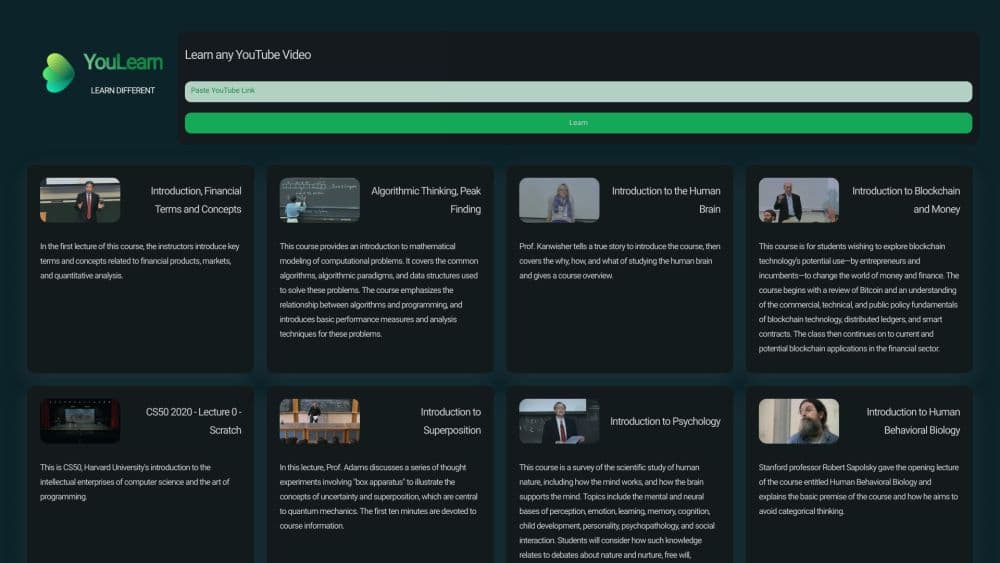
About YouLearn: AI Study Tutor
What Is YouLearn
YouLearn is a study app for students that reads whatever material you already have and turns it into something you can drill. Drop in a PDF, a slide deck, a recorded lecture, or a YouTube link, and it produces a summary, a quiz, flashcards, a podcast episode, or a chat thread grounded in that source. The company is backed by Y Combinator and says the app is used by 2,000,000+ learners.
The problem is a familiar one. Most revision time goes into rereading a chapter and hoping something sticks, and a generic chatbot gives answers with no link back to the page you were assigned. YouLearn's pitch is that answers stay tied to your material, with references pointing at the source, so you can check the claim instead of trusting it.
The limits are real. Everything here costs generation credits against a plan quota, so heavy users hit daily caps on podcasts, chats, and videos. And a generated quiz can only be as good as the source document is clear, so a messy scan gives you messy questions.
Getting Started
- Sign up at app.youlearn.ai with Google, Apple, or an email address. The free plan lets you try it before you pay anything.
- Add your material: upload a file, paste a link, or record a lecture in the app. Each upload becomes a space you can organize later.
- Pick a study tool. Ask for a summary to see the key takeaways, chat with the PDF for a specific question, or generate a quiz or exam to test whether you actually followed the argument.
- Open the chat to ask follow-up questions. Answers cite the passage or timestamp they came from, so you can jump back to the moment in the video or the paragraph in the PDF.
- Turn the material into audio or a lesson plan, then track progress as your weak topics surface in reviews.
Product Information
A quick look at YouLearn: AI Study Tutor's pricing, supported platforms, and performance.
Best for
The users, tasks, and scenarios where this tool fits best.
Users
- University students
- High schoolers preparing for standardized tests
- Self-taught learners following courses online
- Professionals brushing up on an unfamiliar field
Tasks
- Converting a lecture or video into notes
- Chatting with a PDF
- Building practice questions before an exam
- Making revision audio
- Getting unstuck on a hard concept
Scenarios
- Exam week with too many chapters
- Commuting or walking the dog
- Catching up on a missed lecture
- Teaching a small class or study group
Key features
Chat With Your Own Material
This is the core of the app and the part that separates it from a plain chatbot. You attach a file, a link, or a recording, and every answer comes back grounded in that content with references to the page or timestamp. Ask a question the source doesn't answer and you get told so, rather than a confident guess pulled from the open web. For exam revision, that's the difference between checking an answer and trusting it.
Summaries, Quizzes, and Practice Exams
Five study formats come off the same upload: a summary, a quiz, flashcards, a practice exam, and interactive visual explainers such as mind maps and timelines. You choose the exam format that matches your real test, including multiple-choice, short answer, essay, and case-based questions, plus a mixed option. Each answer comes with an explanation and a breakdown of what you got right and wrong, and the app tracks which topics keep coming back as weak spots.
Video and Lecture Ingestion
PDFs, slides, DOCX files, web pages, YouTube links, and recorded lectures all feed the same pipeline, and the Chrome extension adds a YouTube video or article in one click. Uploaded files run up to 2,000 pages or 300 MB each on Pro, with Max raising that to 5,000 pages or 500 MB. The appeal is not having to convert a lecture into notes by hand first.
Podcast and Read-Aloud Audio
The app turns study material into a two-voice podcast episode you can download and play offline, and it reads text aloud at up to 200,000 characters a day on Pro. Pro gets 12 podcasts a day and 30 AI videos a month, while Max makes both unlimited. For material you need to hear repeatedly, this covers a commute better than another reread.
Structured Courses and Placement Tests
Beyond single-document study, YouLearn builds a course path from your goal: you answer a few questions, take a placement test to find your level, then work through short lessons with review questions spaced out over time. The course graph shows how topics connect and what unlocks next. Pro includes 10 courses and 20 placement tests a month.
Teams and Shared Spaces
The Teams plan starts at three seats and bundles everything in Pro with shared workspaces, a single consolidated invoice, and adjustable permissions per member. Discounts grow as the team does. It fits a study group, a tutoring business, or a small department that wants the same material set up once.
Pros and cons
Pros
- Answers carry references to the page or timestamp, so you can check a claim instead of trusting it.
- Five output types come from one upload, which covers reading, testing, and listening without moving files between tools.
- Handles PDFs, slides, YouTube links, and recorded lectures, so material that normally escapes a study app stays usable.
- A free plan and a student discount on Pro lower the cost for anyone testing it before committing.
- The Chrome extension adds a video or article in one click, which removes the copy-paste step.
- Teams billing starts at three seats with shared spaces, so a study group can share one setup.
Cons
- Generation is metered. Pro tops out at 12 podcasts a day and 30 AI videos a month, and Max is priced by inquiry, so heavy users hit a wall.
- The pricing page shows local currency with no currency switcher, which makes comparing against other study apps awkward before checkout.
- There is no public API, so you cannot pull YouLearn's output into your own notes app or automate a pipeline.
- Quality tracks the source. A low-quality scan or a lecture with poor audio produces weak summaries and questions, and you still have to read the output critically.
Frequently asked questions
Yes, there's a free plan with a set number of uploads, chats, quizzes, and lesson plans. Pro runs $35 a month billed monthly or about $20 a month billed yearly, Max is $250 a month billed yearly, and Teams starts at $25 a month per seat with a three-seat minimum. Students get a discount on Pro with a .edu email.
Related content
Explore related tools, skills, and articles for YouLearn: AI Study Tutor.
YouLearn: AI Study Tutor Alternatives

HireKey
HireKey · Voice & Language · Productivity · LeaningHireKey is an AI job search copilot built by a former tech recruiter. It checks role fit, tailors resumes, runs interview practice and tracks every application.

Lune
Retrograde Labs · Productivity · LeaningLune is a research search engine for scientific AI agents. It runs as an MCP server that lets Claude, ChatGPT and Cursor search peer-reviewed computer science papers and cite them.
Coddy
Coddy · Coding · LeaningCoddy is a gamified platform to learn to code through short interactive lessons in 20+ languages, with a browser editor, an AI tutor and free certificates.