

You or Me App
YouOrMe · Image
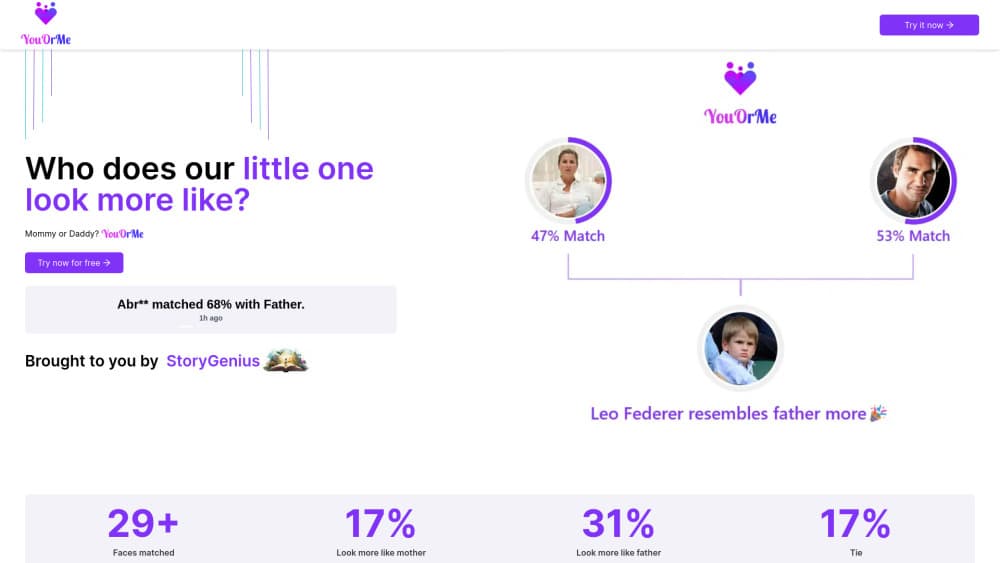
You or Me App is a free browser tool that uses AI to compare a child's photo with each parent's photo and report which one the child resembles more, with a match percentage for both.
About You or Me App
What Is You or Me App
You or Me App is a web tool built around one question families never stop arguing about: which parent does this kid actually look like? Parents who type who does my child look like into a search bar tend to land on tools like this one. You upload three pictures, one of the child and one of each parent. The model looks at facial features across all three and returns a split, shown as a match percentage for mom and for dad.
The point is entertainment, not genetics. In practice it behaves like a facial recognition app with a single job, and it's usually the first look-alike app people try after a family dinner argument. A match percentage says how closely the model thinks certain features line up, and that's the whole claim. Lighting, camera angle, expression and the age gap between the photos all move the number around, so two runs with different pictures can easily disagree.
The same flow works on adults. Anyone chasing a quick answer on child resemblance can run it in under a minute. The maker notes that the three photos don't have to be a child and two parents. An adult with their own parents works fine, and so does a kid with grandparents. Because the images go to a third-party service, check the privacy policy before you upload pictures of children.
Getting Started
- Open the You or Me App site in a browser. There's no account to create and nothing to install.
- Upload a clear, front-facing photo of the child.
- Add one photo of each parent. Similar lighting and framing make the comparison fairer.
- Run the comparison, read the percentage split, then share the result if you want a second opinion from the family group chat.
Product Information
A quick look at You or Me App's pricing, supported platforms, and performance.
Best for
The users, tasks, and scenarios where this tool fits best.
Users
- Parents of young kids
- Grandparents
- Adult children
- Social media posters
Tasks
- Settling a family argument
- Baby shower games
- Making a shareable post
- Checking old albums
Scenarios
- A family dinner where the resemblance debate starts again
- A friend group arguing about a celebrity's kid
- Tracing a family line
Key features
Three-Photo Facial Comparison
You upload a child photo plus one photo of each parent, and the model compares facial geometry across the set. It looks at proportions and spacing rather than overall impression, which is why a photo taken from an odd angle can change the outcome. The whole AI family resemblance claim rests on that geometry step, so photo quality matters more than the marketing suggests. Results come back in seconds, with no manual tagging.
Match Percentage for Each Parent
Instead of a flat "you look like your mother," the app returns a numeric split for both parents. That number is the part people screenshot. It's also the part to read loosely, since the model is measuring resemblance, not inheritance.
Works With Any Three Faces
The standard case is a child and two parents, but nothing in the flow enforces it. Adults comparing themselves with their own parents get the same output, and so do grandchildren against grandparents. That flexibility turns a one-joke app into something you can revisit with different family members.
Shareable Result Cards
The output is formatted for posting, not for archiving. You get a visual result you can drop into a chat or a social feed without cropping or editing. The maker pushes sharing hard, which makes sense for a product that spreads through family groups.
No Install, No Account
Everything runs in the browser, so there's no app store detour and no signup wall before your first comparison. That matters for a tool people open once at a dinner table and forget about for a year. It also means the experience depends on your connection and browser rather than a native app.
Privacy-First Positioning
The maker advertises a strong focus on privacy and data security, and the site explains how uploads are handled. Treat that as a claim to verify rather than a guarantee. You're sending photos of minors to a server you don't control, so read the policy before you start.
Pros and cons
Pros
- Free with no account, so testing it costs nothing but three photos.
- The percentage split is more satisfying than a yes or no answer, and it's the reason people share results.
- Accepts any three faces, which covers adults, grandparents and plenty of non-standard family setups.
- Fast enough to use in the middle of a conversation, with no editing or cropping step.
Cons
- Accuracy swings with photo quality, so a bad upload can hand you a result you don't believe. Use clear, similar photos or expect a rerun.
- It only compares the three faces you provide. There's no way to add aunts, cousins or a whole family tree in one pass.
- Uploading pictures of children to a third-party service carries real privacy risk, and the app's privacy claims are the only assurance on offer.
Frequently asked questions
It compares three photos, one child and two parents, and estimates which parent the child resembles more. The output is a match percentage for each parent rather than a single verdict.
Related content
Explore related tools, skills, and articles for You or Me App.
You or Me App Alternatives

Google EmbeddingGemma 2
Google DeepMind · Writing · Image · CodingGoogle EmbeddingGemma 2 is a 740M-parameter open model that turns text, code, images, audio, and video frames into vectors in one 768-dimension space, running on phones and laptops.

Tractionwave
TractionWave · Image · MarketingTractionWave is an AI attention heatmap tool for static ads. Upload a PNG or JPG and it returns predicted attention, ranked hotspots, and fixes before you spend budget.

Imejis.io
Imejis.io · Image · MarketingImejis.io is an AI design studio for agents and marketing teams. Describe an image in plain words, and it writes the copy, builds the layout, reflows it to every size, then exports a finished file.