
Zawa AI
Starrii · Image · Marketing
Zawa AI is an AI brand kit generator and editor that helps small businesses and solo creators produce logos, posters, social media posts, videos and 4K mockups from a single workspace. Formerly known as X-Design, the platform pairs a library of ready-made marketing skills with an on-brand AI agent that keeps every asset visually consistent. You can start for free on the web, and an Android app is available for quick edits on the move.
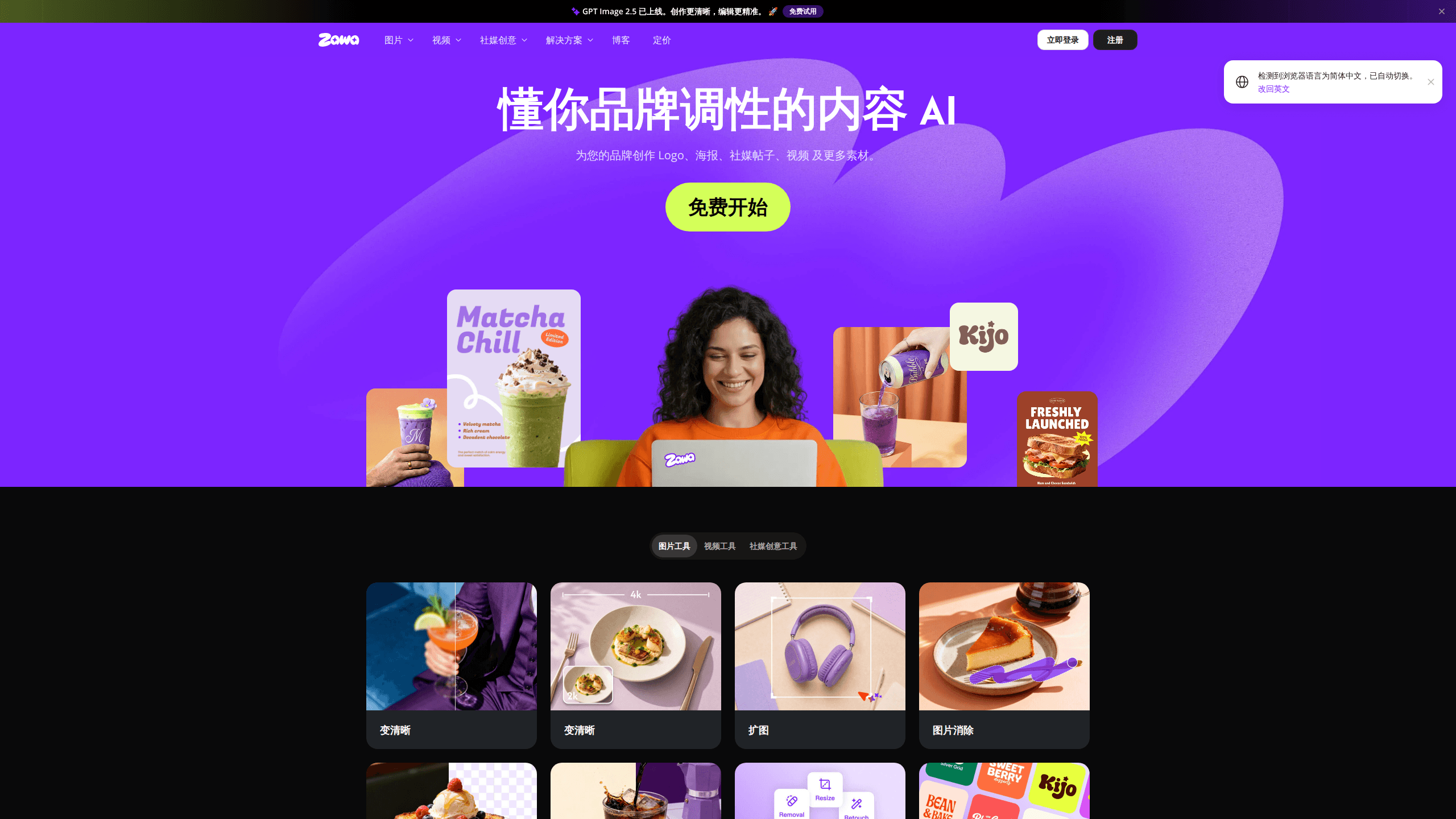
About Zawa AI
What Is Zawa AI
Zawa AI is a web-based design platform built around one idea: you shouldn't need a designer on standby to keep your brand looking the same everywhere. Feed it your logo, colors and a short description of your business, and it becomes an AI agent that drafts on-brand imagery for you. That covers a coffee shop's seasonal poster, a product close-up for an online store, or a week of social posts.
It sits in a crowded space. Canva, Adobe Express and a long list of AI image tools all promise fast design work. Zawa's angle is narrower: it's organized around repeatable marketing skills rather than a blank canvas. Need a carousel for Instagram? There's a Carousel Maker skill. Adapting a viral video to your own product? Video Remix handles that. That structure suits people who know what they want to make but not how to make it.
The name change from X-Design to Zawa came as the product shifted from a general editor toward an agent that acts on your brand rules. The company behind it's Starrii, and the same tool is distributed on Google Play under the package name com.starii.xdesign.
The main limits are worth knowing upfront. Zawa's strength is marketing assets, not precise vector work, so it won't replace a full illustration suite. Output quality still depends on how clearly you describe your brand. Give it a vague brief and you'll get vague results. And the free tier is a real trial rather than a permanent workspace, so heavy users should expect to pay.
Getting Started
- Create a free account at zawa.ai and open the workspace, or install the Android app from Google Play.
- Build your brand profile by uploading a logo and setting your colors, so every generated asset inherits the same look.
- Pick a skill that matches the job, such as Logo Design, Marketing Posters or Product Sales Videos.
- Describe what you want in plain language, then adjust the result with the built-in editor.
- Export your finished image or video and publish it to your store, social channels or print file.
Product Information
A quick look at Zawa AI's pricing, supported platforms, and performance.
Best for
The users, tasks, and scenarios where this tool fits best.
Users
- Small business owners
- Solo content creators
- Marketing generalists
Tasks
- Designing a logo or brand icon
- Making a social media post generator run
- Creating 4K mockups
- Removing watermarks and unwanted objects
Scenarios
- Launching a product with limited budget
- Running seasonal campaigns
- Keeping a small shop's feed consistent
Key features
On-Brand AI Agent
The core of Zawa AI is an agent that learns your brand once and applies it everywhere. After you upload a logo and set colors, it holds those rules while generating new assets, so a poster made in January looks related to a carousel made in June. For a small team, that consistency is the whole point. You stop being the person who fixes mismatched fonts.
Logo Design and Mockups
The Logo Design skill creates a distinct logo or brand icon from a written brief. Logo Mockups then applies it to business cards, packaging and merchandise. That second step matters more than it sounds. Seeing your logo on a paper cup or a shipping box tells you quickly whether it survives contact with the real world. You find out long before you pay a printer. No guesswork at the print shop.
Social Post and Carousel Generation
For the platform grind, Zawa offers a social media post generator plus a Carousel Maker that builds coordinated covers and image sets. Post Remix goes further and recreates viral post covers from a reference you supply. It's the kind of feature that saves an afternoon of scrolling for inspiration and guessing at layouts. Not glamorous work. Just the stuff that has to get done before anything ships.
Poster Creation
Marketing Posters and General Posters cover sales, events, holidays, announcements and invitations. Poster Makeover takes an existing design you already have and improves it rather than starting from zero. Handy when a client or a previous hire hands over something that's 80% there.
Video Tools and Product Commercials
The video side is broader than you'd expect from a brand tool. Product Sales Videos, Product Commercials and UGC Product Videos build short clips aimed at selling, while Video Remix recreates a viral video from a reference and Video Enhancer cleans up footage. Video Watermark Remover and Remove Watermarks & Objects handle the cleanup jobs most people dread doing by hand.
Batch Photo Editing and Smart Crop
Batch Photo Editing applies the same edit across multiple images with a consistent result, and Smart Crop resizes and reframes automatically for each platform's dimensions. If you publish the same photo to three networks with three aspect ratios, Smart Crop is the difference between one upload and five minutes of dragging corners. Small win. It adds up fast across a campaign.
Content Planner
Content Planner helps you map out social post topics, a rough content schedule and the assets each one needs. It won't write your strategy for you, but it keeps the calendar and the creative in the same place. That matters. Most small teams lose track right there.
Image Remix and Product Close-Ups
Image Remix clones a product shot into new contexts, and Product Close-Ups highlight texture and craftsmanship for store listings. Together they let an online seller present one physical item from several angles without booking a studio session. Output depends on your source photo. Start with a sharp original.
Pros and cons
Pros
- One workspace covers logos, posters, social posts, mockups and short videos. That cuts the number of tools you pay for.
- The on-brand agent keeps assets visually consistent, which is hard to do manually across a mixed-format campaign.
- Batch photo editing and Smart Crop handle the repetitive resizing work that eats time on every launch.
- A free plan and an Android app mean you can test the workflow and do quick edits without committing.
- Skills like Post Remix and Video Remix lean on trends, which is useful for creators who need volume.
Cons
- There's no confirmed public API, so teams wanting to plug Zawa into an existing pipeline should assume manual use for now.
- Pricing isn't fully published on the site, so budgeting for a growing team takes a sales conversation.
- It's built for marketing assets, not precise vector or illustration work, so pro designers will still reach for a dedicated suite.
- Results track the clarity of your brand brief; vague input produces generic-looking output.
Frequently asked questions
Zawa AI is used to create on-brand marketing assets: logos, posters, social media posts, carousels, 4K mockups and short product videos. It's aimed at small businesses and creators who need consistent visuals without a full design team.
Related content
Explore related tools, skills, and articles for Zawa AI.
Zawa AI Alternatives

X Ray Interpreter
X-ray Interpreter · ImageX Ray Interpreter is a web-based AI radiology tool that turns X-rays, CT scans, MRI, ultrasound, and PET images into plain-language reports. You upload a scan, get a preliminary X-ray interpretation in moments, then ask follow-up questions if something needs explaining. It works as a second opinion and a learning aid, not as a medical diagnosis.

Aieasypic
AIEasyPic · ImageAIEasyPic is an AI image generator that turns plain text prompts into finished artwork in seconds. You can also train custom models on your own photos, swap faces in existing images, and create short video clips from text, all from a browser. It suits casual creators who want quick visuals and hobbyists who want to build a personal model without touching any code.

Chargen
Chargen · ImageChargen is an AI character generator and worldbuilding toolkit built for Dungeons & Dragons and other tabletop RPGs. It turns a one-line idea into a painted character portrait, spins up NPCs, monsters, maps and encounters from the same session, and keeps every creature's details close at hand. The tabletop RPG art side runs on a credit system called Gold, while the text generators stay free for everyone.