

Zeli.app
Independent developer (solo) · Coding · Business
Zeli is a free web digest that mirrors the Hacker News front page and HuggingFace's daily AI papers, adds a short AI summary to each item, and translates the whole digest into Chinese.
About Zeli.app
What Is Zeli
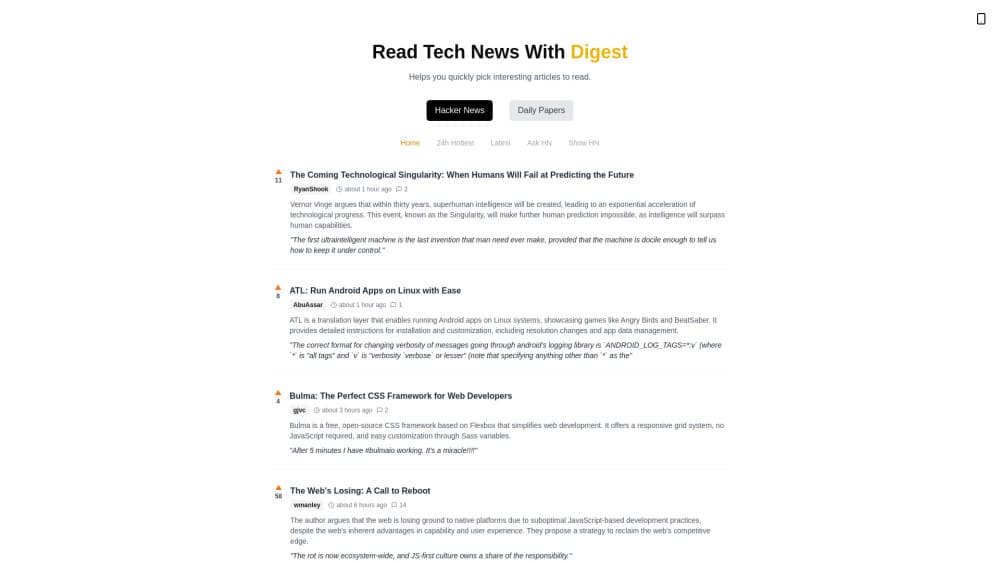
Zeli is a small web tool that watches two sources tech readers already follow, then makes them faster to skim. One is the Hacker News front page. The other is HuggingFace's daily list of AI papers. For every story, Zeli pulls the linked article, writes a short summary and picks out one notable quote, so you read the point without opening the full page.
The whole digest runs on a simple idea. Zeli does not try to replace the original article. It helps you decide whether an article is worth your time before you click. If a summary looks interesting, the source link is right there. If not, you keep scrolling. An update cycle refreshes the Hacker News mirror roughly every 15 minutes, and each day gets its own digest page you can revisit later.
Zeli is built by a solo indie developer, not a company, and it is free to use. The English site is the default. A Chinese version at zeli.app/zh translates every headline and summary on the fly, using a paid translation model from SiliconFlow. Beyond the website, the same digest ships as an RSS feed, a Telegram channel and a Lark (Feishu) bot that posts the morning digest into a group chat.
Getting Started
- Open zeli.app in any browser and land on the latest English digest. Switch to the Chinese version by changing the URL to zeli.app/zh if you read Chinese.
- Browse the day's Hacker News stories, each shown with its points, author and posting date, plus a short summary and a quote from the linked article.
- Move to the Daily Papers section to scan HuggingFace's AI papers for the day, translated and summarized the same way.
- Open any item's source link when a summary catches your interest, or use the dated digests at the top to read a previous day.
- Add Zeli to your home screen for a native app feel, or subscribe through the RSS feed, Telegram channel or Lark bot to get the digest delivered.
Product Information
A quick look at Zeli.app's pricing, supported platforms, and performance.
Best for
The users, tasks, and scenarios where this tool fits best.
Users
- Busy tech readers
- AI researchers and students
- Chinese-speaking readers
- Newsletter and chat-group curators
- People with slow or metered connections
Tasks
- Skimming the day's news
- Catching up on AI papers
- Reading in Chinese
- Tracking a topic over time
- Feeding a group chat
Scenarios
- A developer with a coffee break
- A grad student planning a reading session
- A Chinese reader who wants global tech news
- A community manager running a tech group
- A journalist hunting for a story angle
Key features
Hacker News Front Page With AI Summaries
Zeli mirrors the Hacker News front page and attaches an AI-generated digest to every story. Each entry shows the title, the current point count, the author and the date, then a short summary of the linked article and one pulled quote that captures its main idea. The mirror refreshes about every 15 minutes, so the digest tracks the front page through the day rather than freezing at one snapshot. You get the pulse of Hacker News without opening each thread.
Daily AI Papers From HuggingFace
A separate section lists HuggingFace's daily AI papers, the same feed researchers check to see what dropped that morning. Zeli reads each paper's abstract and boils it into a plain-language summary, with the paper's title and authors kept intact. The result reads like a research digest: you see what the paper claims in a sentence or two, then decide whether the full PDF is worth your time.
On-the-Fly Chinese Translation
The Chinese version at zeli.app/zh translates every headline, summary and quote into Chinese as the page loads. The site credits SiliconFlow's translation model for the work, and the developer notes it moved from a free model to a paid one for better quality. Readers who prefer Chinese get the same coverage and the same source links, just in their own language.
Dated Digest Archive
Every day gets its own digest page, and recent days are listed across the top so you can step back through the week. That makes Zeli useful as a light history: if you heard about a story days ago and want to find the discussion, the dated pages let you reopen that day's front page and its summaries.
Multiple Delivery Channels
Beyond the website, Zeli ships the same digest through an RSS feed, a Telegram channel for sharing finds, and a Lark (Feishu) bot that posts the morning Hacker News digest into a group automatically. You can also add Zeli to your phone's home screen so it opens like a normal app, without an install from a store.
Pros and cons
Pros
- Free to use, with no account or payment step to read the digest.
- One page covers two sources readers often check separately: Hacker News and HuggingFace papers.
- The Chinese translation opens the same content to readers who do not follow English tech news directly.
- Roughly 15-minute refresh keeps the Hacker News mirror close to live.
- Extra delivery through RSS, Telegram and a Lark bot fits group and feed readers.
Cons
- Summaries are AI-generated, so they can miss nuance or misread a technical claim; the source link is the real reference.
- There is no mobile app, only a website you can pin to the home screen.
- No public API, so you cannot pull the data into your own tools.
- Coverage is limited to Hacker News and HuggingFace papers, not the wider web.
- The Chinese translation depends on a third-party model, so wording can lag behind the English.
Frequently asked questions
Yes. Zeli is free. There is no subscription or account, and the paid plans field is simply Free.
Related content
Explore related tools, skills, and articles for Zeli.app.
Zeli.app Alternatives

Udon
Udon · Coding · ProductivityUdon turns an Apple Silicon Mac into a home server you run from a browser, with container controls, file shares, and an optional AI sysadmin.

offstage
offstage cloud · Coding · Productivityoffstage gives AI coding agents and CI jobs a real Mac: a fresh macOS account on Apple silicon, driven over an API and billed by the second.

BotBus
Chengdu Tuyang Tusen Technology Co., Ltd. · Coding · ProductivityBotBus lets you control AI coding agents from your phone and watch: approve commands, start tasks and read results while the code stays on your desktop.