
Zingle
Zingle · Leaning
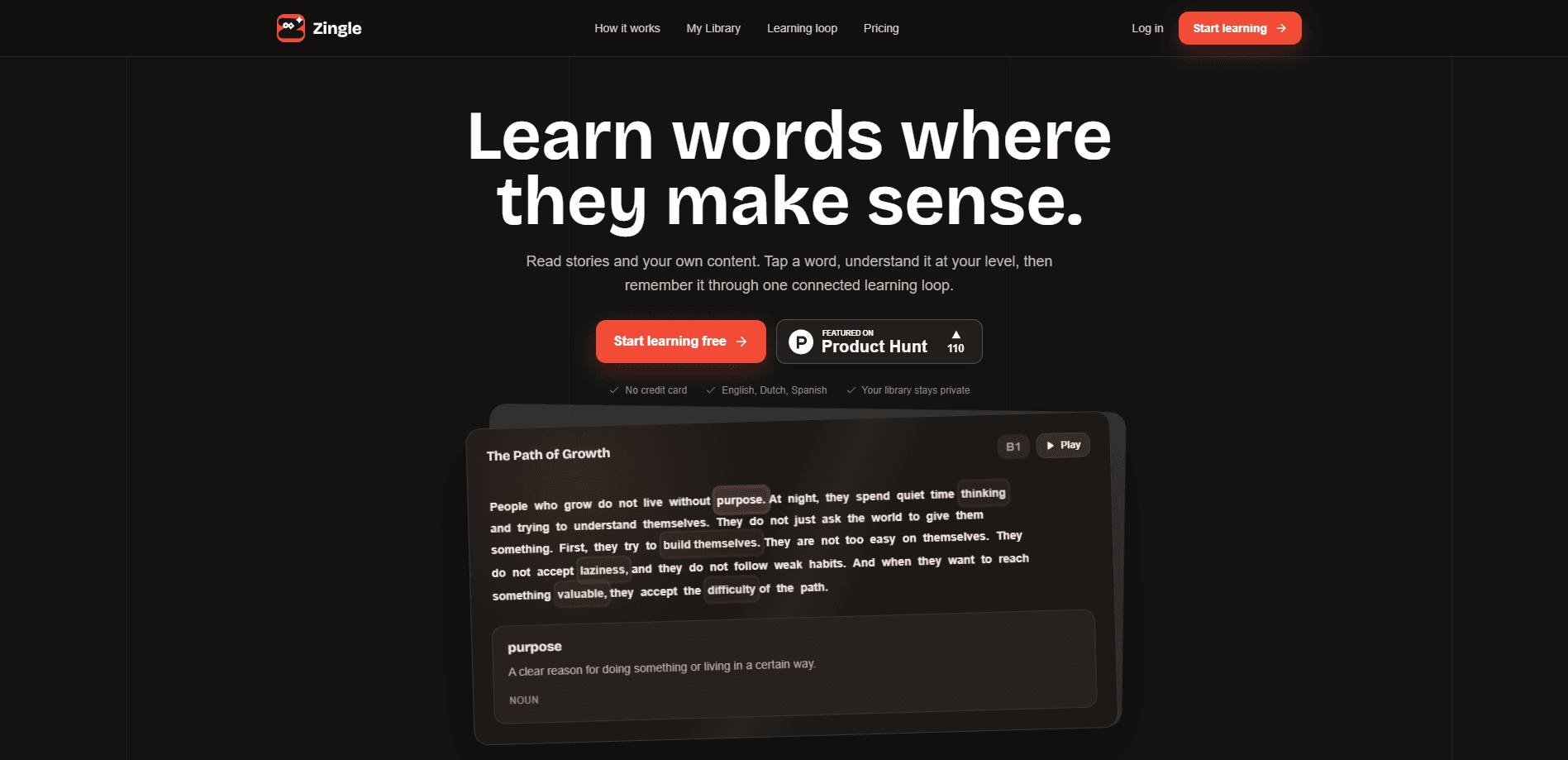
Zingle is an AI language learning app that teaches vocabulary through reading instead of drills. You open a story or paste your own text, tap any word you don't know, and get an explanation written at your CEFR level right next to the sentence. Every word you tap flows into a connected review system so it comes back later and actually sticks. It supports English, Dutch, and Spanish, and the free plan needs no credit card. That's the whole pitch, really.
About Zingle
What Is Zingle
Zingle is a reading-based language learning app built by an independent team and aimed at learners who want vocabulary to come from real text, not from flashcards you forget by Friday. The core idea is simple: instead of leaving your article to look up a word in a separate dictionary, you tap the word and the meaning appears beside the text. Explanations are tuned to your CEFR level, so a B1 learner gets a B1 answer rather than a wall of academic definitions.
The part that separates Zingle from a plain reading tool is what happens after the tap. Tapped words move into a review loop, and the app tracks them so your reading habit feeds directly into memory practice. That closes the gap most learners hit: you understand a word in context once, then never see it again.
The limits are worth knowing up front. Zingle supports English, Dutch, and Spanish today, with more languages described as coming next but not yet available. Your library is private by default, so there's no social feed or community to browse. And the advanced audio features, like human-like AI narration, sit behind the paid Pro plan rather than the free tier. That's not a dealbreaker. It's just the shape of the current offering.
Getting Started
- Go to the Zingle website and create a free account with an email address. No credit card is required for the free plan.
- Pick a language from the available options (English, Dutch, or Spanish) and set your CEFR level by marking a short sample so the app knows how hard your explanations should be.
- Open a Zingle story to start reading, or paste text into My Library from a class note, an article draft, or any paragraph you want to understand.
- Tap any word or select a phrase as you read. The explanation appears beside the text at your level, and the word is saved to your review queue automatically.
- Return to the review loop to revisit saved words, then add more library items when you want fresh reading material.
Product Information
A quick look at Zingle's pricing, supported platforms, and performance.
Best for
The users, tasks, and scenarios where this tool fits best.
Users
- Intermediate readers at B1 or B2 level
- Students working through course material
- Self-taught learners tired of flashcard apps
Tasks
- Building a daily reading habit in a new language
- Understanding words you can't look up cleanly
- Turning articles you already want to read into vocabulary practice
Scenarios
- Reading a short story on a commute
- Studying a foreign-language article for work or school
- Reviewing vocabulary the night before a test
Key features
Tap-to-Understand Explanations That Stay on the Page
The centerpiece of Zingle is the Read Box. When you tap a word or select a phrase, the explanation appears beside the text instead of opening a new tab or a separate dictionary. This matters. The moment you leave the sentence, you lose the context that made the word worth learning. Explanations match your CEFR level, so the answer is pitched at what you can already handle. No detour required.
CEFR-Level Matching
Zingle tags content and explanations by CEFR level, the common framework that runs from A1 beginner up to C2 advanced. When you set your level, both the text difficulty and the word explanations adjust. A learner at A2 won't get a definition written for a linguistics student. The homepage demos this with B1-level stories and matching word notes, and you can see the level tag on each item in your library.
My Library From Your Own Content
You're not limited to the stories Zingle provides. My Library lets you paste text you already want to read, and the app detects its language and level, then applies the same reading tools to it. A class note, a paragraph from an article, or a draft you're working on all become readable, tappable content. Use what you already care about. The free plan includes 3 library items per month, and your library stays private rather than feeding a public stream of other people's texts.
One Connected Review Loop
Words you tap don't disappear when you close the story. They travel into a review system that uses data from the Read Box where you first met them. So the context you learned the word in isn't thrown away, it's carried forward into the review. Ever wonder why flashcard words vanish? Context is what fixes that. For learners who've bounced off spaced-repetition apps, this reading-to-review link is the reason vocabulary is more likely to stick.
Multi-Language Support With a Shared System
Zingle currently supports English, Dutch, and Spanish, and the company says more languages are coming. The important detail is that every language runs on the same learning logic: the same Read Box rules, progress tracking, vocabulary flow, audio behavior, and review system. That means once you learn how Zingle works in one language, adding another doesn't mean relearning the interface.
Audio and Human-Like Narration on Pro
Free users get browser-based text-to-speech, which reads content aloud with a standard synthetic voice. The Pro plan adds human-like AI narration for stories and individual words, plus audio upload with transcription, so you can bring your own recordings in. If listening practice matters to your routine, this is the main reason to consider upgrading. Otherwise, free is plenty.
Private-by-Default Library
Zingle's library isn't a social feed. What you save and read stays yours, which is useful if you're working through sensitive material like work documents or personal notes in a language you're learning. The company frames this as a default, not an optional setting, so you don't have to configure privacy yourself.
Pros and cons
Pros
- Learning happens in context, so vocabulary is tied to the sentence where you found it instead of an isolated flashcard.
- The CEFR-level matching keeps explanations pitched at your actual reading level, which helps beginners avoid overwhelming definitions.
- The review loop connects reading to memory practice automatically, so you don't have to build a separate study routine.
- Pasting your own text into My Library turns any content you already care about into a lesson.
- The free plan includes the full learning loop, and it needs no credit card.
Cons
- Only English, Dutch, and Spanish are supported right now, so learners of most other languages can't use it yet.
- Pro pricing isn't shown publicly on the site, so you have to sign up or open the subscription page to see what it costs.
- The free plan caps AI explanations at 40 per cycle and My Library at 3 items per month, which will run out fast for heavy readers.
Frequently asked questions
Zingle is a language learning app for building vocabulary through reading. You read a story or paste your own text, tap words you don't know, and get in-context explanations at your CEFR level. Those words then move into a review loop so you keep encountering them.
Related content
Explore related tools, skills, and articles for Zingle.
Zingle Alternatives

HireKey
HireKey · Voice & Language · Productivity · LeaningHireKey is an AI job search copilot built by a former tech recruiter. It checks role fit, tailors resumes, runs interview practice and tracks every application.

Lune
Retrograde Labs · Productivity · LeaningLune is a research search engine for scientific AI agents. It runs as an MCP server that lets Claude, ChatGPT and Cursor search peer-reviewed computer science papers and cite them.
Coddy
Coddy · Coding · LeaningCoddy is a gamified platform to learn to code through short interactive lessons in 20+ languages, with a browser editor, an AI tutor and free certificates.