

Zush
Zush · Image · Productivity
Zush is an AI file renamer for Mac and Windows that reads what's inside a file and proposes a descriptive name for it. Instead of opening every photo, PDF, or spreadsheet and typing a name by hand, you drop in a folder, set a naming pattern, and review the names it suggests before anything changes on disk. It handles over 100 file formats and runs its analysis either in the cloud or fully offline.
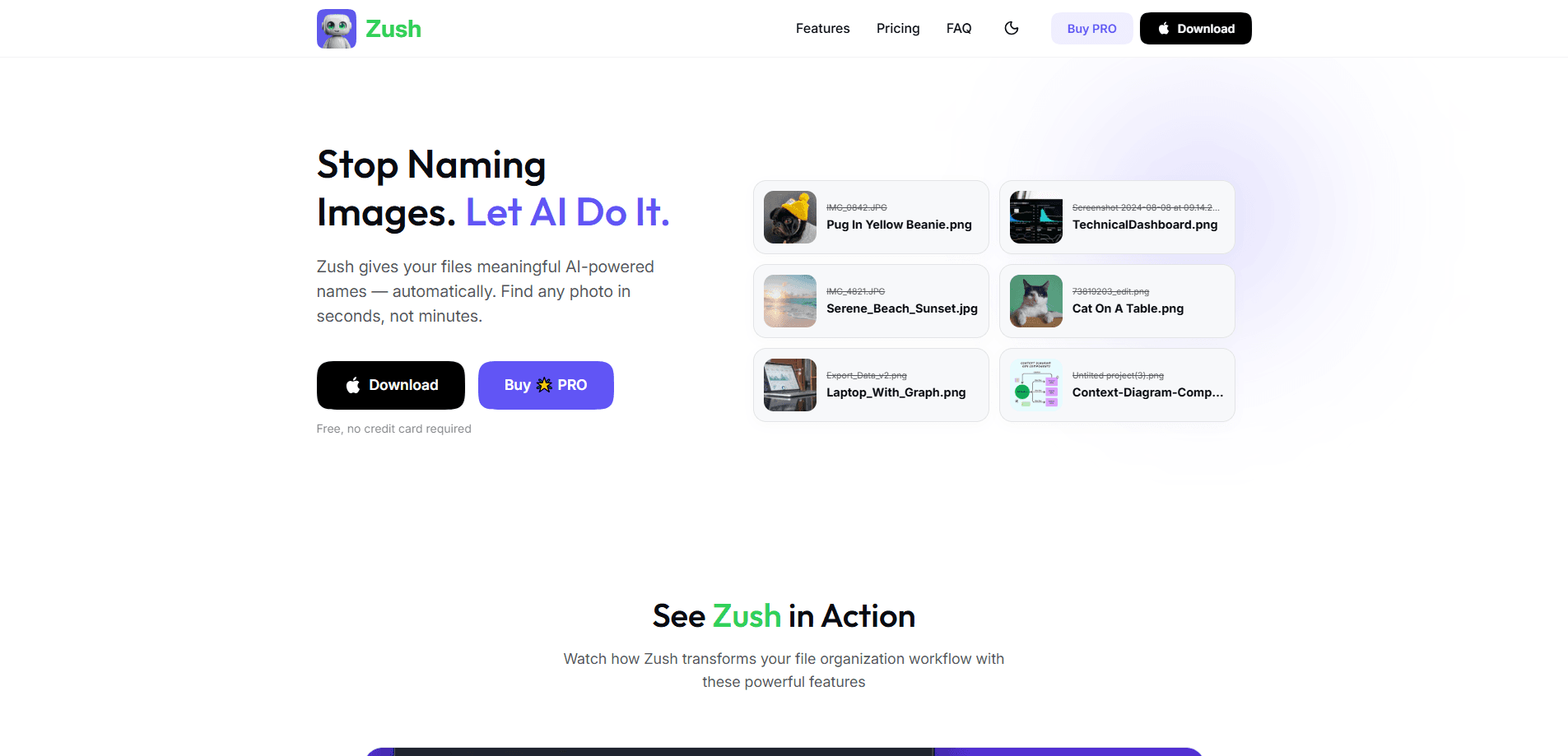
About Zush
What Is Zush
Zush is a desktop AI renaming software app that renames files based on their content. Point it at a folder of screenshots, scanned invoices, RAW photos, or Word documents, and it uses AI to figure out what each file actually contains, then writes a filename that says so. A generic "IMG_4821.jpg" becomes something like "beach-sunset-trip-2026.jpg" without you touching a single file. That's the whole trick. It's a file renaming tool, not a file manager.
The pitch is narrow, and that's the point. Zush isn't a full file manager or a cloud storage service. It sits on top of the folders and tools you already use and just fixes the names, that's the part most people never get around to doing. If your Downloads folder is a graveyard of "Document (3).pdf" and "Screenshot 2026-07-03," this is the cleanup crew. Ready to batch rename files without the tedium? That's exactly where it earns its keep. And it can organize files with AI in a way a manual rename marathon never will.
The main limits are worth knowing up front. It runs only on Mac and Windows, so there's no mobile version. Free renames are capped at 50, and the local AI modes lean on your own hardware, which means an older machine will feel slow on big batches. Zush also suggests names rather than applying them silently, so you're always in the loop, but that means review time is part of the workflow.
Getting Started
- Download Zush from zushapp.com and install it on Mac or Windows. No registration or credit card is required to start.
- Add files or a folder, including ones synced through iCloud Drive, Google Drive, Dropbox, or OneDrive. Zush can also watch a folder in the background.
- Build a naming pattern with Naming Blocks, mixing file content, metadata, dates, and custom instructions into the filename structure you want.
- Pick where the AI runs: Zush Cloud, your own API key (BYOK), or a local model through LM Studio or Ollama.
- Preview the suggested names, adjust anything that looks off, then apply the rename. Any batch can be undone later.
Product Information
A quick look at Zush's pricing, supported platforms, and performance.
Best for
The users, tasks, and scenarios where this tool fits best.
Users
- Photographers and videographers
- Accountants and bookkeepers
- Legal staff
- Anyone with a messy Downloads or screens folder
Tasks
- Batch renaming large folders
- Renaming by document content
- Renaming photos automatically
- Applying a consistent naming convention
- Cleaning up mixed folders
Scenarios
- Ingesting a shoot or a folder of exports after a project wraps up.
- Sorting scanned records before handing them to a client or an auditor.
- Watching a synced cloud folder and renaming new files automatically as they arrive.
- Taming an old drive of files whose names stopped being useful years ago.
Key features
Content-Aware Renaming
Zush reads what a file contains rather than relying on its existing name or metadata alone. That's what separates it from a plain batch renamer. Ask it to name a photo by subject and scene, or a PDF by the text inside, and it works from the actual content. The result is names you could search for later, which is the whole reason to bother renaming at all.
Naming Blocks and Custom Patterns
You build filenames from reusable pieces called Naming Blocks. Combine file content, metadata, dates, and custom instructions into a pattern that matches how you already name things. If you describe a detail you want extracted, you can save it as a Custom AI Block and drop it into any template. Once a pattern works, you reuse it instead of rebuilding it. Simple.
Over 100 File Formats
Zush handles images, EPUB and FB2 ebooks, PDFs, audio, video, and Office and iWork documents. That range matters because real folders are messy. You're rarely renaming only JPEGs or only Word files. Being able to throw a mixed batch at it and get sensible names back is the practical benefit.
Flexible AI Backends
You choose where the intelligence runs. Zush Cloud routes requests through a relay to a commercial AI provider. BYOK lets you connect your own key from Gemini, OpenRouter, OpenAI, or Claude. For privacy-first work, LM Studio and Ollama keep supported analysis on your own device and run offline after setup. The free tier includes 50 renames across all modes, and PRO is unlimited.
Folder Watching
Zush can monitor one or more folders, including synced cloud ones, and process new files as they show up. That turns renaming into a background habit instead of a chore you remember twice a year, and it means the folder where new files constantly land, whether that's a Downloads directory on a personal machine or a shared drive at work, keeps a tidy set of names without you lifting a finger. Set it once and move on.
Preview and Undo
Nothing gets renamed until you say so. Zush suggests a name, you review it, and you can undo any batch afterward. This review-first design means a bad AI guess costs you a glance, not a corrupted archive. It's the feature that makes handing a batch over to an automated tool feel safe. Review first. Rename second.
Pros and cons
Pros
- Renames by actual file content, so the names hold up when you search for them later.
- Works across 100+ formats, which suits the mixed folders people actually have.
- Local AI modes via LM Studio and Ollama keep sensitive files on your machine.
- Preview and undo make batch renaming low-risk.
- Flat pricing at $10 per month or $48 once, with no per-seat surprises.
Cons
- Desktop only. If you work mainly on a phone or tablet, there's no version for you.
- Local modes depend on your hardware, so large batches on an older machine can drag.
- The 50-rename free cap runs out fast once you point it at a real folder.
- You still have to review suggested names, which adds a step on very large batches.
Frequently asked questions
It renames files based on what's inside them. You give it a folder, it reads each file's content, and it proposes a descriptive name. You review the suggestions and apply them, and you can undo any batch later. No surprises.
Related content
Explore related tools, skills, and articles for Zush.
Zush Alternatives

Google EmbeddingGemma 2
Google DeepMind · Writing · Image · CodingGoogle EmbeddingGemma 2 is a 740M-parameter open model that turns text, code, images, audio, and video frames into vectors in one 768-dimension space, running on phones and laptops.

Tractionwave
TractionWave · Image · MarketingTractionWave is an AI attention heatmap tool for static ads. Upload a PNG or JPG and it returns predicted attention, ranked hotspots, and fixes before you spend budget.

Imejis.io
Imejis.io · Image · MarketingImejis.io is an AI design studio for agents and marketing teams. Describe an image in plain words, and it writes the copy, builds the layout, reflows it to every size, then exports a finished file.